
A text adventure is a program where commands move a player through a world and change the game’s state.
Model commands as explicit state transitions, validate movement and keep invalid actions from partly changing the world.
A game command can change position, inventory or room contents. Before writing handlers, decide what each command is allowed to change and what should stay unchanged after a refusal. The room map supplies data; your rules turn that data and a command into the next game state.
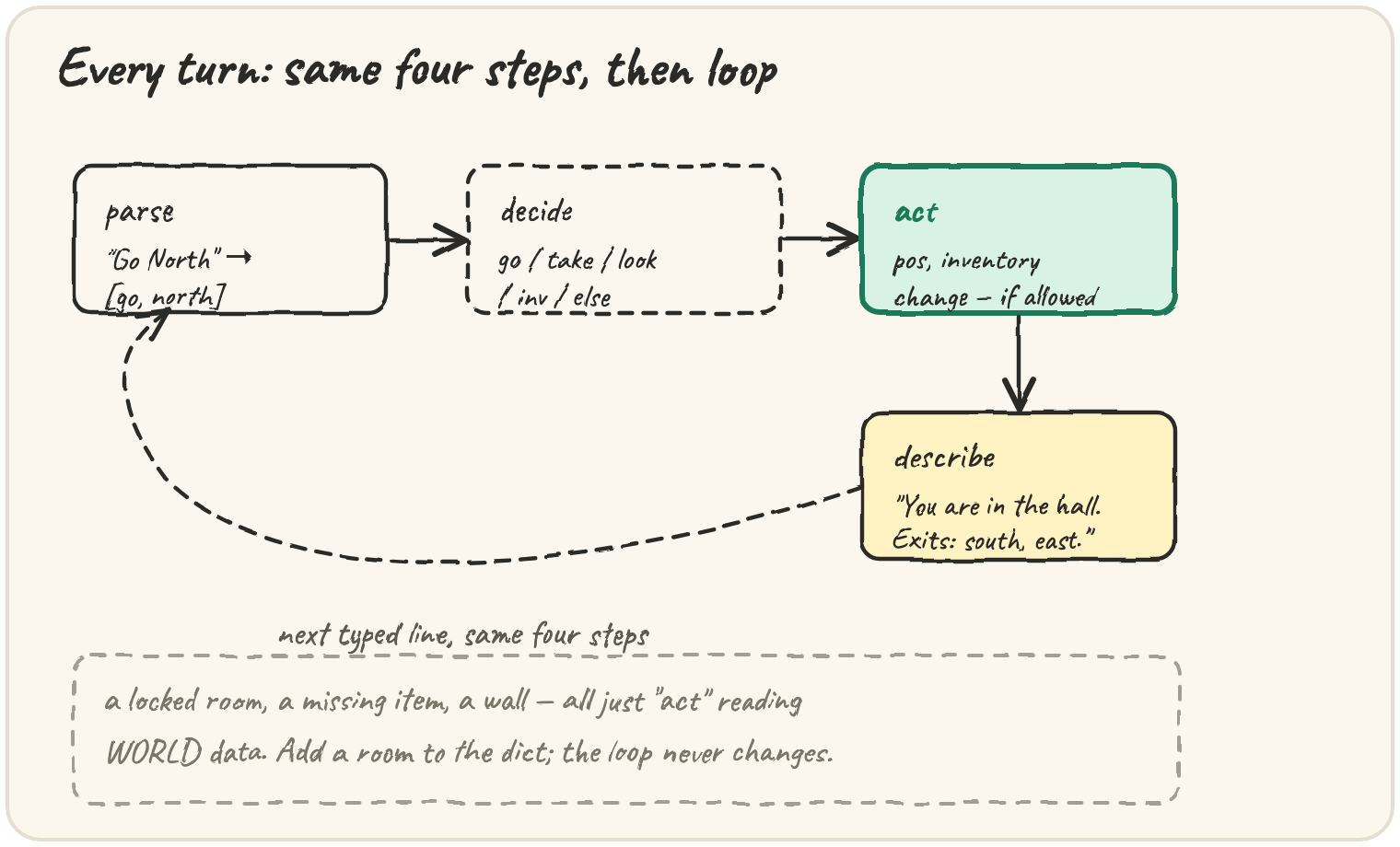
Before games had graphics, they had sentences. You typed go north, and the game
answered. Under the story is a small machine: a
state (where you are, what you carry), commands, and a rule for how each
command changes the state. Checkout flows and traffic lights are the same state
machine; a text adventure is the friendliest way to build one.
You'll build it twice: on a bare 5×5 grid (the Your task editor), then, as the project at the bottom, in a real little world with named rooms, walls, a locked vault and a crown to win.
You are in the cellar. Exits: north. Items: torch
> go north
You are in the hall. Exits: south, east. Items: key
> take key
Taken: key
> go east
You are in the library. Exits: north, west. Items: map, coin
Every box is live — edit and ▶ Run.
The plan
Each turn repeats the same steps until input runs out or the player wins:
The state is a few plain variables — a position, an inventory — and only a command's
handler changes them. Like the café till, the game never calls input(): it takes the
typed lines as a list and returns what it would print, so every playthrough is a
repeatable test.
Preparing this topic’s interactive investigation…
Write the transition before the handler
You already know lists,
dictionaries,
functions and guards. Here they combine
into one rule: (old state, command) → (new state, output). State includes
position, inventory and remaining room items. A look command changes only
output; take key changes two collections together; go north changes
position only after validating its destination.
For a locked vault, write both transitions before implementing them: without a key, keep the old position and emit the refusal; with the key, move and emit the new room description. No partial move should occur before the lock check. That makes a rejected command a useful invariant test.
The grid task and world project intentionally differ. On the grid, take
can collect any named item once. In the world, the item must exist in the
current room and is removed from that room. Reusing a helper is safe only
if its rule matches the layer where it is called.
Milestone 1 — parsing a command
People type Go North or look. Normalise first:
split() with no argument is doing more than it looks:
print("go north".split(" "))An empty list is a blank line: if not words: continue before reading words[0].
Milestone 2 — moving on the grid
On the bare grid, position is [x, y]: north adds 1 to y, east adds 1 to x. The
edges are walls, so each coordinate is clamped into 0 .. size - 1:
min stops a coordinate going above the top edge, max below 0. Trace a walk that
hits two walls:
The third step north and the step west change nothing: the player bumped a wall and stayed put.
Milestone 3 — picking things up
take adds an item to the inventory — once. The exercise asks you to return a new
list rather than change the one you were given, and the reason is one of Python's most
important facts:
inventory = ["key"]
backpack = inventory
backpack.append("map")
print(inventory)This matters once rooms hold items. If playing removes the key from the world itself, the next game starts without one:
Run it. The game took the key, and the world lost it too. Make fresh_items hand back copies.
The keys are tuples of integers, so every component is hashable and the tuple can be a dict key. A tuple containing a list would not be hashable.
Milestone 4 — describing a room
The describe line joins lists into prose, with none for an empty one. Exits aren't
stored — they're worked out from which neighbouring positions hold a room:
Derived exits can't contradict the map: a door from the hall to the library always leads back.
Which objects belong to this game?
WORLD is a reusable description, while items is the current game's
mutable copy of where objects remain. A new outer dict alone is insufficient:
its values could still point to the room-item lists inside WORLD. Copying
each list separates exactly the layer that take mutates; names and tuple
positions are immutable and can be shared.
An ownership check is to play twice with the same WORLD. Taking the key
in game one must not remove it from game two. Within a game, taking an item
moves it from one location to another: it cannot remain in the room while
also appearing in inventory. When the goal is taken, returning immediately
prevents commands after the win from changing the completed game.
Derived exits guarantee that adjacent room coordinates are connected under this project's movement rules. Locks still affect whether an exit is usable, so listing an exit is not a promise that entry will succeed.
Extend the world with a drop command without copying the solution. Specify
missing-item behavior, how room display changes, and whether dropping the key
can strand the player. Replay take, drop, take and compare the room and
inventory after each command. The important check is conservation of items,
not just the wording of the messages.
From grid to world
The project swaps the grid for WORLD, a dict from (x, y) to a room; a position with
no room is a wall. The vault is "locked": "key" — enterable only while carrying the
key. The trickiest handler is go, which can fail four ways:
Is there a direction?
goalone leaveswordswith one element. AnswerGo where?andcontinue.
take has the same shape, and taking the crown ends the game with You win!.
Build the adventure
The starter gives you WORLD, DIRECTIONS, GOAL and describe(world, pos, items).
You write adventure.
Write adventure(world, inputs). The player starts at (0, 0) with nothing. Output starts
with the start room's description; then each typed line (case-insensitive, blanks
skipped) answers:
go <dir>→ describe the new room.Go where?with no direction;You can't go up.for a wall or a non-direction;The vault is locked.if the room's"locked"item isn't carried.take <item>→Taken: key(room to inventory); elseThere is no map here.orTake what?. TakingGOALaddsYou win!and ends the game.look→ describe the current room.invorinventory→You carry: torch, keyin pickup order, orYou carry nothing.- anything else →
I don't understand dance.
Never change world itself.
- the start room is described
- moving describes the new room
- walls, nonsense, no direction
- taking removes it from the room
- inventory in pickup order
- empty inventory
- the vault needs the key
- the crown wins and ends the game
- unknown and incomplete commands
- the world itself never changes
When it passes, add a garden at (2, 1) to WORLD and walk there. The library now
lists east without a change to adventure — the payoff of keeping the world as
data and the rules as code.
🎯 Your turn
Build the four practice cards, then play(commands) in the editor beside the lesson:
start at [0, 0] on a 5×5 grid; go <dir> moves (clamped), take <item> picks it up
once.
play(["go north", "go north", "take key", "go east"])→{"position": [1, 2], "inventory": ["key"]}
Press ▶ Run and hit ✓ Check. ✅
Practice — level up
0/4 solvedSolve each in its own editor — Run to try, Check to grade. Stuck? Reveal a Hint, or the full Solution + walkthrough.
Write parse_command(text) returning the command's words, lowercased, as a list. Any amount of whitespace separates words: "Go North" → ["go", "north"], " take KEY " → ["take", "key"], and a blank line → [].
Write move(position, direction, grid_size). position is [x, y]: north is y+1, south y-1, east x+1, west x-1, and each coordinate is clamped to 0 .. grid_size-1 so walking into a wall leaves you in place. An unknown direction changes nothing. Return the new [x, y].
Write take(inventory, item) returning a new inventory list with item added at the end — unless it's already there. Don't change the list you were given: backpack = inventory would only give the same list a second name, so copy it with list(inventory) first.
A room is {"name", "exits": [...], "items": [...]}. Write describe(room) returning "You are in the <name>. Exits: <a, b>. Items: <x, y>", with lists joined by ", " and an empty list shown as none.