
JSON, and the Types It Cannot Hold
In short: json.dumps(obj) turns a Python object into text and
json.loads(text) turns it back; dump/load do the same to a file. JSON
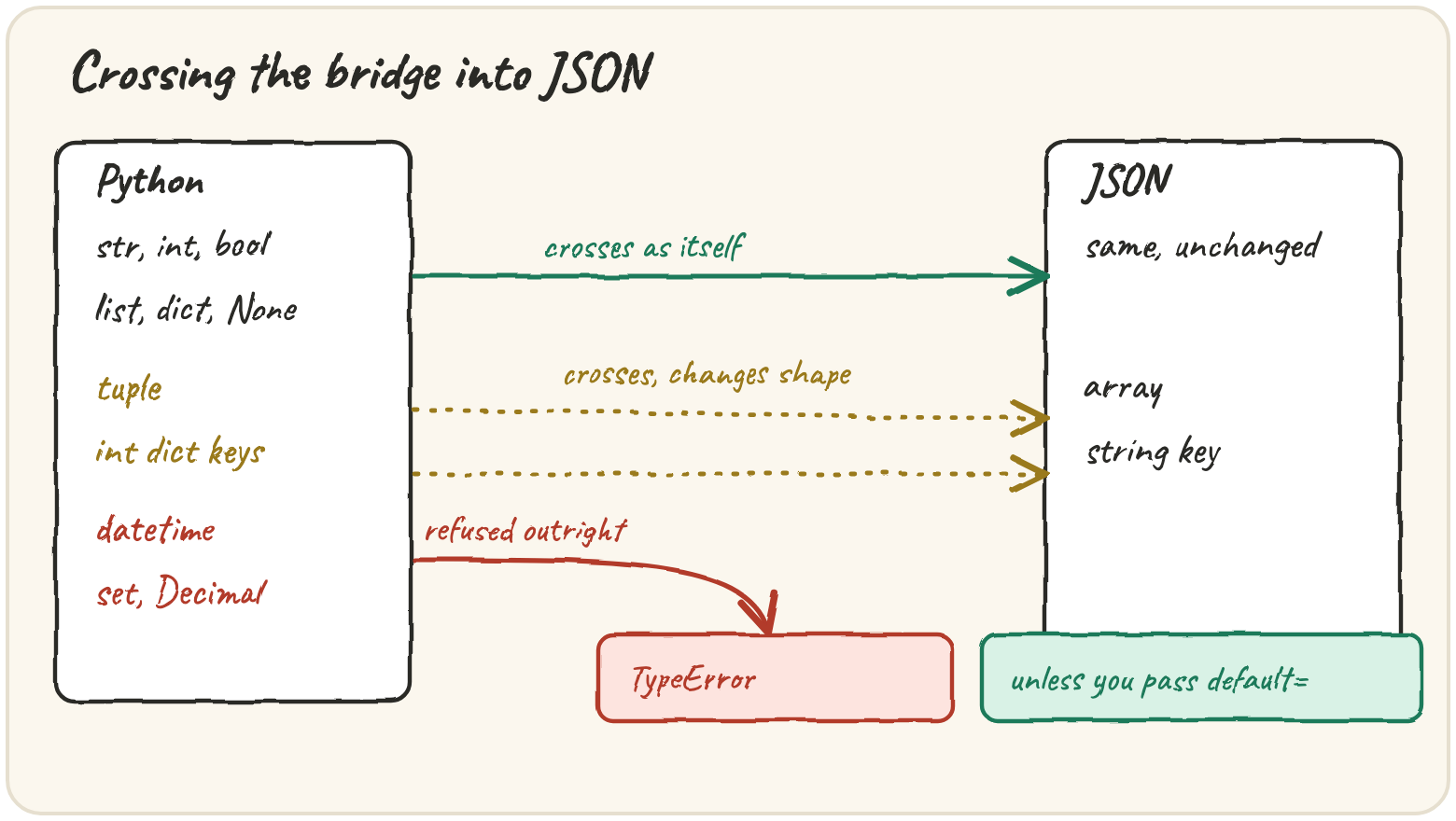
has only six kinds of value, and Python has dozens, so every round trip is a
border crossing: str, int, float, bool, None, list and dict
cross unchanged, a tuple crosses and comes back a list, an int dict key
comes back a str key — both silently, nothing raises — and a
datetime, set, Decimal or bytes is refused outright with a
TypeError, unless you hand dumps a default= function that says how to
convert it. The gap is real for Quarry: timestamps are datetimes, tags are
sets, and a byte count that must stay exact is a Decimal.
You'll build to_json(raw), Quarry's encoder, which crosses that gap on
purpose instead of by accident.
Ship a log record to a JSON dashboard
A dashboard that only speaks JSON needs Quarry's record turned into JSON text. The straightforward call works for plain values:
False became false, None became null, and single quotes became double
— the only kind JSON allows. The trouble starts with the types JSON has no
room for. A datetime is refused on the spot — the good kind of failure,
loud and early:
default= is the fix: dumps calls your function on anything it can't
encode and writes whatever it returns instead:
Three choices there are decisions, not formalities. sorted(value), not
list(value), because a set's iteration order isn't stable and the same data
must always produce the same text. str(value), not float(value), for
Decimal — Decimal("0.10") exists so it is not the binary approximation
of 0.1. And the hook raises at the end rather than falling back to
str(value) for everything, which would quietly turn an open file into
"<_io.TextIOWrapper ...>" in your data.
Fix this logger, which crashes on its first record:
TypeErrorRun it and read which type JSON refuses. Then teach dumps what to do with it.
Compare today's export with yesterday's
Quarry fingerprints batches, so the same data must always produce the same text. Two dicts built in different field order are still "the same data":
sort_keys=True removes insertion order from the output. separators=(",", ":") drops the spaces, which also removes one more way two encoders could
disagree. The values that get through and shouldn't are quieter than a
refusal:
import json

print(json.dumps({"ratio": float("nan")}))json.dumps(obj, allow_nan=False) raises ValueError instead, catching the
bad value where it was made rather than in someone else's system later.
Bring timestamps back to life on the way in
default= works on the way out; object_hook= is its partner coming in.
loads calls it on every decoded dict, innermost first, and uses whatever it
returns:
The hook relies on a naming convention, the _at suffix, because JSON
itself carries no type information. Watch the hook fire once per value it
handles, never for the ones it doesn't need to:
Quick practice
import json

hits = {404: 3, 500: 1}
back = json.loads(json.dumps(hits))
print(list(back))import json
span = (3, 9)
back = json.loads(json.dumps(span))
print(back == span, type(back).__name__)TypeErrorRun it, read which type is refused, then add a default= hook that turns a set into a sorted list.
import json

escaped = json.dumps({"city": "Zürich"})
plain = json.dumps({"city": "Zürich"}, ensure_ascii=False)
print(escaped == plain, "u" in escaped, "u" in plain)🎯 Your turn
Quarry's record stage hands the vault typed records. The starter includes
build_record(raw), a stand-in for that stage: it turns at into a
datetime, tags into a set and size into a Decimal. Write:
encode_extra(value):datetime→.isoformat(),set→sortedlist,Decimal→str, and anything else raisesTypeErrorto_json(raw):json.dumps(build_record(raw), default=encode_extra, sort_keys=True, separators=(",", ":"), ensure_ascii=False)
Example:
to_json({"id": 1, "level": "WARN", "at": "2026-03-01T09:30:00",
         "tags": ["web", "disk"], "size": "12.50"})
→ '{"at":"2026-03-01T09:30:00","id":1,"level":"WARN","size":"12.50","tags":["disk","web"]}'
Hint: isinstance(value, (set, frozenset)) catches both kinds of set.
Press ▶ Run, try the Live App chips, and hit ✓ Check. ✅