
unittest, doctest & tox
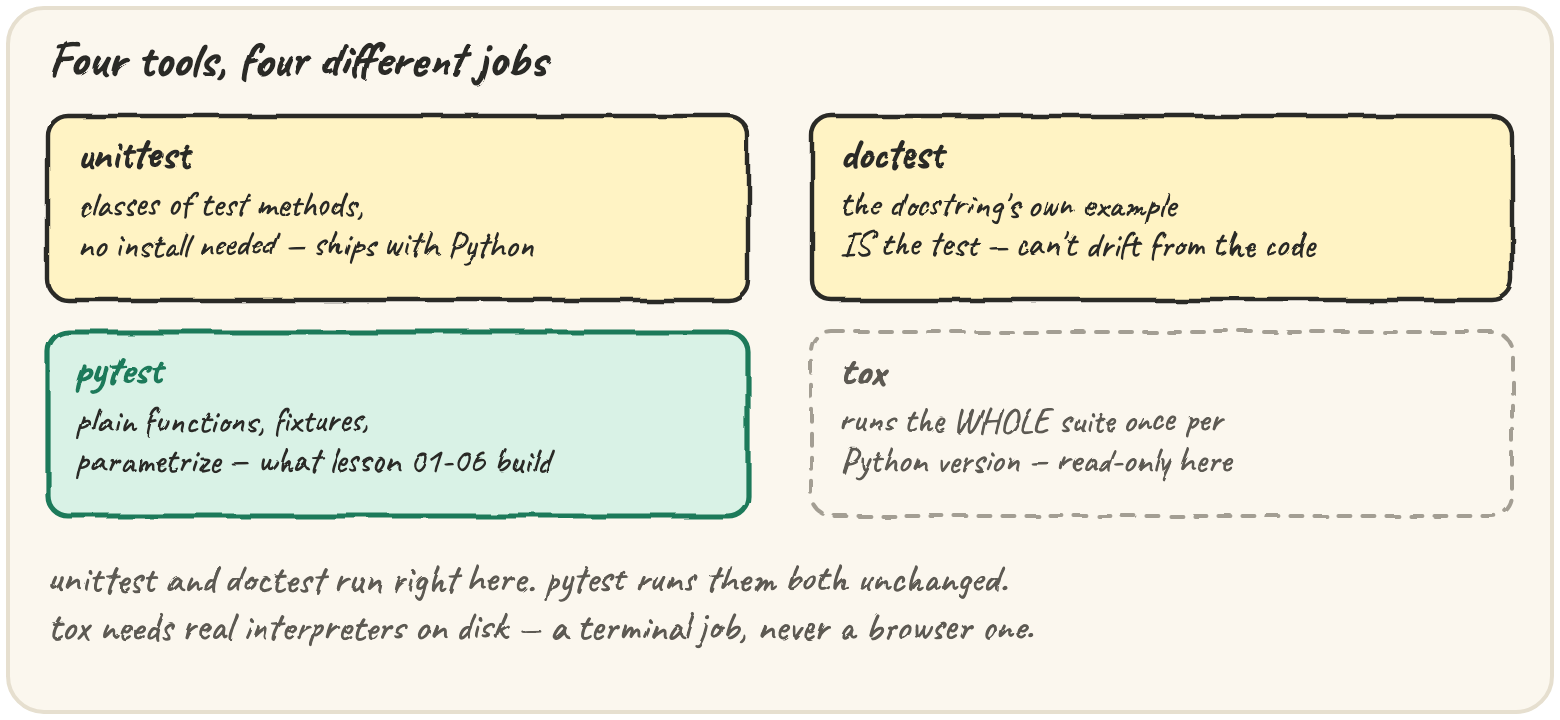
In short: unittest is the test framework Python ships with no install
— tests are methods on a TestCase, self.assertEqual/self.assertRaises
instead of a bare assert, and setUp builds fresh state before every
test method. doctest turns the example already in a function's docstring
into a test, so the documentation can't quietly drift from the code it
describes. tox runs your whole suite once per supported Python
version from a tox.ini, catching the bug that only shows up on the
version nobody tested locally. pytest runs unittest classes and
doctest examples unchanged, so none of this is wasted — each tool just
answers a different question.
Lesson 1 showed unittest and doctest running right alongside your
hand-built test rig. This lesson goes one level deeper into each — and
covers tox, the one tool in this section that genuinely cannot run in a
browser, because it needs real Python interpreters installed on disk.
Run a legacy unittest suite nobody has rewritten yet
Quarry's original codebase has a module of unittest tests from before
anyone adopted pytest. A TestCase groups related tests as methods, and
self.assertEqual/self.assertRaises replace the bare assert you've
been writing:
setUp runs before every test method, building whatever each one
needs fresh — the same job a pytest fixture does, just scoped to one
class instead of shared by name. unittest.main(argv=[...], exit=False)
runs the tests in the current module without sys.exit-ing the page,
which is what makes it usable here instead of only from a terminal.
A trap worth seeing once: inside with self.assertRaises(...), the block
stops at the first line that raises — anything after that line never runs.
Keep exactly the one call that should raise inside the block. And if nothing
raises at all, the test fails with ValueError not raised:
For code that still lives as a standalone script, TextTestRunner over a
loaded suite is the same thing spelled without unittest.main:
Let the docstring's own example be the test
A handful of Quarry's functions are small, pure, and already have a
usage example in their docstring. doctest runs that example as a test
and compares the output character for character — so a stale comment
can't survive:
Nothing printed before "checked" means every example matched. Break the
claimed answer and doctest reports the mismatch on its own, with no test
function to write:
import contextlib
import doctest
import io

def area(w, h):
    """
    >>> area(3, 4)
    13
    """
    return w * h

buf = io.StringIO()
with contextlib.redirect_stdout(buf):
    doctest.run_docstring_examples(area, {"area": area}, verbose=False, name="area")
print("captured" if buf.getvalue() else "silent")That silence-on-success, loud-on-failure behaviour is exactly backwards
from assert, and it's worth remembering precisely for that reason.
Guard three supported Python versions with tox
pytest and unittest both answer "does the suite pass, right now, on
this Python." Neither answers "does it still pass on every version we
promise to support." That's tox's one job: a tox.ini lists
environments, one per interpreter, and running tox builds a clean
virtual environment for each and runs the whole suite in it.
# tox.ini
[tox]
envlist = py310, py311, py312

[testenv]
deps = pytest
commands = pytest
tox needs real Python 3.10, 3.11 and 3.12 binaries installed on the
machine it runs on — there is no version of that in a browser tab, so this
is read-only. What matters is reading the result: tox -e py310 runs
just one environment, and tox exits non-zero the moment any
environment fails, the same exit-code convention lesson 6's rig ended on.
A bug that only appears on an older Python — a removed stdlib function,
a changed default — is exactly the class of bug a single local run can
never catch, because your own machine only has one Python on it.
Quick practice
import unittest

import io

class T(unittest.TestCase):
    def test_a(self):
        self.assertEqual(1, 1)
    def test_b(self):
        self.assertEqual(1, 2)
    def test_c(self):
        raise RuntimeError("boom")

result = unittest.TextTestRunner(stream=io.StringIO(), verbosity=0).run(
    unittest.defaultTestLoader.loadTestsFromTestCase(T))
print(result.testsRun, len(result.failures), len(result.errors))import contextlib
import doctest
import io
def half(n):
"""
>>> half(10)
5
>>> half(7)
3.5
"""
return n / 2
finder = doctest.DocTestFinder()
runner = doctest.DocTestRunner(verbose=False)
buf = io.StringIO()
with contextlib.redirect_stdout(buf):
for t in finder.find(half, "half", globs={"half": half}):
runner.run(t, out=lambda s: None)
result = runner.summarize(verbose=False)
print(result)🎯 Your turn
Build run_unittest(source, class_name): exec source (it defines a
unittest.TestCase subclass, using the name unittest you already put in
its namespace), load its tests with
unittest.defaultTestLoader.loadTestsFromTestCase, run them with a
TextTestRunner writing to an io.StringIO so nothing prints, and return
{"ran": result.testsRun, "failures": len(result.failures), "errors": len(result.errors)}.
run_unittest(
    "class Suite(unittest.TestCase):\n"
    "    def test_ok(self):\n"
    "        self.assertEqual(1 + 1, 2)\n",
    "Suite",
)
# → {"ran": 1, "failures": 0, "errors": 0}
Hint — ns = {"unittest": unittest} before exec(source, ns), so the
class body's own unittest.TestCase resolves; everything after that is
the loader → runner → result pattern from this lesson.
Then press ▶ Run and hit ✓ Check. ✅