
Binary Search Trees
In short: a binary search tree keeps one rule at every single node:
everything in its left subtree is smaller, everything in its right
subtree is bigger. That rule alone means search and insert can skip half
the remaining tree at every step, the same idea as binary search on a
sorted list — except the tree can grow without ever shifting anything.
Python has no built-in BST the way it has list or dict; this is the one
structure on this tour you'd actually write a Node class for yourself.
(In practice, sorted() plus the bisect module covers most "keep this
searchable" needs without one — the DSA course covers when a real BST earns
its keep, and how to keep it balanced.)
File a document by ID number
A records office keeps folders in one cabinet, filed by ID number, using the same rule at every drawer: smaller numbers to the left, bigger to the right. Building that cabinet is just repeated insertion — walk down from the root, going left or right by comparing, until there's an empty spot:
Walk left-subtree, node, right-subtree — in that order — and a BST hands you its values back sorted, no matter what order the files were filed in. That's not a coincidence; it's the left-smaller-right-bigger rule read aloud. The mistake people make is assuming that order, once built, has to be re-sorted to read out — it doesn't. The structure already encodes it.
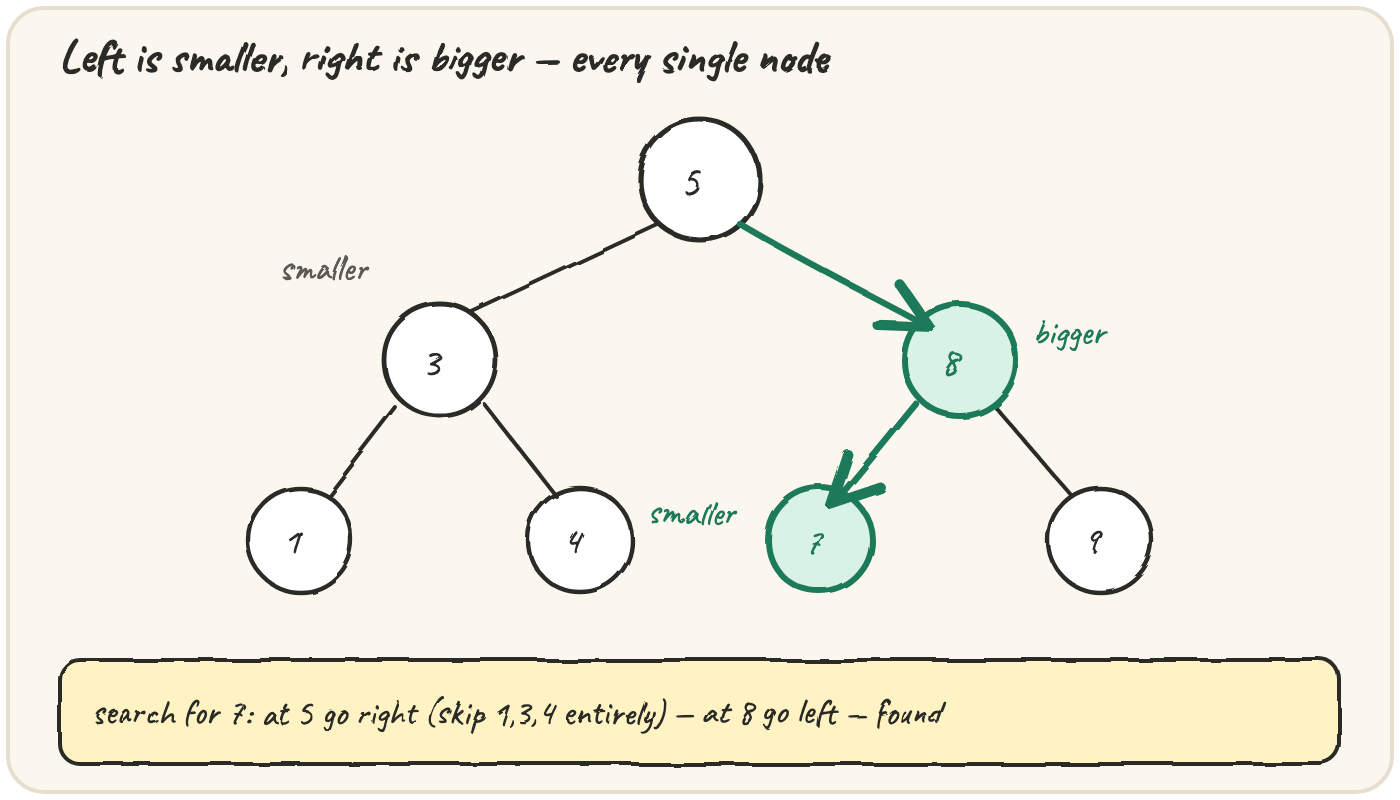
Search for a folder: skip half the cabinet at each step
Looking something up never checks more than one path from root to leaf:
At the root (5), searching for folder 7 goes right — the entire left subtree (1, 3, 4) is skipped, never even looked at. That's the whole payoff: each comparison throws away a whole branch, not just one value, the same way a librarian skips entire shelves instead of checking every book.
The mistake that breaks this isn't in the search code at all — it's
filing a folder on the wrong side in the first place. contains trusts
the tree's own rule; if a value ever ends up on the wrong side, the search
will walk straight past it without ever knowing it's there:
Run it — contains(root, 9) wrongly says False, because the tree itself broke its own rule. Fix where 9 was placed, not the search.
Always build a tree through insert, never by hand-wiring .left/.right
directly — that's the only way the rule stays true at every node, and the
only reason contains is allowed to trust it.
Quick practice
root = None
def insert(root, val):
    if root is None:
        return Node(val)
    if val < root.val:
        root.left = insert(root.left, val)
    else:
        root.right = insert(root.right, val)
    return root

class Node:
    def __init__(self, val):
        self.val = val
        self.left = None
        self.right = None

for v in [10, 5, 15, 3]:
    root = insert(root, v)
print(root.left.left.val)class Node:
def __init__(self, val):
self.val = val
self.left = None
self.right = None
root = Node(5)
root.left = Node(2)
root.right = Node(9)
def contains(root, target):
node = root
while node:
if target == node.val:
return True
node = node.left if target < node.val else node.right
return False
print(contains(root, 2), contains(root, 7))🎯 Your turn
Write sorted_via_bst(values). Build a binary search tree by inserting
every value in values in order, then return an inorder traversal —
proving the tree already holds them sorted:
sorted_via_bst([5, 3, 8, 1, 4, 7, 9])→[1, 3, 4, 5, 7, 8, 9]sorted_via_bst([])→[]
Hint — build the tree with insert exactly as in the lesson, then
inorder(n.left) + [n.val] + inorder(n.right).
Press ▶ Run, try the Live App chips, then ✓ Check. After that, the practice set below walks to the smallest and largest values, and counts how deep the tree actually grew.