
pathlib
In short: a Path is an object, not a string — it knows its own name,
stem, suffix and parent, and the / operator joins pieces using the right
separator for whatever system you're on. Paths are immutable: with_suffix,
with_name and friends all return a new path. path.glob(pattern) and
path.rglob(pattern) find files by pattern instead of by hand-filtering —
* matches within one folder level, ** descends through every level, and
rglob(p) is shorthand for glob("**/" + p). Joining is the one place paths
surprise you: joining an absolute path throws away everything to its left,
the same rule os.path.join follows.
Rename every export to .json
A nightly job converts each CSV export to JSON, same name, new extension. Hand-written string surgery breaks the moment a filename has more than one dot:
from pathlib import PurePosixPath

p = PurePosixPath("exports/2026/sales.backup.csv")
print(p.stem)with_suffix does the swap correctly, because it only ever touches the last
suffix, exactly like stem only ever strips the last one:
Paths are immutable, like strings — every one of those calls returns a new
path, and src itself never changes. relative_to is the method Quarry
leans on hardest: it walks a folder with absolute paths on disk, but a report
should say 2026/sales.backup.csv, not /tmp/tmpk2x9d/exports/2026/....
Stripping the root off with relative_to(root) is exact, where slicing the
string by its length breaks the moment there's a trailing slash.
Join a report path from a config file
Quarry reads a filename out of a config file and joins it onto the output
folder. The / operator looks like string concatenation, but it isn't one:
TypeErrorRun it and read the TypeError. Then join the two parts the pathlib way.
/ has one rule that surprises everybody once, and it's exactly the kind of
thing a config file can trigger by accident:
from pathlib import PurePosixPath

print(PurePosixPath("yard") / "logs" / "/etc/hosts")That's why "just join whatever the config says" is a security bug: a
filename of /etc/hosts or ../../etc/passwd silently escapes the folder
Quarry meant to write into. A safe join checks is_absolute() first and
walks .parts to refuse any .. that climbs out — you'll build exactly that
in the exercises.
Find every log in a shared yard
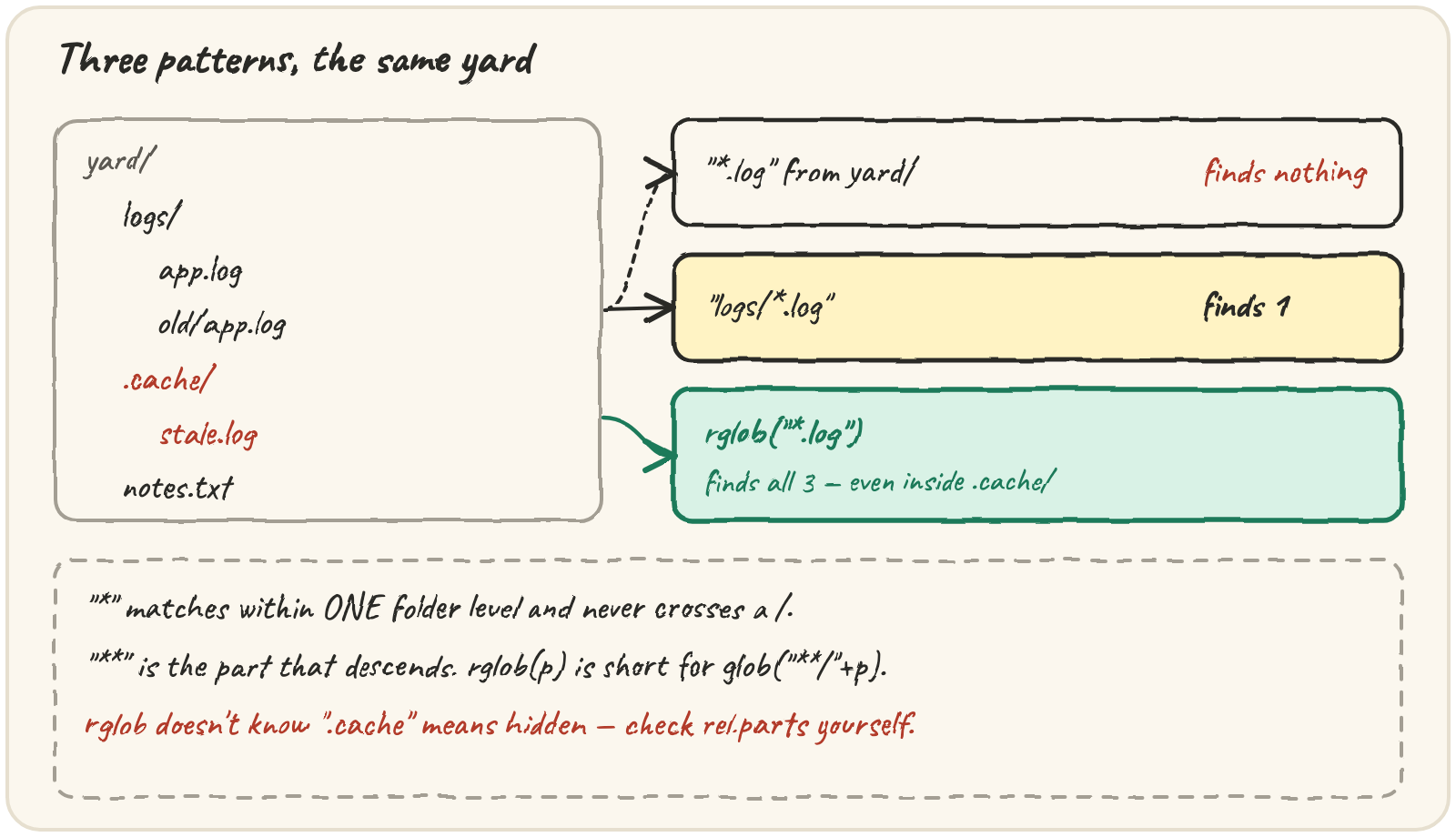
A yard holds logs/app.log, logs/old/app.log, a hidden editor cache
.cache/stale.log, and notes.txt. glob and rglob find files by
pattern instead of listing everything and filtering by hand:
| pattern | matches |
|---|---|
*.log |
any name ending .log, in this folder only |
**/*.log |
any .log at any depth, this folder included |
data/*/q?.csv |
q1.csv…q9.csv, one level under data/ |
* never crosses a /; ** is the part that descends. rglob("*.log") is
shorthand for glob("**/*.log") — recursive glob. Here is the yard the next
example builds, as a picture:
Predict what each pattern finds before you run it: *.log from yard/ finds
nothing (there is no log at the top), logs/*.log finds one, and
rglob("*.log") finds all three — including the one inside the hidden
.cache/ folder:
That last line is the trap Quarry has to handle: rglob happily walks into
hidden folders too. Editor caches, version-control internals and trash
folders are all "hidden" on POSIX systems by the convention that their name
starts with a dot — and rglob doesn't know or care about that convention.
Checking rel.parts for any part starting with . catches a hidden file
or a file anywhere inside a hidden folder:
from pathlib import PurePosixPath

rel = PurePosixPath("srv/.cache/x.log")
print(any(part.startswith(".") for part in rel.parts))Patterns match names, and you can test that matching with no disk at all. Step
through this and watch which names survive — notice that * refuses to
swallow the old/ level:
Two lessons in one trace: * stays inside one level, and matching is
case-sensitive on POSIX paths, so app.LOG is not a .log. Real yards
contain both spellings, which is why Quarry lowers the suffix before
comparing.
Quick practice
from pathlib import PurePosixPath

p = PurePosixPath("archive.tar.gz")
print(p.suffix, p.suffixes)TypeErrorRun it, read the error, then join the pathlib way.
import tempfile
from pathlib import Path

with tempfile.TemporaryDirectory() as tmp:
    yard = Path(tmp)
    (yard / "a" / "b").mkdir(parents=True)
    (yard / "a" / "b" / "deep.log").write_text("x", encoding="utf-8")
    (yard / "top.log").write_text("x", encoding="utf-8")
print(sorted(p.name for p in yard.glob("*.log")))from pathlib import PurePosixPath
print(PurePosixPath("data") / "/backup" / "q1.csv")🎯 Your turn
Build find_sources(files, suffixes):
find_sources({"logs/a.log": "", "notes.txt": "", "data/X.CSV": ""}, [".log", ".csv"])→["data/X.CSV", "logs/a.log"]find_sources({".git/config.log": "", "srv/app.LOG": ""}, [".log"])→["srv/app.LOG"]
Hint — walk with rglob("*"), keep is_file(), skip hidden parts of
relative_to(root), compare suffix.lower(), and sort the POSIX strings.
Then press ▶ Run and hit ✓ Check. ✅