
Choosing a Web Framework
In short: every Python web framework solves the same core problem —
match an incoming (method, path) to the function that should handle
it — and then wraps that match in its own syntax, middleware and
conventions. Flask, Django and FastAPI each read as different code for the
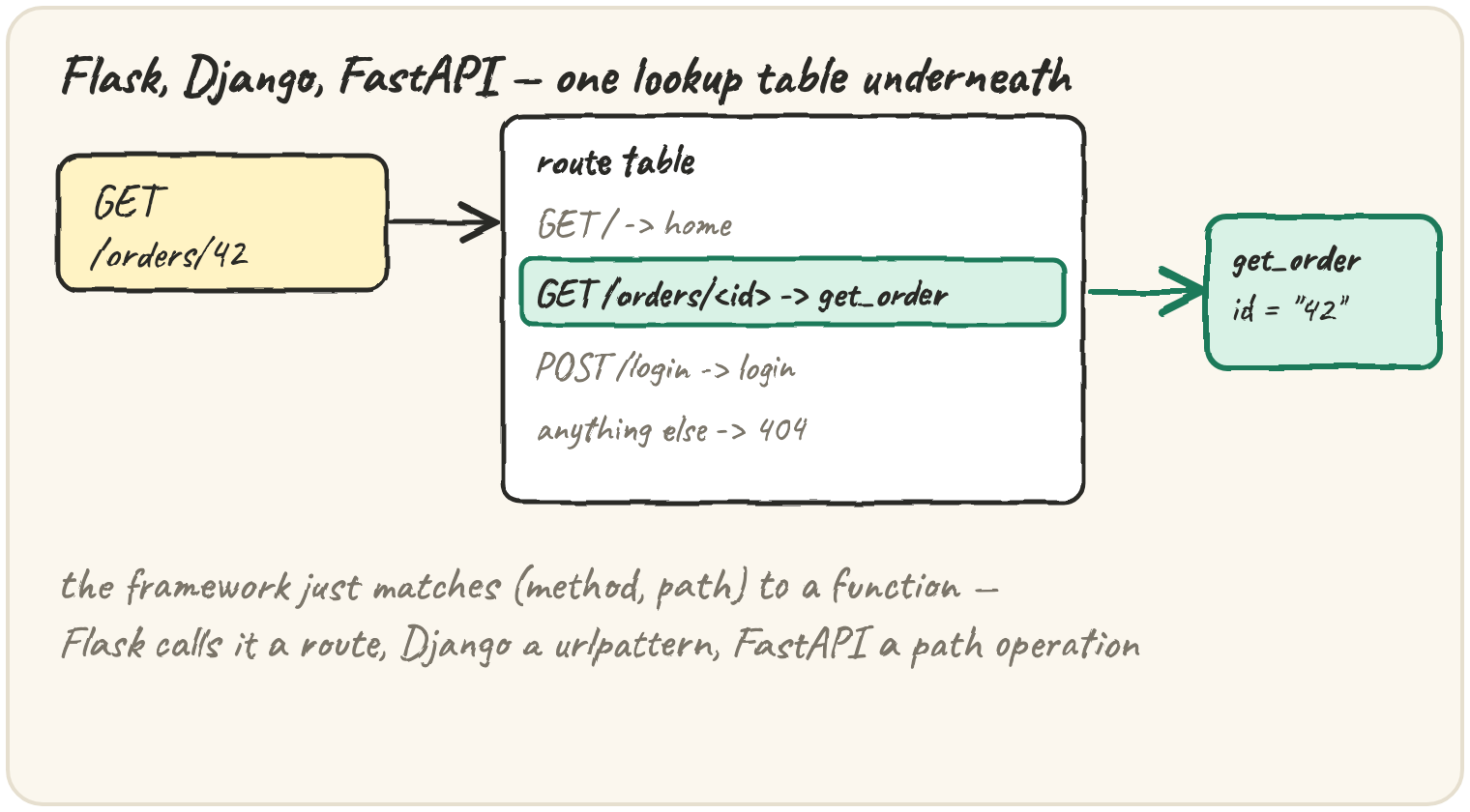
same "list orders" endpoint, but underneath, a router is just a lookup
table: request in, handler out. None of them can start a real server inside
a browser, so the framework snippets here are read-only. What does run is
the lookup table itself — a tiny router, built in plain Python, including
the path-parameter matching (/orders/<id>) every framework does for you.
Build the same endpoint three ways
One endpoint — list today's orders — in three frameworks. Read these for the shape, not to run them:
# Flask
from flask import Flask
app = Flask(__name__)

@app.route("/orders")
def list_orders():
    return {"orders": ["Tea", "Samosa"]}
# Django (urls.py + views.py)
# urls.py
from django.urls import path
from . import views
urlpatterns = [path("orders", views.list_orders)]
# views.py
from django.http import JsonResponse
def list_orders(request):
return JsonResponse({"orders": ["Tea", "Samosa"]})# FastAPI
from fastapi import FastAPI
app = FastAPI()
@app.get("/orders")
def list_orders():
return {"orders": ["Tea", "Samosa"]}Flask and FastAPI both use a decorator to register a route right above
the function that handles it — @app.route vs @app.get, a difference in
spelling more than idea. Django separates the two: urls.py lists every
path, views.py holds the function each one points to. FastAPI additionally
reads list_orders's own type hints to validate the request and build
interactive API docs automatically — the same hints from the previous lesson,
put to work at runtime.
Compare the rest of the field
Past the three most-used frameworks, the rest split by what they're optimised for, not by how routes are declared:
| Framework | Built for |
|---|---|
| gevent | not a framework by itself — a library that makes blocking code cooperate with many connections via greenlets |
| aiohttp | both an async HTTP client and server, built directly on asyncio |
| Tornado | one of the first Python servers built for thousands of long-lived connections (chat, live updates) |
| Sanic | Flask-shaped syntax, but async-first for higher throughput |
| Pyramid | starts minimal like Flask, but scales up to Django-sized apps without switching frameworks |
| Plotly Dash | not a general web framework — builds a data-dashboard UI entirely from Python, no HTML/JS required |
A team wants Flask's simple, minimal feel but needs the server to handle many slow, concurrent connections efficiently. Which is the closest match?
Match a request to a handler
Strip away the decorators and URL config, and every framework is doing the same lookup a plain dict can do:
The key is the pair (method, path) — not just the path. Miss that and
two different operations on the same URL silently overwrite each other:
routes = {}
routes["/orders"] = "list_orders"   # GET /orders
routes["/orders"] = "create_order"  # meant to be POST /orders — same key!

print(routes["/orders"])Real paths aren't all fixed strings, either — /orders/42 needs to match a
pattern, /orders/<id>, and hand "42" to the handler as a parameter.
That match is still just string work: split both the pattern and the real
path on /, compare segment by segment, and capture anything written as
<name>.
Quick practice
GET /orders and POST /orders should be two different routes, but the second overwrites the first and dispatch never even looks at method. Fix the keys so both survive, and print both handlers.
def split_path(path):
    return [seg for seg in path.strip("/").split("/") if seg]

print(split_path("/orders/42/"), split_path("/"))pattern_segs = ["orders", "<id>"]
path_segs = ["orders", "42"]
params = {}
for p, s in zip(pattern_segs, path_segs):
if p.startswith("<"):
params[p[1:-1]] = s
print(params)FastAPI reads list_orders's own type hints to validate incoming requests automatically. What does that cost, compared to Flask reading no hints at all?
🎯 Your turn
Write route_request(method, path). Build a router dict with these three
fixed routes, then look up (method, path) in it:
("GET", "/")→"home"("GET", "/health")→"health_check"("POST", "/login")→"login"anything else →
"404 Not Found"route_request("GET", "/health")→"health_check"route_request("DELETE", "/orders")→"404 Not Found"
Hint: routes = {("GET", "/"): "home", ...}, then
return routes.get((method, path), "404 Not Found").
Press ▶ Run, try the Live App chips, then ✓ Check. After that, the practice set below grows this lookup table into a router that matches path parameters like a real framework does.