
Reading & Writing, Text and Binary
In short: open() returns a file object, and the mode you pass decides
everything: "r" reads, "w" empties the file first, "a" appends,
"x" refuses to clobber an existing file. The bigger choice is text versus
binary. Text mode does two jobs on every read — decoding bytes to
characters, and newline translation, collapsing \r\n and \r into
\n — so \r\n on disk becomes one \n character, not two. Binary mode
("rb"/"wb") does neither: you get the raw bytes, exactly as they sit on
disk. Always open inside a with block, so the file closes whether or not
the body raises, and always name encoding="utf-8" in text mode.
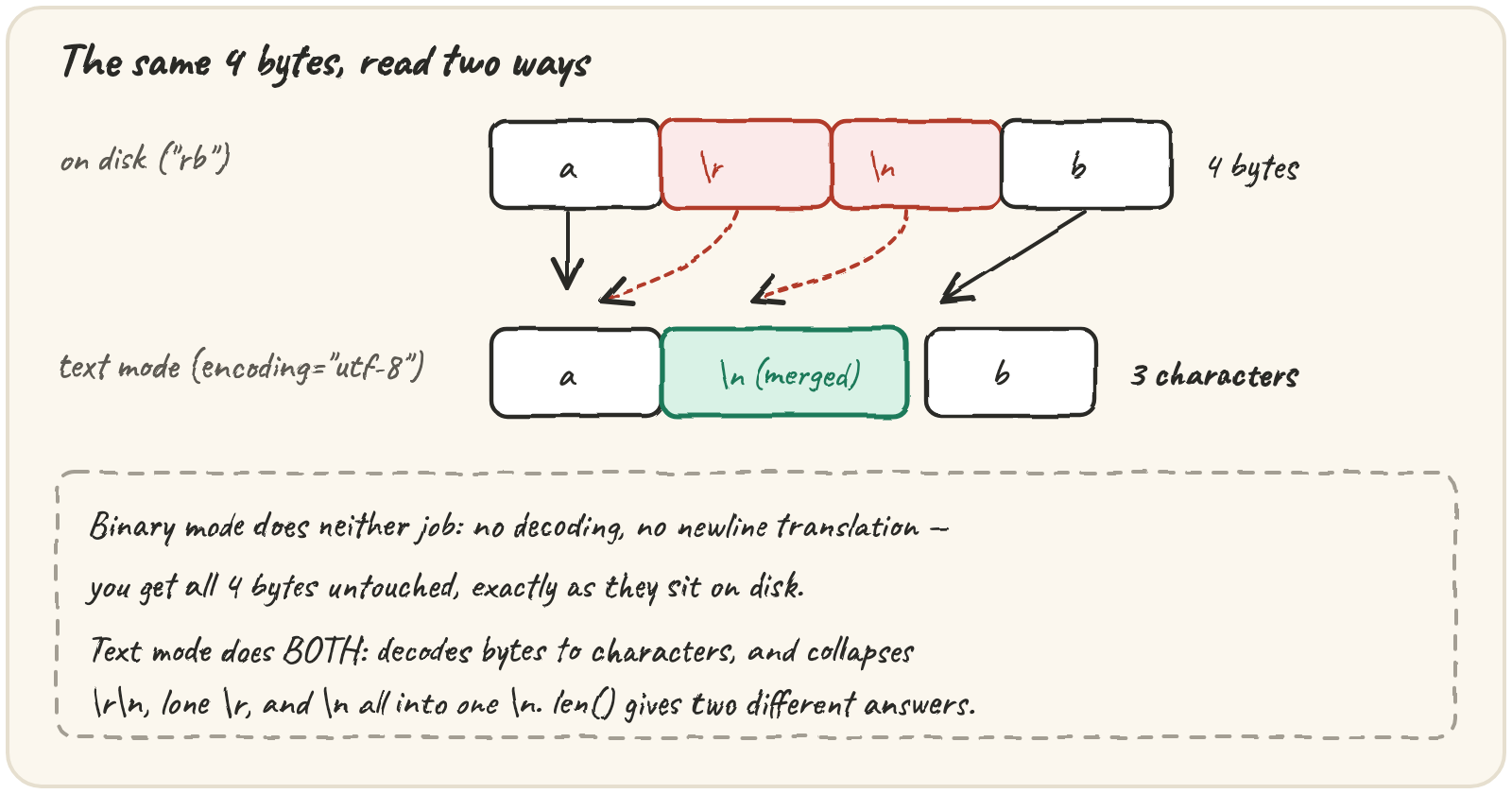
Read a Windows log without guessing
A log shipped from a Windows server uses \r\n line endings. Put exactly
four bytes on disk — a, carriage return, line feed, b — and read them
both ways:
import tempfile
from pathlib import Path

with tempfile.TemporaryDirectory() as tmp:
    path = Path(tmp) / "w.txt"
    path.write_bytes(b"a\r\nb")
    with open(path, encoding="utf-8") as f:
print(len(f.read()))"How big is this file, and does it use Windows endings?" is a question about
bytes — ask it in "rb" mode, where b"\r\n" in raw is still visible.
"What does line 3 say?" is a question about text — ask it with
encoding="utf-8", where the loop below never sees a stray \r:
Looping the file object reads one line at a time and holds only that line in
memory — read() and readlines() pull the whole file into memory,
which is fine for a config file and fatal for a 20 GB log. Strip the ending
with rstrip("\n"), never strip(), which would also eat meaningful
leading spaces.
"w" is the dangerous mode: opening for writing empties the file
immediately, before you've written a single byte. If the program crashes
between open and write, the old contents are already gone — lesson 03
fixes that properly. "x" is the polite alternative, for an output that must
never overwrite a previous run's:
import tempfile
from pathlib import Path

with tempfile.TemporaryDirectory() as tmp:
    path = Path(tmp) / "report.txt"
    path.write_text("first run\n", encoding="utf-8")
    with open(path, "x", encoding="utf-8") as f:
        f.write("second run\n")
print("written")Stream a 20 GB telemetry dump in flat memory
Quarry reads files far too big to hold in memory at once, in fixed-size
chunks, using read(size):
read(n) returns at most n bytes, and the last chunk is often
shorter. The only reliable stop signal is an empty result — a short
chunk doesn't mean the end in general, only here, at the real end of the
file. Writing follows the same shape in reverse: write() returns how much
it accepted, which in text mode is a count of characters, not bytes —
only after encoding do they become bytes on disk.
Replay a buffer with StringIO
io.StringIO and io.BytesIO behave like files but live entirely in
memory — useful for testing file-handling code without touching a disk, and
they make a file object's one hidden rule visible: there is a single
cursor, shared by reading and writing. This prints an empty line; fix it
with one call:
Run it — it prints nothing. Explain to yourself where the cursor is, then fix it.
That same shared cursor exists on a real file opened "r+" or "w+".
tell() reports its position, seek(n) moves it. Step through a chunked
read and watch the position march forward four bytes at a time:
The trace shows the same rule the telemetry dump relied on: read(4) returns
at most four bytes, the last chunk is shorter, and the loop stops on an
empty result, never on "the chunk was short".
One warning about tell(): only on a binary file is its position a byte
offset you can do arithmetic on. On a text file it's an opaque cookie you may
only hand back to seek(), because decoding and newline translation mean
"character 7" and "byte 7" aren't the same place. When Quarry needs real
offsets, it opens in "rb".
Quick practice
import tempfile
from pathlib import Path

with tempfile.TemporaryDirectory() as tmp:
    path = Path(tmp) / "a.log"
    with open(path, "w", encoding="utf-8") as f:
        f.write("first\n")
    with open(path, "a", encoding="utf-8") as f:
        f.write("second\n")
print(repr(path.read_text(encoding="utf-8")))line = " indented value\n"
print(repr(line.strip()), repr(line.rstrip("\n")))import io
buf = io.StringIO("abcdef")
buf.seek(2)
first = buf.read(2)
buf.write("XY")
buf.seek(0)
print(first, buf.read())Run it. The size may read 0. Close the file (or use `with`) before measuring it.
🎯 Your turn
Build read_source(files, name):
read_source({"a.log": "one\r\ntwo\r\n"}, "a.log")→{"bytes": 10, "lines": 2, "first": "one", "crlf": True}read_source({"c.txt": "café\nnaïve\n"}, "c.txt")→{"bytes": 13, "lines": 2, "first": "café", "crlf": False}
Hint — read once in "rb" for size and endings, once in text mode with
encoding="utf-8" for lines.
Then press ▶ Run and hit ✓ Check. ✅