
Logging
In short: print answers one question — show this text now, here — and
an unattended program needs four more: how important is this (level),
who said it (name), where should it go (handler), and how much do I
want today (the logger's threshold). You never construct a logger;
logging.getLogger(name) always hands back the same object for the same
dotted name, and names form a tree that mirrors your package layout. A
record below a logger's level is dropped immediately; one that passes is
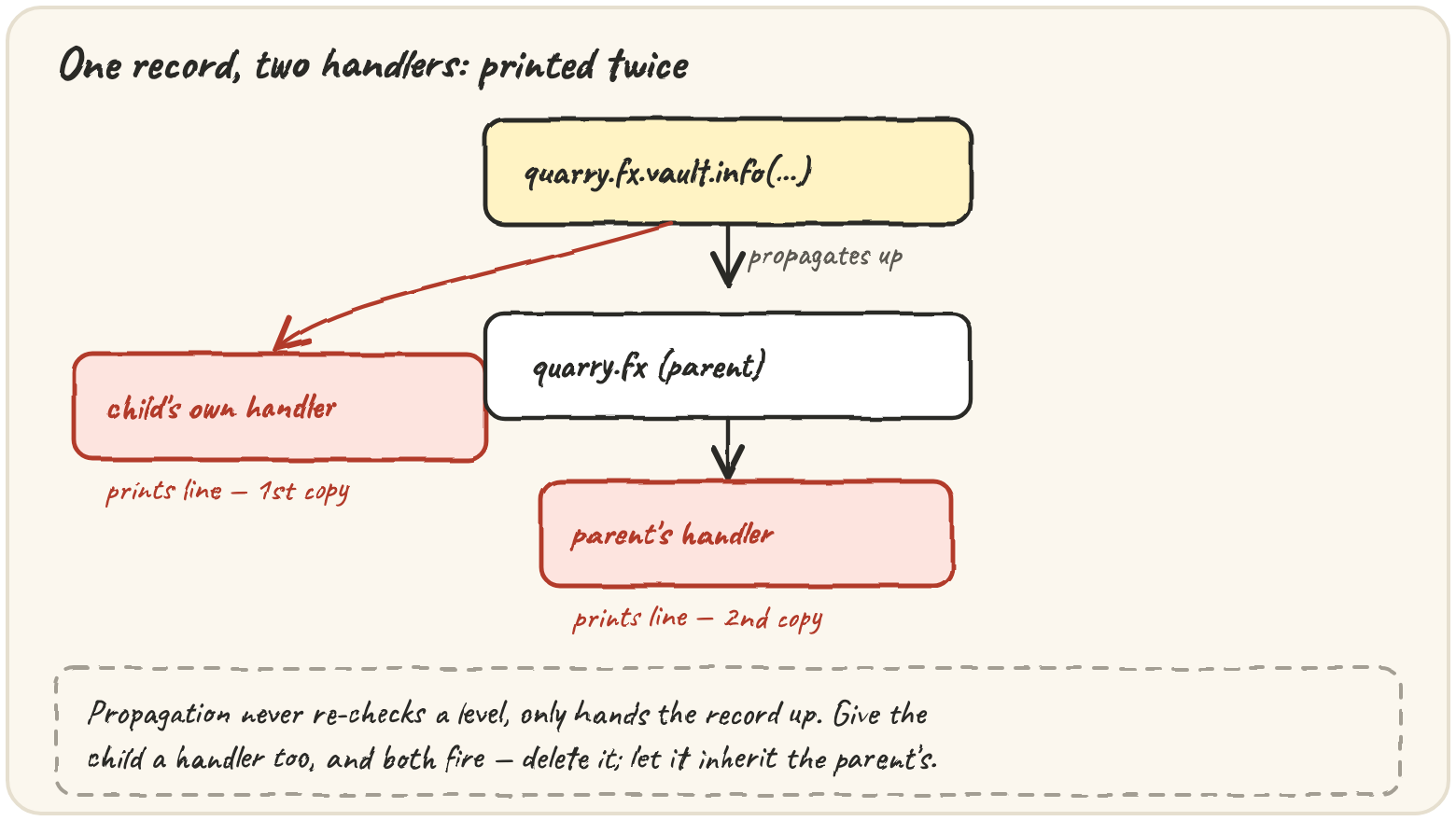
handed to that logger's own handlers, then propagates up to every
ancestor's handlers too — the single fact behind almost every "why did this
print twice" bug.
Give every stage its own named logger
Quarry's nightly run used to talk with print. At 03:00 with nobody
watching, it all went into a terminal nobody would scroll, and on the days
someone was watching, the useful lines drowned in "row 4127 ok". A logger,
a level and a formatter fix all of it:
Those five calls are the five levels — DEBUG (10, detail for hunting a bug), INFO (20, normal milestones), WARNING (30, handled but unexpected), ERROR (40, a piece of work didn't get done), CRITICAL (50, the program can't continue) — and a logger's level is a threshold: records below it are dropped before any formatting, before any output:
import logging, sys

log = logging.getLogger("quarry.p1")
log.handlers.clear()
log.propagate = False
out = logging.StreamHandler(sys.stdout)
out.setFormatter(logging.Formatter("%(levelname)s %(message)s"))
log.addHandler(out)

log.setLevel("WARNING")
log.info("loaded 3 rows")
log.error("disk full")The convention is one line at the top of every module —
log = logging.getLogger(__name__), so quarry/vault.py gets the logger
"quarry.vault" — and names being dotted means the tree mirrors your
package layout. A logger with no level of its own inherits its nearest
ancestor's:
Set quarry to WARNING and every stage goes quiet; set quarry.vault to
DEBUG and you hear everything from the vault, and only the vault, while
chasing a bug there.
Stop a vault warning from printing twice
A logger decides whether a record is worth making; everything after is
another object's job. A handler decides where it goes (StreamHandler
to a stream, FileHandler to a file) and has its own level, so one logger
can send everything to a file but only warnings to the console. A
formatter decides what it looks like. And the rule that causes duplicate
lines: after a logger's own handlers run, the record passes up to its
parent's handlers, and so on to the root — without re-checking any
ancestor's level, only each handler's own:
Here's that walk in plain Python — the level check happens once, where the record was born, then every ancestor's handlers get a turn:
So when a child and its parent both have a handler, every record is handled twice:
The vault's message is printed twice. Configure output in one place so each record appears once.
Only the program's entry point should attach handlers or set levels —
a library, Quarry's own modules included, should only ever do
log = logging.getLogger(__name__) and call log.info(...). For a script,
logging.basicConfig(level=..., format=..., force=True) does the whole
setup in one call on the root logger.
Log an exception without flooding the log
Pass values as arguments, not pre-formatted into the message —
log.debug("row %d parsed: %r", index, row) only builds the text if some
handler actually outputs the record, so a million skipped debug calls cost
almost nothing. But be precise about what that saves:
import logging

calls = 0

def expensive_summary():
    global calls
    calls += 1
    return "12 stages, 40,000 rows"

log = logging.getLogger("quarry.p2")
log.setLevel("INFO")
log.debug("state: %s", expensive_summary())
print(calls)Inside an except block, log.exception(...) logs at ERROR and
attaches the traceback — the full cause chain from the last lesson:
Use log.exception only inside an except block, and log or re-raise,
not both — if every layer logs and re-raises, one failure produces five
copies of the same traceback. Log it once, at the layer that decides what
to do about it.
Traps worth knowing
basicConfig only works once. It does nothing if the root logger
already has a handler — call it twice with different settings and the
second call is silently ignored; force=True removes the old handlers
first. Logging isn't free. At DEBUG, Quarry writes about 600 bytes per
row; at 5 million rows a day that's 3,000 MB. To fit a 100 MB budget it can
afford 20 bytes per row — so per-row detail belongs at DEBUG, switched off
in production, and per-row news at INFO should be a summary instead: one
line per batch, plus a WARNING for each row actually skipped.
Quick practice
import logging

log = logging.getLogger("quarry.q1")
log.setLevel(logging.NOTSET)
print(log.getEffectiveLevel() == logging.WARNING)import logging, sys
logging.getLogger("quarry.q2").setLevel("ERROR")
child = logging.getLogger("quarry.q2.vault")
print(child.getEffectiveLevel() == logging.ERROR, child.level == logging.ERROR)Nothing prints. The handler is attached and formatted correctly — the logger itself is silencing the record.
🎯 Your turn
Build stage_log(stage, events, level). The starter gives you ListHandler,
a handler that keeps each formatted line in a list instead of printing it.
Get the logger named "quarry." + stage, set it to level, attach a fresh
ListHandler formatted as "%(levelname)s %(name)s: %(message)s", and log
each [level_name, message] pair in events. Return the captured lines —
and make sure the handler is removed afterwards even if logging fails,
or the next call to the same stage will print everything twice.
stage_log("export", [["INFO", "saved 3 rows"], ["DEBUG", "row 1 ok"]], "INFO")
# → ["INFO quarry.export: saved 3 rows"]
Press ▶ Run and hit ✓ Check. ✅