
Capstone — The Vault
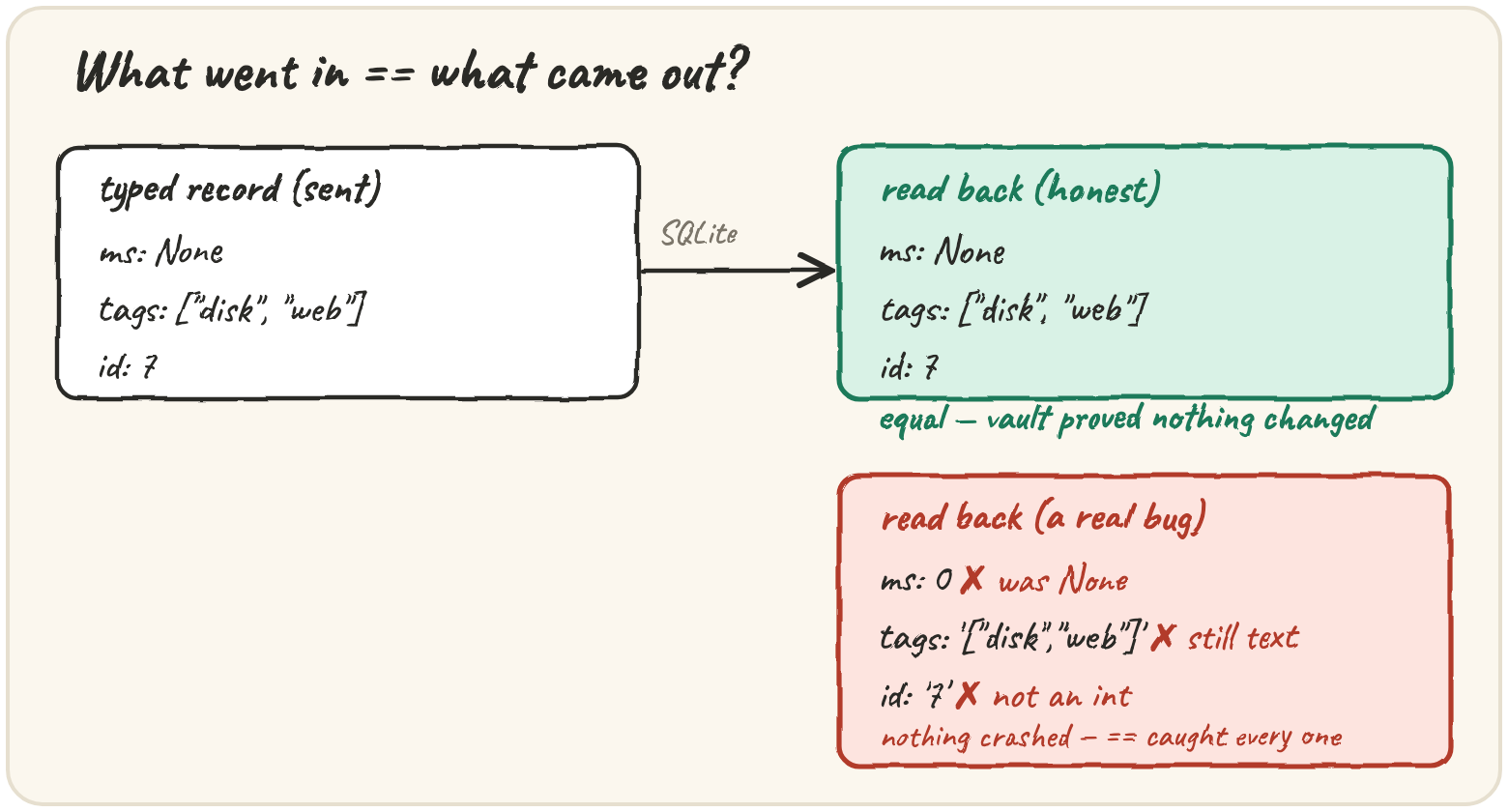
In short: four lessons, four formats, each answering a different question — CSV for tables people and spreadsheets exchange (every value a string), JSON for documents programs exchange (tuples, sets and datetimes don't survive unaided), pickle for Python talking to itself (loading it runs code, so never across a trust boundary), SQLite for data you want to query and trust (a schema, parameters and transactions to get right). A real system rarely picks just one. Quarry's vault takes a CSV export in, turns each row into a typed record, stores the records in SQLite with the one list-valued field packed as JSON, reads everything back, and checks the claim this whole section has been working towards: what came out is exactly what went in.
Type a raw CSV row before it reaches the vault
The CSV has columns id, source, level, ms, tags, where tags is a
|-separated list like web|disk. Typing a row is where two decisions get
made that matter later:
An empty ms becomes None, not 0: "we don't know" and "it took zero
milliseconds" are different facts, and SQLite stores None as NULL and
gives it back as None. Tags become a sorted, de-duplicated list, so the
same tags always produce the same value — without that, the final comparison
could fail on ordering alone:
row = {"id": "7", "source": "web-01", "level": "WARN", "ms": "", "tags": ""}
tags = sorted({t for t in row["tags"].split("|") if t})
print(tags, "".split("|"))Store a record whose tags are a list
SQLite binds only None, int, float, str and bytes, so the list of
tags has to cross as JSON text — json.dumps(["disk", "web"]) is the string
'["disk", "web"]'. Everything else goes in as itself, inside one
transaction with :name placeholders. Here's what happens if you forget the
JSON step:
Run it and read which type the driver refused to bind. Then pack the list as JSON before inserting.
Reading back means the reverse: select every row in id order, turn each into
a dict, and json.loads the tags column back into a list. Watch a single
row's tags column change type on the way out:
Prove the round trip lost nothing — and catch it when it does
Python's == on two lists of dicts compares every field of every record,
including the difference between None and 0, "7" and 7, and
["web"] and '["web"]'. That comparison is only worth something if it
would fail when something goes wrong — and each of these bugs is easy to
write and invisible at a glance: forgetting json.loads on the way out,
storing ms as text, turning an empty ms into 0, leaving tags unsorted,
a half-stored batch after a rollback.
back = [{"id": 1, "ms": None, "tags": ["web"]}]
sent = [{"id": 1, "ms": 0, "tags": ["web"]}]
print(back == sent)When a batch breaks a constraint — a duplicate id — the transaction rolls
back and nothing is stored. The capstone reports that honestly: stored is
0 and unchanged is False, because the vault doesn't hold what it was
given.
Measure what each format actually costs
Which format is smallest, fastest? Measure it — here's a harness that builds
synthetic records and writes and reads them through all four, timing each
with time.perf_counter:
CSV is compact because the header is written once, but gives you back
strings. JSON pays for repeating every key on every record, yet it's the
only one of the four a browser or another language reads without help.
pickle is usually fastest and gives back real Python objects, but only
Python can read it, and never from a stranger. SQLite is rarely the smallest
or fastest to write — what you pay for is what the others can't do: a
WHERE clause, an update of one record, a crash that leaves the previous
state intact. That's why the vault is a database.
Quick practice
sent = {"id": 2, "ms": 120, "tags": ["disk", "web"]}
back = {"id": "2", "ms": 120, "tags": ["disk", "web"]}
print(sent == back)Run it, see the mismatch, then add the missing json.loads so tags_back is a list again.
rows = [{"id": 3, "tags": ["web"]}, {"id": 1, "tags": ["disk"]}]
sent = sorted(rows, key=lambda r: r["id"])
print([r["id"] for r in sent])🎯 Your turn
Write vault_roundtrip(csv_text). The starter includes read_csv from the
first lesson and the SCHEMA. You write to_record and the round trip:
records = [to_record(row) for row in read_csv(csv_text)]- store them in one transaction, with
tagsasjson.dumps(...)text - if the batch raises
sqlite3.IntegrityError, return{"stored": 0, "unchanged": False, "levels": {}, "slowest": None} - read everything back
ORDER BY id, decodingtags - return:
"stored": how many records came back"unchanged": whether they equal the records sorted by id"levels":{level: count}, fromSELECT level, COUNT(*) ... GROUP BY level"slowest": the id with the largestms(the lowest id on a tie), orNoneif no record has anms
Example: three incidents where id 2 took 950 ms →
{"stored": 3, "unchanged": True, "levels": {"INFO": 1, "WARN": 2}, "slowest": 2}.
Hint: max(timed, key=lambda r: r["ms"]), where timed is the records
read back in id order that have an ms, returns the first of any tie, which
is the lowest id.
Press ▶ Run and hit ✓ Check. When it's green, the vault is done: data goes out of memory and comes back unchanged. ✅