
Writing an Iterable by Hand
In short: a for loop doesn't know about lists, files or dicts. It only
calls iter(obj) once, to get an iterator, then calls next(iterator)
once per pass until it raises StopIteration. An iterable is anything
iter() accepts — it hands back a fresh iterator every time, which is why
you can loop over the same list twice. An iterator is what iter()
returns: it has __next__, remembers a position, and its own __iter__
just returns itself — which is why you can only walk one, once. Quarry's
200 MB log can't be read into a list first; everything in this section rests
on these two methods and one exception.
Read a 200 MB log without building a list
Here is a for loop written the long way — the two calls it's secretly
making:
That's the whole protocol. next also takes an optional default, turning
"the first item, if there is one" into one line instead of a try:
it = iter(["INFO boot", "ERROR disk"])
next(it)
next(it)
print(next(it, "no more rows"))The mistake people make is treating something iterable (a list) as if it
were the iterator itself. A list hands out a brand new iterator every
time you call iter() on it — that's why looping over the same list twice
just works. map, by contrast, returns an iterator directly, with exactly
one position:
upper = map(str.upper, ["info", "warn", "error"])
print(len(list(upper)), len(list(upper)))A file object works the same way: looping over an open file gives you one line at a time, and the file itself is the position. That's what makes it safe to read a file far bigger than memory — nobody ever asks for "all of it" at once.
Give Quarry's rows a class — the wrong way
To make your own class work in a for loop, give it __iter__ and
__next__:
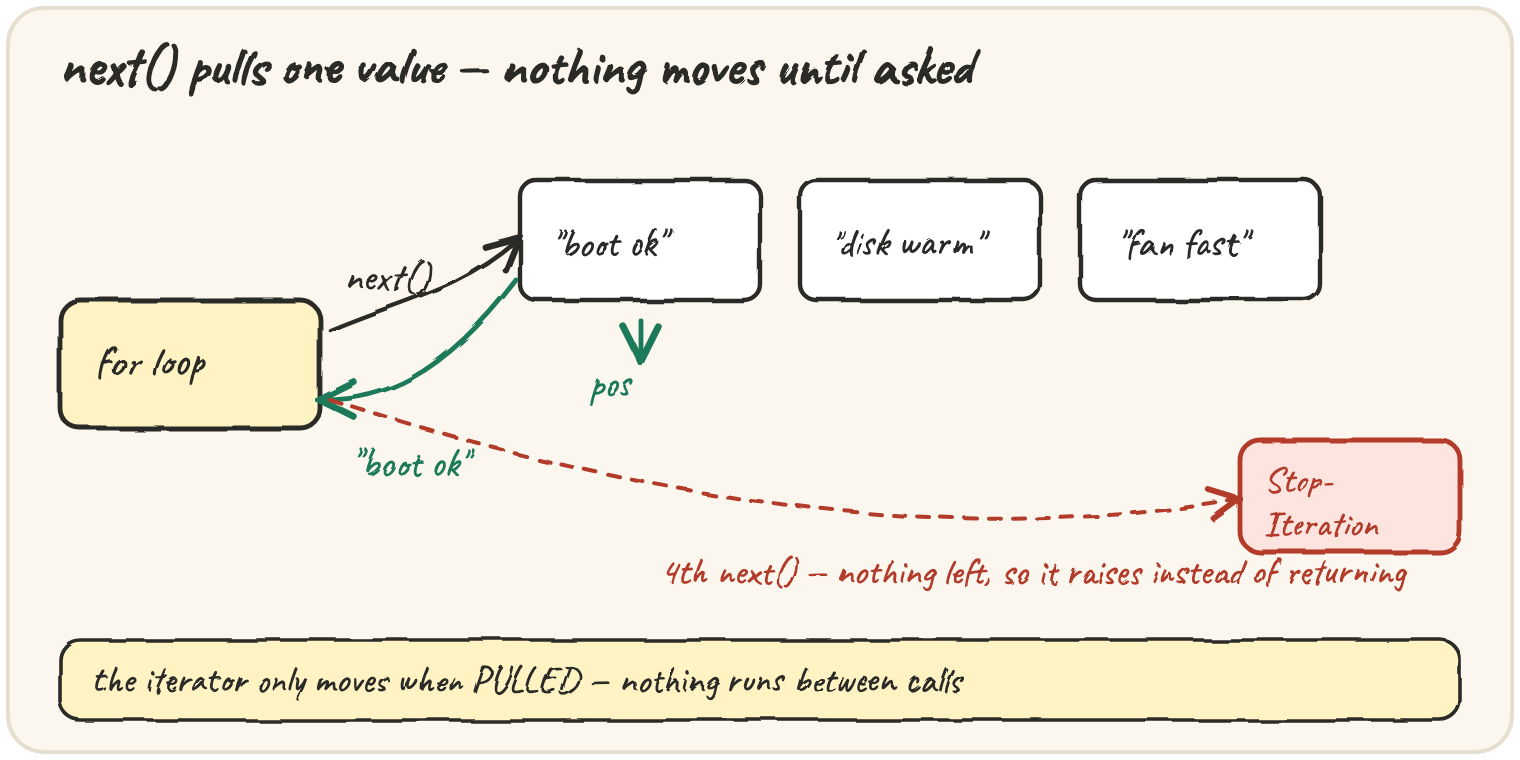
Step through a few calls by hand and watch pos move. Each next does one
small piece of work and returns — nothing runs between calls, because
nothing is asking:
The same conversation, as a picture. The consumer does all the asking — the iterator never sends anything on its own:
This is what people mean when an iterator is pulled, not pushed. It's also why laziness saves memory: a value nobody has asked for yet has not been read, computed or stored.
Now the trap that catches almost everyone who writes their first iterable class. Quarry wraps its rows in a class so it can add behaviour later, and a report runs over the rows twice — once to count, once to print. The second pass comes back empty:
Run it and look at the second list. Then change __iter__ so each loop gets its own iterator, and the same Rows object can be walked twice.
Rows holds data, so it's a container — but it was written as an
iterator, with one shared position that sits at the end for good after
the first pass. The rule: if your class holds data, give it __iter__
that returns a new iterator each time, no __next__ — it's an iterable.
If your class is a position in some data, give it __next__, and make
__iter__ return self — it's an iterator. Often the new iterator doesn't
need its own class at all: return iter(self.lines) is a perfectly good
__iter__.
Fetch pages only when the buffer runs dry
This is where pulling starts to pay. Some of Quarry's sources hand over rows a page at a time over the network. A cursor that fetches every page up front wastes fetches whenever the consumer stops early — and Quarry's preview mode always stops early. So the cursor keeps a small buffer and only fetches when it runs dry:
The consumer stopped at row 23, so the cursor fetched three pages and never touched the other seven. An eager reader — one that fetches every page up front — always pays for all ten, whatever the consumer actually needed. A lazy cursor's cost scales with what was read, not with what exists.
Two smaller tools in real code: iter(callable, sentinel) calls a function
repeatedly and stops at a sentinel — iter(lambda: f.read(4096), "") reads
a file in 4 KB chunks until end of file (lesson 02 returns to this). And a
class with __getitem__ but no __iter__ still loops: Python falls back
to obj[0], obj[1], … until IndexError — old, don't design around it.
Quick practice
rows = ["a", "b", "c"]
print(iter(rows) is iter(rows))it = iter(["a", "b"])
print(iter(it) is it)class TwoValues:
def __init__(self):
self.pos = 0
self.values = ["a", "b"]
def __iter__(self):
return self
def __next__(self):
if self.pos >= len(self.values):
return None # bug: should raise StopIteration
v = self.values[self.pos]
self.pos += 1
return v
it = TwoValues()
print(next(it), next(it), next(it))🎯 Your turn
Quarry's source files have blank lines and # comments mixed in with the
real rows, and a bad row has to be reported by its line number in the
original file, not by its position after the blanks were dropped.
Write the class RowCursor(lines). It's a container, so looping over it
must give a fresh walk every time. Each walk yields (line_number, text)
pairs, where line_number counts from 1 in the original list and text is
the line with the surrounding whitespace stripped. Lines that are blank or
start with # after stripping are skipped.
Then write row_cursor(lines), which builds one cursor, loops over it
twice, and returns both walks as lists of [number, text] lists:
row_cursor(["boot ok", "", "# note", " disk warm "])→{"first": [[1, "boot ok"], [4, "disk warm"]], "second": [[1, "boot ok"], [4, "disk warm"]]}
Write the iterator by hand with __iter__ and __next__. No yield yet.
Hint: two classes, RowCursor with __iter__ returning a new
RowIterator, and RowIterator holding the position and doing the skipping
inside __next__.
Press ▶ Run, then ✓ Check. ✅