
Groups, Named Captures & Lookaround
In short: wrap part of a pattern in ( ) and the engine remembers what
that part matched — .group(n) reads it back by position, .groups() returns
all of them, and (?P<name>...) lets you read one back by name with
.groupdict(), which survives someone editing the pattern later. (?:...)
groups without capturing, for when you need parentheses but not the text.
Lookaround — (?=...), (?!...), (?<=...), (?<!...) — checks what sits
around a match without consuming it, but a failing lookahead doesn't stop the
engine; it makes a quantifier give a character back and try again, which is
where lookaround bugs live.
Quarry's gate can now say yes, this is a log line. That's a start, but a yes/no isn't data. The report at the end of the pipeline wants the level, the component and the message as separate values it can count, filter and store — and groups are how a pattern hands those pieces back.
Read every key=value in a support ticket into a dict
A ticket tail like user=maya ip=10.0.4.17 took=312ms is full of pairs.
Capture the key and the value, and findall with two groups returns a list of
tuples — which feeds straight into dict():
No groups, one group, two groups — three different return shapes from the
same findall. That's worth knowing cold, because the number of groups in
your pattern silently changes what comes back.
A quantifier after a group repeats the whole group — which finally lets you repeat something bigger than one character:
import re
m = re.fullmatch(r"(ab)+", "ababab")
print(m.group(1))That surprises nearly everyone once: a group is a single slot, and each repetition overwrites it.
Name the pieces of a slow-request alert
An alert line says took=2s or took=312ms — a number, then a unit. Reading
group(1) and group(2) works, but add one more group near the front of the
pattern later and every number after it silently shifts. A named group
fixes that for good:
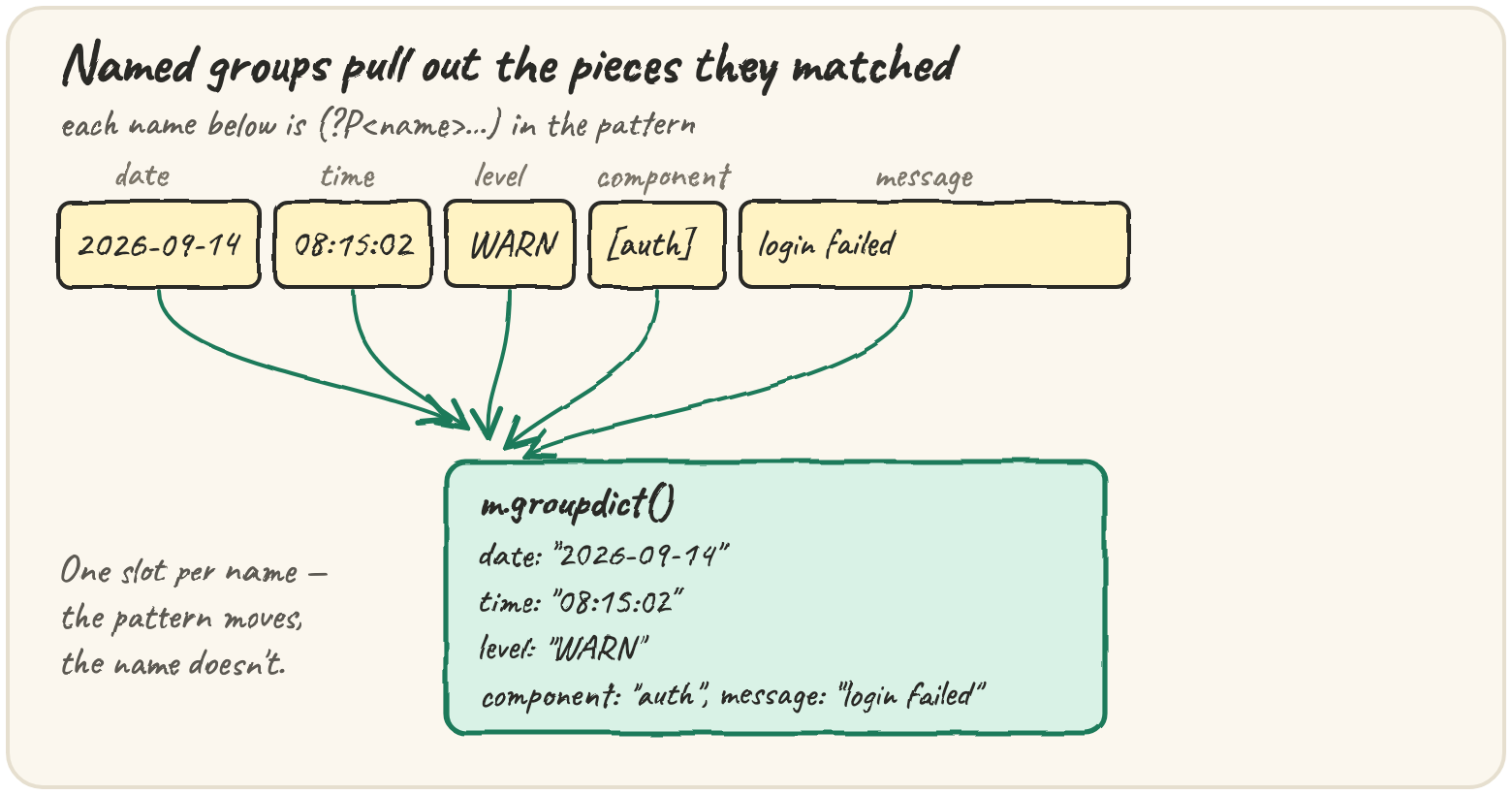
.groupdict() is exactly the shape the extractor wants to hand to the rest of
Quarry: the pattern now documents itself, and a reader sees (?P<unit>...)
and knows instantly what that part is for.
Sometimes you need parentheses only to bundle an alternation, not to capture
text. (?:...) groups without capturing, so it takes no number and never
shows up in .groups():
import re
print(re.findall(r"(?:WARN|ERROR) \[(\w+)\]", "WARN [auth] x ERROR [db] y INFO [web] z"))Quantifiers take as much as they can and give back only when forced to. Fine
for \d+, which stops at the first non-digit anyway — a trap for .*, which
can match anything:
Greedy .* runs to the end of the line, then backs off one character at a
time until a " fits — landing on the last one. Lazy .*? (the ? after
a quantifier) takes as little as possible and grows only when forced. Neither
is "the fast one": a greedy .* before a separator at position p in a
string of length n backs off n − p steps to get there; a lazy .*? creeps
forward p steps. Choose by which match you want. When it matters, the real
fix is a class that can't cross the boundary at all — ([^"]*) can never run
past the closing quote, so there's nothing to back off from.
Count real customers, not load-test bots
A dashboard counts customer visits from cust= ids in access logs, but load
tests leave fake ids tagged (test) behind, like cust=loadbot9(test).
Lookaround checks a condition without consuming it, so you can require
cust= just before and reject (test) just after, keeping neither in the
match:
| Syntax | Name | Passes when the text… |
|---|---|---|
(?=...) |
lookahead | ahead matches ... |
(?!...) |
negative lookahead | ahead does not match |
(?<=...) |
lookbehind | behind matches ... |
(?<!...) |
negative lookbehind | behind does not match |
Python's lookbehind must be fixed-width — (?<=cust=) is fine,
(?<=\w+=) is refused.
The output includes a leftover test-account fragment. Run it, work out why the engine produced it, then fix the pattern so test accounts are excluded completely.
That's the sentence worth remembering: a failing lookaround doesn't make the
engine give up — it makes a quantifier give a character back and try again.
Whenever a negative condition follows + or *, ask what happens when it
gives one back.
Building extract_fields, piece by piece
Last lesson's gate pattern, with every useful part named — the \[ and \]
stay outside the component group, because the brackets are punctuation, not
data:
Adjacent string literals join automatically, so a long pattern can be split
across lines with a comment-sized piece on each. re.compile turns the
pattern into a reusable object with the same methods — LOG.fullmatch(...) —
which avoids re-parsing the pattern on every call.
Watch the groups fill in. This trace does by hand what the engine does for the first three named groups: walk the line, close each group's span when the separator after it arrives.
Quick practice
import re
m = re.fullmatch(r"(?P<level>INFO|WARN) (?P<msg>.+)", "NOTICE all good")
print(m)import re
print(re.findall(r"(\d+)(?=ms)", "took=312ms wait=2s"))import re
tail = "retries=3 user=maya retries=9"
print(dict(re.findall(r"(\w+)=(\S+)", tail)))🎯 Your turn
Write extract_fields(line). For a valid Quarry log line it returns a dict
with the keys date, time, level, component and message; for anything
else it returns None:
extract_fields("2026-09-14 08:15:02 WARN [auth] login failed user=maya")→{"date": "2026-09-14", "time": "08:15:02", "level": "WARN", "component": "auth", "message": "login failed user=maya"}extract_fields("Traceback (most recent call last):")→None
Hint — compile the named-group pattern once at module level, fullmatch
the line, and return m.groupdict() only if m is not None.
Then press ▶ Run and hit ✓ Check. ✅