
CSV & the Dialects Nobody Agrees On
In short: CSV looks like "split each line on commas", and that line works
right up until a field itself contains a comma, a quote, or a newline — all
legal in real CSV, protected by wrapping the field in double quotes. split
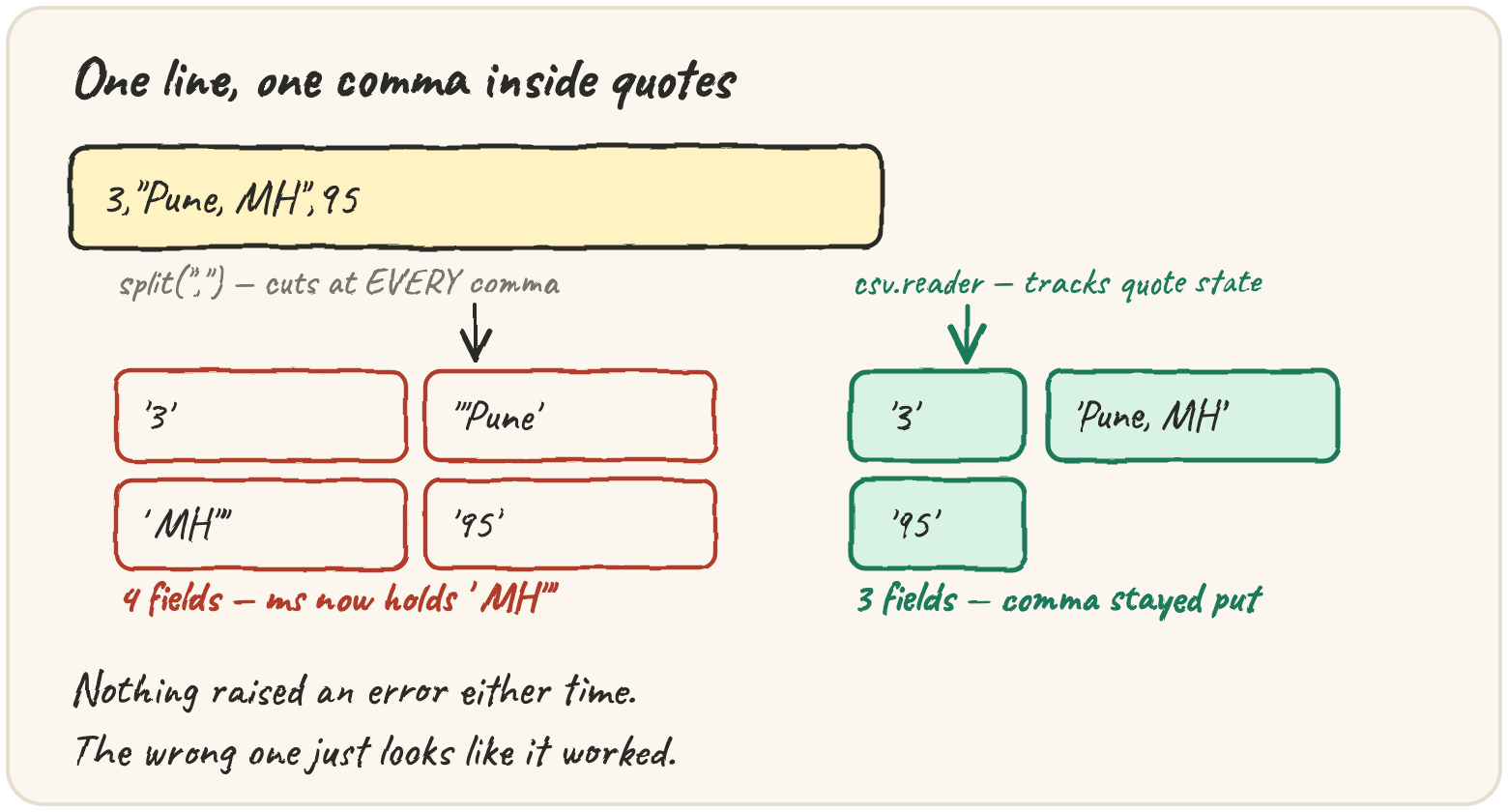
knows nothing about quotes, so it cuts there anyway, shifting every column
after it, without raising an error. The standard library's csv module is
a small state machine that tracks whether it's inside quotes, so a comma
inside quotes stays part of the field. "Comma-separated" is also a hope, not a
rule — spreadsheets from different countries use ; or \t — so CSV has
dialect settings for the delimiter and quote character. Every value a
reader gives you comes back as a str; CSV carries no types.
You'll build read_csv(text), the first piece of Quarry's vault: it reads the
exports people actually send, not the ones you wish they sent.
Import a support-ticket export with a quoted city
A support team's export has one row per ticket. Someone typed a city with its state after a comma, so the tool that wrote the file quoted that field — exactly what quoting is for:
line = '3,"Pune, MH",95'
print(len(line.split(",")))Four fields where there should be three, and nothing raised an error. The
ms column now holds ' MH"'. A shifted column is worse than a crash — the
program carries on and stores the wrong number under the right heading. Real
exports also allow a doubled quote inside a quoted field ("she said ""hi"""),
a newline inside a quoted field, \r\n line endings, and a byte-order mark
glued to the first header. Each one breaks split differently; the embedded
newline breaks it before you even reach the commas, because splitting on \n
has already cut the record in half.
csv.reader reads this correctly, and it wants an iterable of lines, not one
string — a file, a list, or io.StringIO, which wraps a string so it behaves
like one:
Fix the version that still uses split, so every city comes out whole:
Run it first and look at the second city. Then replace the split with a csv.reader so the quoted comma stays inside its field.
Pull a column by name from a reshuffled export
Column positions are fragile — insert a column and row[2] silently means
something else. csv.DictReader reads the first row as the header and hands
you each later row as a dict, keyed by name:
Notice the blank line before 3,Oslo,40 — DictReader skips fully empty
rows, which is what you want from a hand-edited file. Every value is still a
str, which is easy to forget:
import csv, io

rows = list(csv.DictReader(io.StringIO("item,qty\nbolt,3\n")))
print(rows[0]["qty"] * 2)Step through a small reader loop and watch row become a dict each pass,
while the running total only changes once the string is converted:
Read a spreadsheet from Germany
Much of Europe writes decimals with a comma, so spreadsheets there separate
fields with ; instead. Log exporters favour tabs or |. The csv module
calls one set of these choices a dialect; delimiter is the one you'll
touch most:
How do you know which delimiter a file uses before reading it? csv.Sniffer
guesses from a sample, but it can guess wrong on short or odd samples. Quarry
uses a simpler rule: look at the header line and pick the candidate that
appears most often in it. Headers rarely contain punctuation, so the
delimiter is almost always the most common character:
On a tie, max returns the first candidate, so a one-column file falls back
to the comma — a reasonable default.
Traps worth knowing
Writing has the mirror-image bug. Building rows with ",".join(values)
breaks the moment a value contains a comma. csv.DictWriter quotes only the
fields that need it, and its line ending surprises almost everyone:
import csv, io

buf = io.StringIO()
csv.writer(buf).writerow(["a", "b"])
print(repr(buf.getvalue()))A leading BOM breaks row["id"] on a file that looks perfect in any
editor. Strip it first: text.removeprefix(""). Then the header reads
id, not 'id'.
Quick practice
import csv, io

rows = list(csv.reader(io.StringIO('a,"say ""hi""",b')))
print(rows[0])text = "id,city\n1,\"Pune, MH\"\n2,Leeds\n"
import csv, io
print(len(list(csv.DictReader(io.StringIO(text)))))KeyErrorRun it, read the KeyError, then fix the DictReader call so the space doesn't become part of the key.
import csv, io

rows = list(csv.DictReader(io.StringIO("a;b\n1;2\n"), delimiter=";"))
print(rows[0]["a"])🎯 Your turn
Write read_csv(text). It returns a list of dicts, one per data row, keyed by
the header:
- strip a leading
""if there is one - pick the delimiter: whichever of
,;\t|appears most in the first line (ties go to,) - parse with
csv.DictReaderoverio.StringIO(text, newline=""), withskipinitialspace=True - strip whitespace from every key
Examples:
read_csv("id,name\n1,Ada\n")→[{"id": "1", "name": "Ada"}]read_csv('id,city\n1,"Pune, MH"\n')→[{"id": "1", "city": "Pune, MH"}]read_csv("id;amount\r\n7;3,50\r\n")→[{"id": "7", "amount": "3,50"}]
Hint: the first line is text.split("\n", 1)[0]. Take it after
stripping the BOM.
Press ▶ Run, try the chips in the Live App, then hit ✓ Check. Green means Quarry can read spreadsheets. ✅