
Virtual Environments & Pinned Dependencies
In short: pip install chardet unpacks a folder into site-packages,
which sits on sys.path — but by default there's one site-packages
per Python install, shared by every project, and two projects can need two
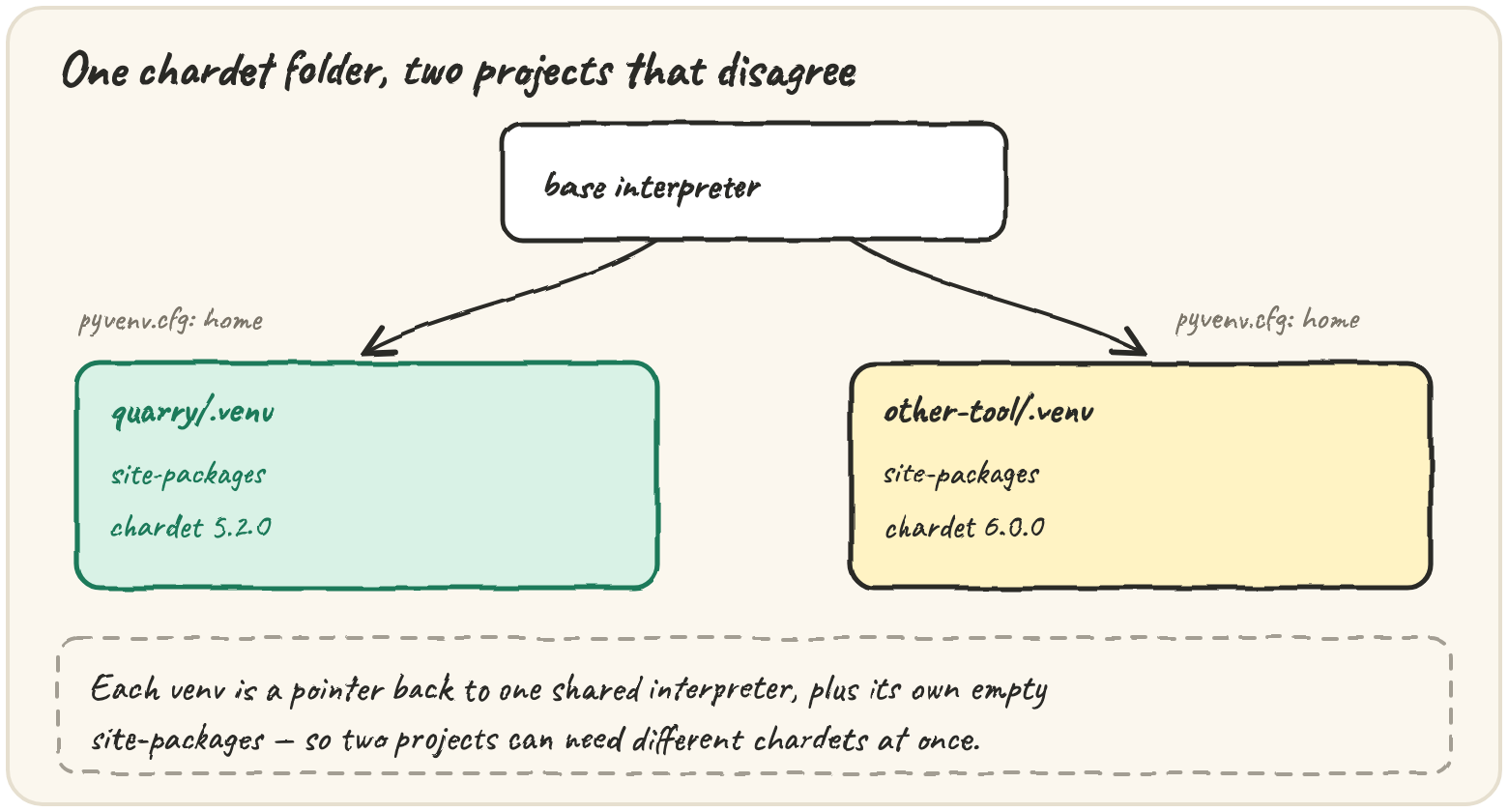
different versions of the same package. A virtual environment gives each
project its own site-packages: a small folder pointing back at the real
interpreter, with an empty package folder of its own. Separately, a loose
requirement like chardet>=5,<6 says what would work; it does not say what
you tested — a pin (chardet==5.2.0) and a lock file (every
transitive dependency, pinned) remove that bet. Comparing versions as text
gets this wrong in a specific, nasty way: "2.10.0" > "2.9.1" is False.
Compare chardet 5.9.1 against 5.10.0 — and pick the newer one
Same code, same data, same Python — except the laptop had chardet 5.2.0
and the server's fresh install pulled 6.0.0, which changed a return value
Quarry relied on. Before any tool can pick "the newest version in range",
it has to compare two versions, and the obvious way is wrong:
print("2.10.0" > "2.9.1")Turn a version into a tuple of ints and tuple comparison does it right:
One wrinkle: 5 and 5.0.0 are the same release, but their tuples disagree
unless you drop trailing zeros first — (5, 0, 0) != (5,) even though the
versions are equal:
print((5, 0, 0) == (5,), (1, 4) < (1, 4, 0))The bug that bug like this causes is concrete: a naive picker returns the lexically largest version, not the newest one:
The filter compares versions correctly, but the pin is still wrong — it picks 5.9.1. Make pick() return the newest release in range.
Install chardet into its own project folder
pip install chardet downloads a file and unpacks a chardet folder into
site-packages — nothing magic, just a folder on sys.path. A virtual
environment gives each project its own:
$ python -m venv .venv
$ source .venv/bin/activate          # Windows: .venv\Scripts\activate
(.venv) $ which python
/home/asha/quarry/.venv/bin/python
(.venv) $ python -m pip install "chardet>=5,<6"
Successfully installed chardet-5.2.0
"Activating" just puts .venv/bin first on PATH; scripts and servers
usually skip it and call .venv/bin/python -m pip ... directly. Always
install with python -m pip, never a bare pip, so there's no doubt which
Python the package goes into. Python can tell whether it's running inside
one — sys.prefix points at the environment, sys.base_prefix at the real
install, and outside a venv they're the same:
In this browser the answer is always no — there's no venv and no pip
here, so this lesson teaches the tools in prose and real terminal sessions,
and grades you on the logic those tools apply: comparing versions, reading
specifiers, resolving pins. That logic is exact; only the downloading is
missing.
Pin tonight's exact chardet version
A project states what it needs as requirements — a name plus an optional specifier:
chardet>=5,<6          # 5.x only: 6.0 changed detect()'s return value
rich~=13.7              # 13.7 or newer, but still 13.x
requests>=2.28,!=2.30.0| Specifier | Means |
|---|---|
==2.31.0 |
exactly that release |
!=2.30.0 |
anything but that release |
>=5, <6 |
ordinary comparisons, as numbers |
~=13.7 |
compatible release: >=13.7 and still 13.* |
Commas mean and — >=5,<6 is one range, and names are normalised
(lower-cased, runs of -_. collapsed to one -) so Typing_Extensions and
typing-extensions are one package. Step through one version checked
against three clauses at once:
A loose requirement is a bet that the future behaves. A pin removes it —
chardet==5.2.0 — but pinning only what you import directly isn't enough,
because rich depends on markdown-it-py, which depends on mdurl. A
lock file pins the whole installed tree, produced by tools like
pip-tools, uv or Poetry: loose requirements are the input, exact pins
are the output, and the output gets committed.
Traps worth knowing
Collisions need backtracking. Quarry needs chardet>=5; the newest
quarry-report needs chardet<5. No single chardet fits both, but an
older quarry-report that accepts chardet>=4 would — finding that means
undoing a choice and trying the next one, which is what pip's resolver does
when it reports a conflict. You build a small version of that resolver in
this lesson's capstone exercise.
Drift compounds. If each dependency has a 5% chance of a new release in
a month, an unpinned install stays identical with probability 0.95 ** k
for k transitive dependencies — 51% at 13, under 8% at 50. Real projects
have dozens, so without a lock file, "the same install" twice is rare.
Quick practice
def normalize(name):
    import re
    return re.sub(r"[-_.]+", "-", name.lower())

print(normalize("Typing_Extensions") == normalize("typing-extensions"))def vkey(v):
parts = [int(p) for p in v.split(".")]
while len(parts) > 1 and parts[-1] == 0:
parts.pop()
return tuple(parts)
print(vkey("5.0.0") == vkey("5"), sorted(["5.10.0", "5.9.1", "5.2.0"], key=vkey))A comment on a requirements line isn't part of the specifier, but it's leaking into the output. Strip it before printing.
🎯 Your turn
Build resolve_pins(requirements, index), the piece of Quarry's shipment
that writes the lock. requirements are lines from a requirements file;
index maps each normalised package name to the versions that have been
released.
- Skip blank lines and everything after a
#. - Normalise names; if a package appears on several lines, every spec applies.
- Pin the highest release that satisfies all of them, comparing as numbers.
- Report packages with no acceptable release (or none at all) as unsatisfied.
resolve_pins(["chardet>=5,<6", "rich"],
             {"chardet": ["4.0.0", "5.1.0", "5.2.0", "6.0.0"], "rich": ["13.9.4"]})
# → {"pins": ["chardet==5.2.0", "rich==13.9.4"], "unsatisfied": []}
normalize and vkey are in the starter. satisfies(version, spec) is
yours to finish first — it is the rule every other step leans on.
Press ▶ Run and hit ✓ Check. ✅