
Unicode, str and bytes
In short: a file never contains text — it contains bytes, and text
is one interpretation of them. str is a sequence of Unicode code
points; bytes is a sequence of integers 0–255, what a disk actually
holds. Encoding goes str → bytes; decoding goes bytes → str.
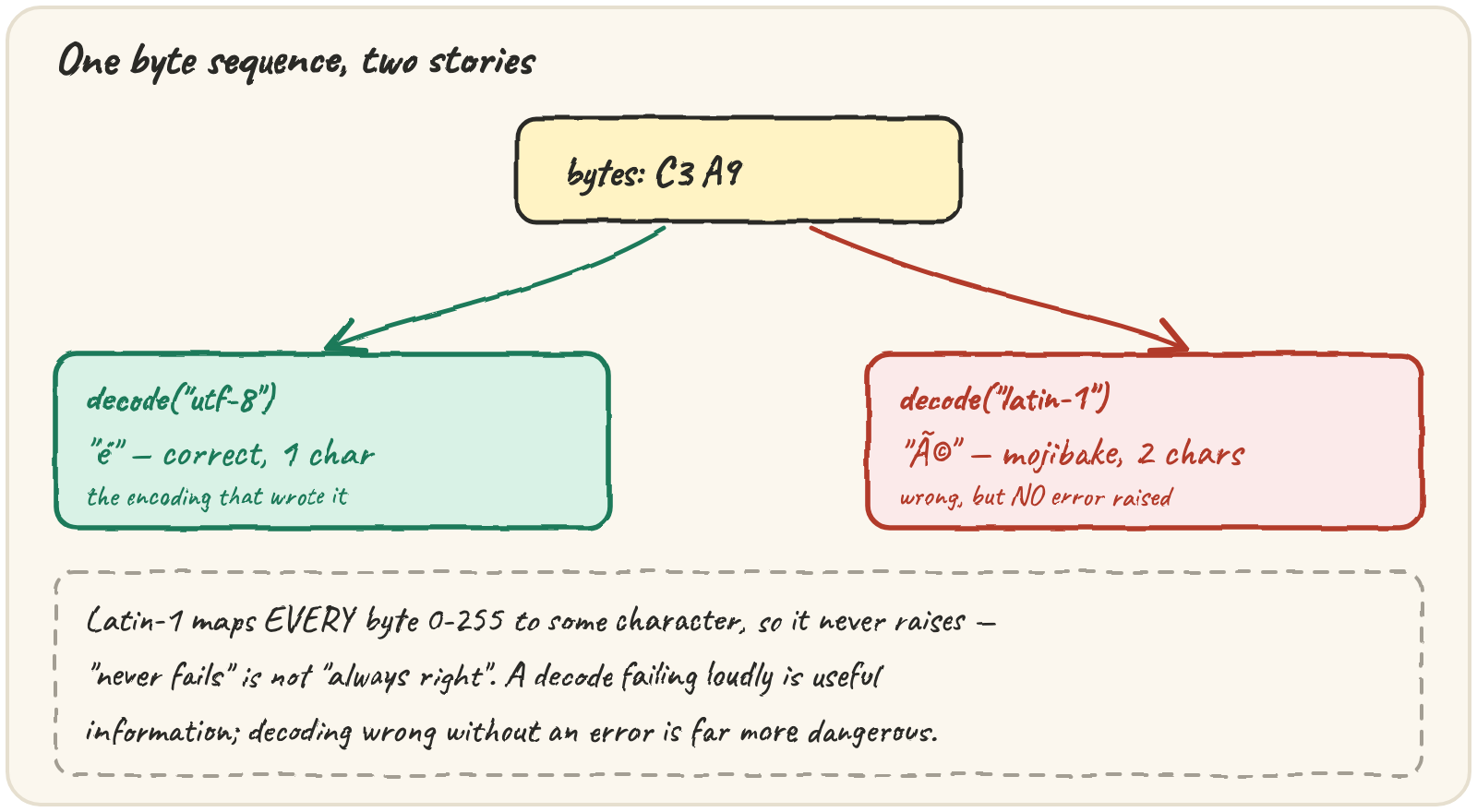
A wrong guess fails two ways: loudly, raising UnicodeDecodeError when
the bytes aren't legal in that encoding, or silently — the bytes happen
to be legal in the wrong encoding too, and you get confidently wrong
characters with no error at all (mojibake). UTF-8 is the default to
reach for: it's ASCII-compatible, has no byte-order question, and spends
1 byte on ASCII, more on everything else. Nothing in a file says which
encoding it used — some tools add a byte-order mark as a hint, but
otherwise you have to work it out from the bytes themselves.
Decode a Windows export that isn't UTF-8
A spreadsheet exported from a Windows machine often uses cp1252, not
UTF-8. UTF-8 has strict rules about which bytes can follow which, so most
wrong guesses crash loudly:
UnicodeDecodeErrorRead the error — it names the byte it choked on and its position. Then decode with the encoding that was actually used.
But the dangerous case is quieter. The bytes happen to be valid in the wrong encoding too, and nothing fails — you just get the wrong text:
print("café".encode("utf-8").decode("latin-1"))Once you've seen é, ï and ’, you'll recognise them forever — UTF-8
bytes read as a single-byte Western encoding. Quarry's decoder tries the
strongest evidence first: utf-8, then cp1252 (the most common
non-UTF-8 export), falling back to latin-1 as a last resort — because
Latin-1 maps every one of the 256 byte values to some character, so it
can never raise. That's exactly why it's last, not first: never crashing is
not the same as being right, and a guess should be visible, not silent.
You can also choose what a decode does with bytes that don't fit, through
errors=:
replace is honest — the � marks exactly where information was lost, and
you can count them. ignore quietly deletes data and should make you
nervous every time you reach for it.
Watch a string's byte cost, character by character
UTF-8 is a variable-width code: ASCII costs one byte, and everything above it costs more. Step through a string one character at a time and watch the byte cost of each:
Five characters, seven bytes: the rupee sign alone costs three. That's why
len() of a str and len() of the bytes it encodes to can disagree —
one counts code points, the other counts bytes.
Strip a byte-order mark from a Mac export
A stray  glued to the first column name is a BOM: the bytes
EF BB BF, which some tools put at the start of a UTF-8 file to announce
"this is UTF-8". Decoded as plain utf-8 it survives as an invisible
character; the utf-8-sig codec reads it and throws it away:
UTF-16 needs its mark more, because it has a real question to answer: is
each two-byte unit stored low byte first (FF FE) or high byte first
(FE FF)? The utf-16 codec reads the mark and picks the order for you —
trust it before anything else when it's there:
data = b"\xff\xfe\x68\x00\x69\x00"
print(data.decode("utf-16"))Compare two spellings of the same accented name
One last surprise: é has two spellings in Unicode — the single code point
U+00E9, or a plain e followed by U+0301, a combining acute accent. They
render identically and == says they differ:
a = "é"     # e + combining accent
b = "é"      # é as one code point
print(a == b, len(a), len(b))unicodedata.normalize("NFC", s) composes a string into one canonical
spelling, and casefold() is lower() built for comparison — it also maps
ß to ss:
Quick practice
print(len("naïve".encode("utf-8")))UnicodeEncodeErrorRun it and read the UnicodeEncodeError. Then encode with a codec that can hold the character.
print("STRASSE".casefold() == "strasse".casefold(), "straße".casefold())data = "hé".encode("utf-8")
cleaned = data.decode("utf-8", errors="ignore")
print(cleaned == "hé", len(cleaned))🎯 Your turn
Build decode_source(hex_data):
decode_source("636166e9")→{"encoding": "cp1252", "text": "café"}decode_source("efbbbf636166c3a9")→{"encoding": "utf-8-sig", "text": "café"}
Hint — check the BOMs with startswith, then try utf-8 and cp1252 in a
try/except UnicodeDecodeError, and fall back to latin-1.
Then press ▶ Run and hit ✓ Check. ✅