
Bytes, Buffers & struct
In short: some files aren't text at all — they're a fixed layout,
byte for byte, with no newline to split on. bytes holds integers 0–255;
indexing gives an int, slicing gives bytes back. Numbers bigger than one
byte raise the byte order question: big-endian writes the most
significant byte first (how we write digits), little-endian writes the
least significant first (how most CPUs store them) — the same two bytes
mean different numbers read the wrong way. struct describes a whole
layout as one format string — "<4sBBHI8s" is little-endian (<), a
4-byte tag, two single bytes, a uint16, a uint32, then 8 raw bytes — and
pack/unpack convert a tuple of Python values to and from that exact
byte layout in one call. Without the </> prefix, struct uses the
machine's native mode: its own byte order and padding, so the same
format string can even change size from one machine to another.
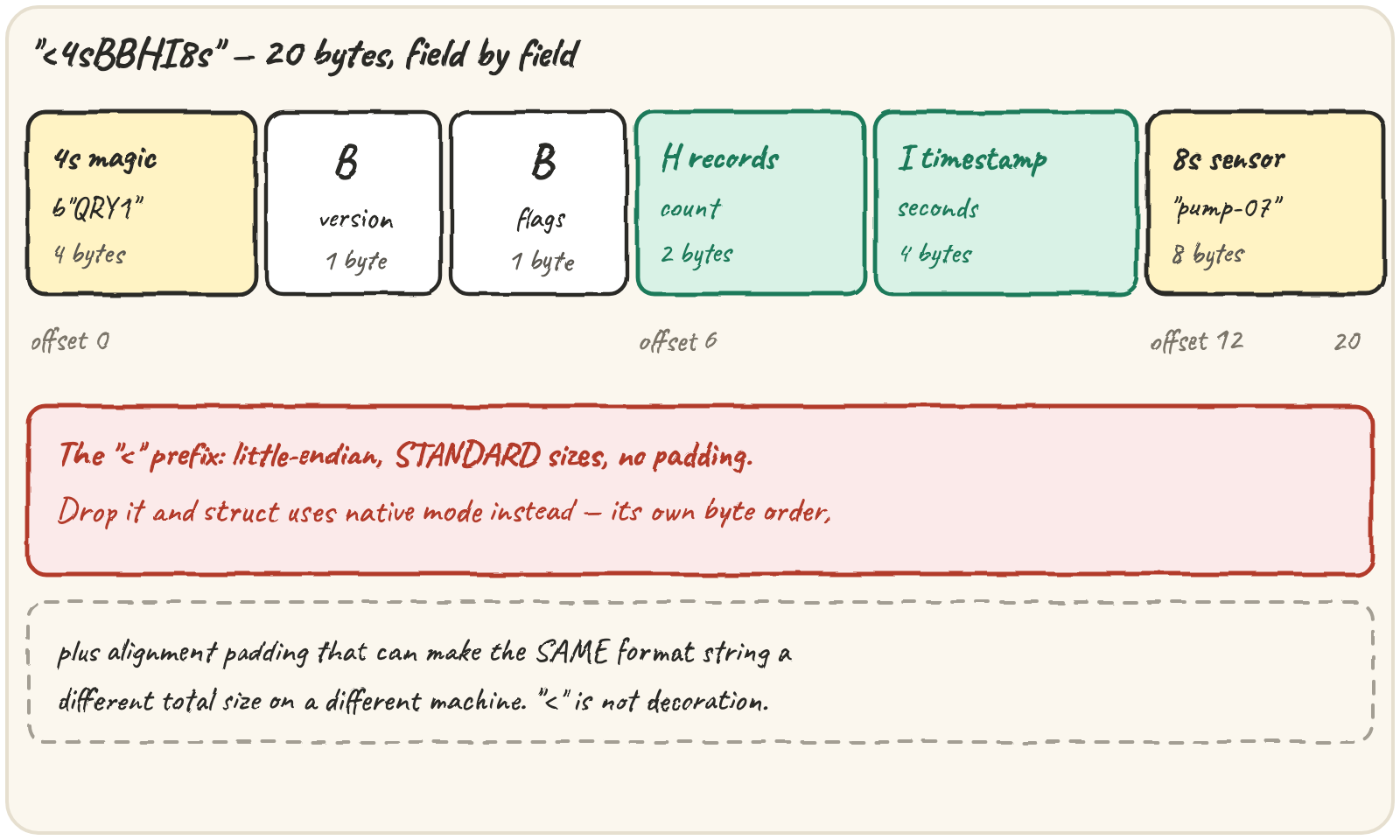
Read the pump's 20-byte header
Every hour a pump sensor uploads a compact file: no encoding to guess, just
a header followed by records. struct.Struct pre-builds a format once —
worth doing when you'll unpack thousands of records — and pack/unpack
convert the whole layout together:
pump-07 is 7 characters in an 8-byte field: pack pads s fields with
NUL bytes on the way out, so you strip them on the way back in. A real file
is a header followed by records, so you rarely have exactly one layout's
worth of bytes — unpack insists on an exact length and raises if there's
anything left over. unpack_from(fmt, buffer, offset) reads from a
position and ignores the rest, which is how you walk a buffer record by
record:
Run it and read the struct.error. Then read the first record without trimming the data by hand.
unpack_from(fmt, buffer, offset) is how you walk a buffer: read a record at
offset, add the record size, repeat. Step through it:
The temperature is stored as a signed short in hundredths — 2150 means
21.50°C, -325 means -3.25°C. For records packed back to back,
RECORD.iter_unpack(data) does this loop for you.
Tell big-endian from little-endian
A field only means one number if reader and writer agree on byte order. Mix them up and the bytes don't change — the number they mean does:
print(int.from_bytes(b"\x01\x00", "little"), int.from_bytes(b"\x01\x00", "big"))That's not a hypothetical: a telemetry header written by a big-endian
sensor and read with a little-endian format string doesn't crash — it just
silently reports the wrong record count, three readings misread as 768. The
< or > at the front of a struct format isn't decoration; it's the
contract between whoever wrote the file and whoever reads it, possibly on
different hardware, possibly years apart.
Signed numbers use two's complement — you rarely compute it by hand,
you just ask for signed=True (or the signed struct code, lower-case)
whenever a field can go negative, like a temperature:
Pad a struct without meaning to
The </> prefix also turns off something you'd never choose on purpose:
native alignment. Without a prefix, struct uses the machine's own
rules, which insert padding so bigger fields start on tidy memory
boundaries:
import struct

print(struct.calcsize("@BI"), struct.calcsize("<BI"))struct.pack also checks every value against its field's range, and raises
rather than silently wrapping or truncating:
A field that's too narrow for the values it needs to hold is an overflow
waiting to happen — timestamps are the classic case: seconds since 1970,
stored in a fixed number of bits, roll over once seconds have
passed. A signed 32-bit field rolls over in 2038; Quarry's header stores the
timestamp as an unsigned uint32 (I), which buys until 2106.
Quick practice
import struct

print(struct.pack("<Hh", 65535, -1).hex())Run it and read the struct.error about the buffer size. Fix the call, not the data, so unpacking succeeds.
print((-2).to_bytes(2, "big", signed=True).hex())import struct
HEADER = struct.Struct("<4sB")
print(HEADER.size, struct.calcsize(">4sB"))🎯 Your turn
Build read_header(hex_data):
read_header("5152593101000300803bb16a70756d702d303700")→{"version": 1, "flags": 0, "records": 3, "timestamp": 1790000000, "sensor": "pump-07"}- a PNG's first bytes →
{"error": "bad magic"}
Hint — check len(data) < HEADER.size, unpack_from, compare the magic with
b"QRY1", then sensor.rstrip(b"\x00").decode("ascii").
Then press ▶ Run and hit ✓ Check. ✅