
Threads and the GIL
In short: concurrency is structuring a program to deal with many
things at once (an order being packed while another is being paid for);
parallelism is actually doing many things at the literal same instant on
different cores. CPython's threading module gives you concurrency, but not
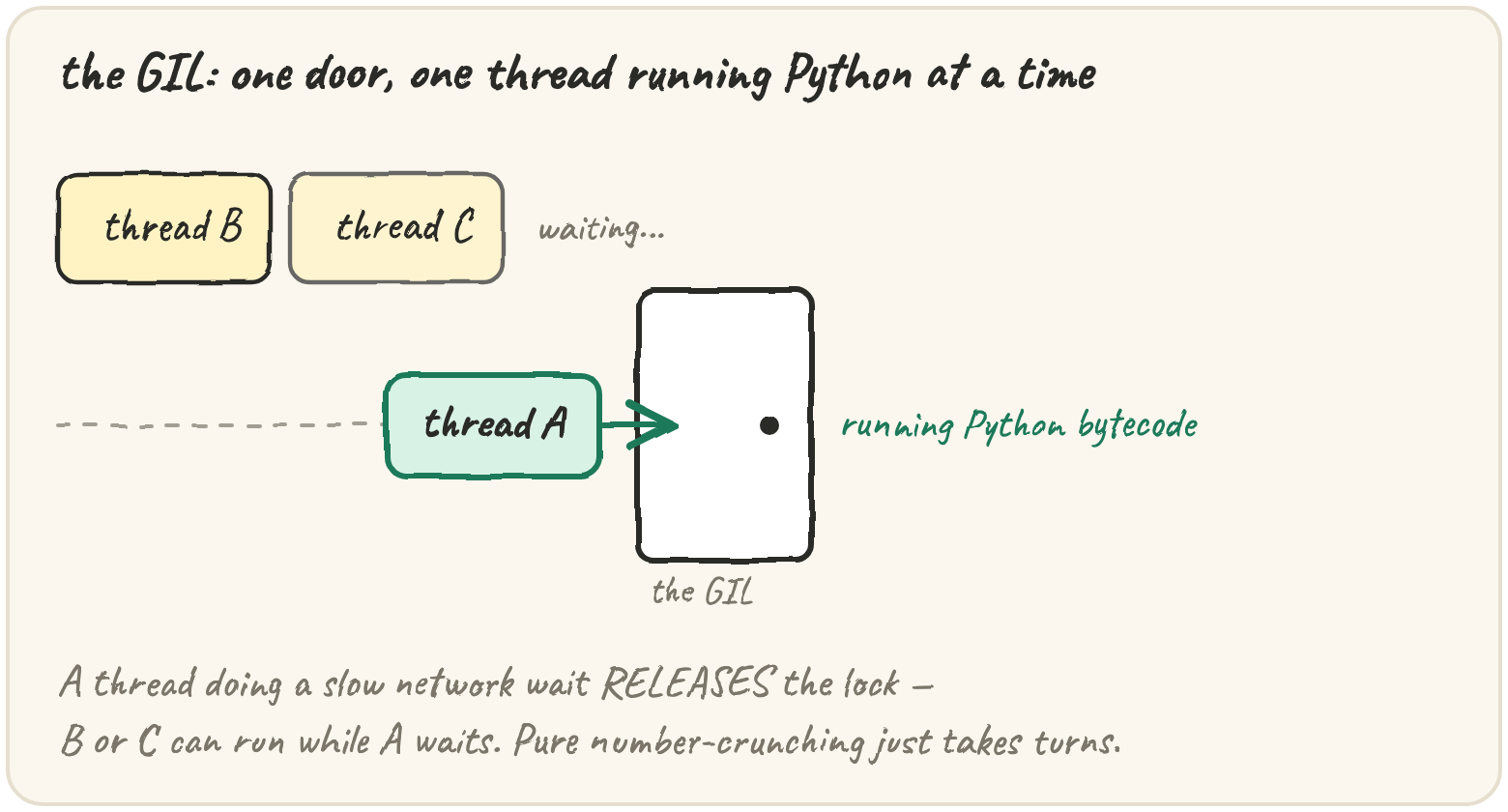
parallelism — the GIL (Global Interpreter Lock) only ever lets one
thread run Python bytecode at a time, no matter how many CPU cores you
have. A thread that's waiting (for a file, a socket, a timer) releases the
GIL, so other threads can run while it waits — that's where threads genuinely
help. A thread that's computing holds it until the interpreter forces a
switch every few milliseconds, so four threads doing pure arithmetic just take
turns and run no faster than one. (Python 3.13+ also ships an optional
"free-threaded" build without a GIL; the standard build still has one.) And a thread can be interrupted between
any two bytecodes, which is exactly what makes two threads sharing one
counter lose updates. None of threading.Thread, Lock or real parallel
timing can run here — Pyodide has no real OS threads, and timing is never
deterministic anyway. What is deterministic, and runs here, is simulating
an interleaving by hand: given an exact order of steps, compute what a shared
counter ends up holding.
Wait for a slow download, not block on it
Threads earn their keep when most of the time is spent waiting, not computing — three downloads waiting on the network can all be "in flight" at once, because each one releases the GIL the moment it's waiting on the network, not the CPU:
import threading
import time

def download(name, seconds):
    time.sleep(seconds)          # simulates waiting on the network
    print(f"{name} done")

threads = [threading.Thread(target=download, args=(f"file{i}", 1)) for i in range(3)]
for t in threads:
    t.start()
for t in threads:
    t.join()                     # wait for every thread to finish
# all three ~1 second apart finish in ~1 second total, not ~3 —
# each sleep() releases the GIL while it waits
t.start() launches the thread; t.join() blocks the main thread until
that one finishes. Three 1-second waits finish in about 1 second total, not
3, because while one thread sleeps, another can run.
Crunch numbers across 4 threads
The same pattern applied to CPU-bound work doesn't speed anything up — there's no waiting to overlap, only computing, and the GIL only lets one thread compute at a time:
import threading

def count_to(n):
    total = 0
    for i in range(n):
        total += 1
    return total

threads = [threading.Thread(target=count_to, args=(50_000_000,)) for _ in range(4)]
for t in threads:
    t.start()
for t in threads:
    t.join()
# four threads, but still only ONE running Python bytecode at any instant —
# this takes roughly as long as running count_to four times in a row
This is the one-line test for "will threads help here?" — does the work
spend most of its time waiting, or computing? Waiting: threads help.
Computing: they don't (multiprocessing, next lesson, is the fix for that).
Lose an update to a shared counter
The GIL can swap which thread is running between any two bytecodes — not
just between function calls. counter += 1 isn't one step; it's three:
read the current value, add one, write it back. Two threads can
interleave those three steps and silently lose an update:
import threading

counter = 0

def increment():
    global counter
    for _ in range(100_000):
        counter += 1

threads = [threading.Thread(target=increment) for _ in range(2)]
for t in threads:
    t.start()
for t in threads:
    t.join()

print(counter)   # often LESS than 200_000 — some updates got lost
Both threads read the same old value before either writes the new one, so
one increment vanishes. A Lock fixes it by making the three steps atomic —
only one thread can hold the lock at a time:
lock = threading.Lock()

def safe_increment():
    global counter
    for _ in range(100_000):
        with lock:          # only one thread inside this block at a time
            counter += 1
with lock: is what makes read-add-write one uninterruptible step instead of
three interruptible ones. Exactly which interleavings happen is up to the OS
scheduler and never guaranteed — but the pattern of a lost update is
something you can compute by hand, for an exact, chosen interleaving.
Quick practice
A function downloads 10 web pages, one after another, each taking about 1 second. Will running it with 10 threads instead of 1 make it roughly 10x faster?
def final_value(schedule, start=0):
    shared = start
    locals_ = {}
    for thread, step in schedule:
        if step == "read":
            locals_[thread] = shared
        elif step == "incr":
            locals_[thread] = locals_[thread] + 1
        elif step == "write":
            shared = locals_[thread]
    return shared

schedule = [["A", "read"], ["A", "incr"], ["B", "read"], ["A", "write"], ["B", "incr"], ["B", "write"]]
print(final_value(schedule))def final_value(schedule, start=0):
shared = start
locals_ = {}
for thread, step in schedule:
if step == "read":
locals_[thread] = shared
elif step == "incr":
locals_[thread] = locals_[thread] + 1
elif step == "write":
shared = locals_[thread]
return shared
schedule = [["A", "read"], ["A", "incr"], ["A", "write"], ["A", "read"], ["A", "incr"], ["A", "write"]]
print(final_value(schedule))Four threads each sum 10 million numbers purely in Python (no I/O at all). Compared to doing the same work in one thread, four threads will be about how much faster?
🎯 Your turn
Write final_value(schedule, start=0). schedule is a list of [thread_id, step] pairs, where step is "read", "incr", or "write". Each thread
has its own local value: "read" copies the shared counter into that
thread's local; "incr" adds one to the local; "write" copies the local
back into the shared counter. Simulate the schedule in order and return the
final shared value.
final_value([["A","read"],["A","incr"],["A","write"],["B","read"],["B","incr"],["B","write"]])→2final_value([["A","read"],["B","read"],["A","incr"],["B","incr"],["A","write"],["B","write"]])→1(a lost update)
Hint: keep a dict of each thread's local value, updating it on "read"
and "incr", and only touch the shared value on "write".
Press ▶ Run, try the Live App chips, then ✓ Check. After that, the practice set below builds tools for spotting and avoiding the race this function can produce.