
sqlite3 & the DB-API
In short: CSV, JSON and pickle all write the whole thing and read the
whole thing — fine for a batch, hopeless for a question like which sources
logged an ERROR yesterday. SQLite is a complete SQL database in a single
file (or entirely in memory), built into Python, and sqlite3 follows the
DB-API: connect, get a cursor, execute, fetch — the same shape every
other Python database driver uses. The one rule that matters most: values
travel into SQL as parameters (? or :name), never pasted into the
query text, because a pasted value can rewrite what the query means. A
transaction makes a batch of inserts succeed or fail together, so a bad
record 312 of 500 never leaves 311 silently stored.
You'll build store_batch(raws), the vault itself: a batch goes in as one
transaction, all of it or none of it.
Look up a customer by a name with an apostrophe
The obvious way to put a value into a query is an f-string, and it's the one way you must never use — it breaks on an ordinary surname before anyone attacks anything:
import sqlite3

conn = sqlite3.connect(":memory:")
conn.execute("CREATE TABLE people (name TEXT)")
conn.execute("INSERT INTO people VALUES ('Siobhan')")

name = "O'Brien"
rows = conn.execute(f"SELECT * FROM people WHERE name = '{name}'").fetchall()
print(len(rows))Fix the lookup so a real surname works, using a parameter instead of a pasted string:
OperationalErrorRun it, then rewrite the SELECT so the name travels as a parameter.
Stop a hostile "source name" from rewriting the query
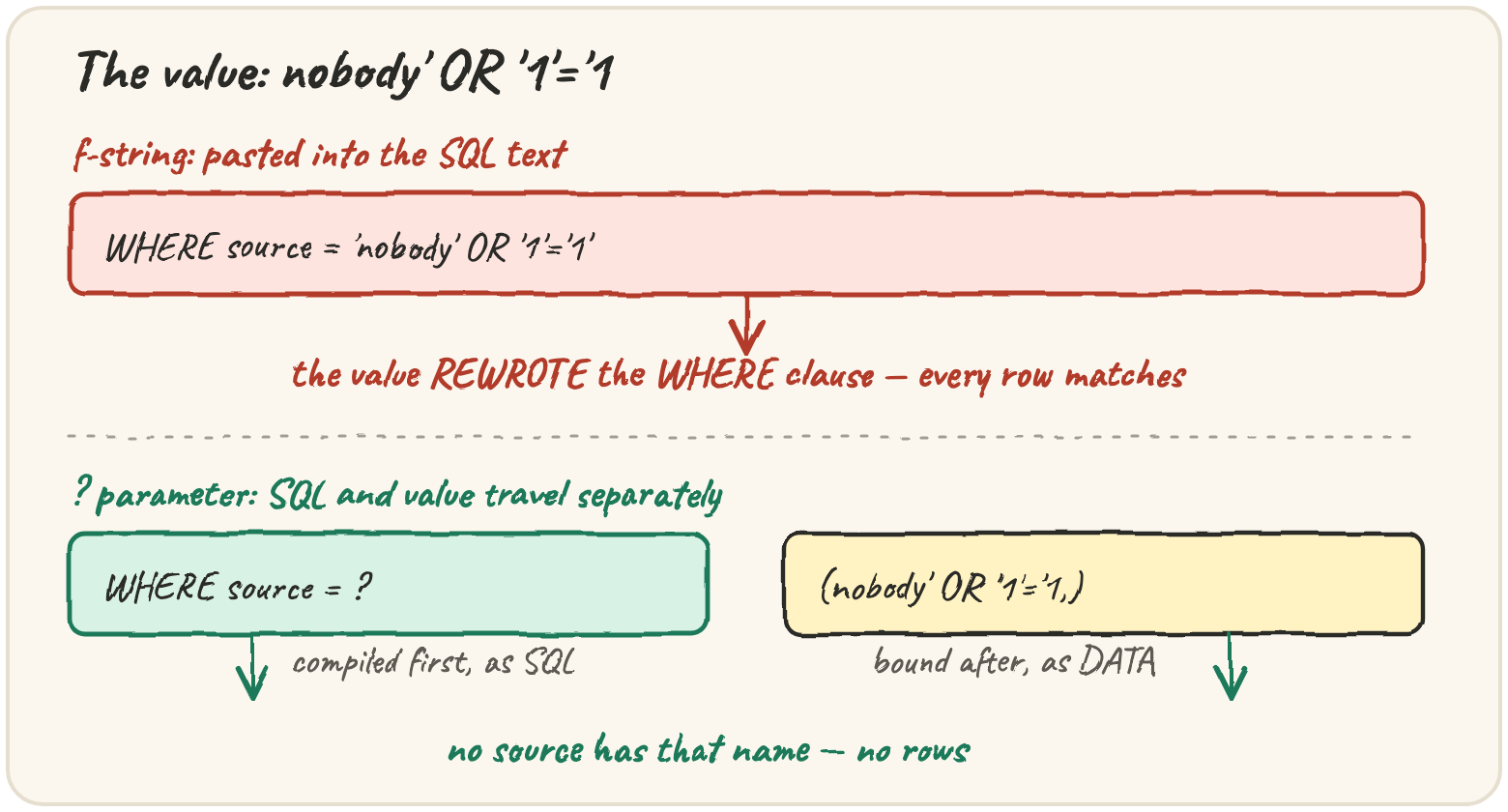
That's the accidental version. The deliberate version is SQL injection: a value crafted to change what the query means without breaking its syntax:
The formatted query returns every row, because the value rewrote the
WHERE clause into something always true. The parameterised query returns
none, because it looked for a source literally named nobody' OR '1'='1,
and there isn't one. That difference is structural: with ?, SQL text and
values travel separately — the statement compiles first and the value is
bound afterwards as data, so it can never become SQL, whatever characters it
holds. Two placeholder styles work: ? with a tuple, and :name with a dict
— handy because Quarry's records already are dicts:
Placeholders stand for values only — you can't parameterise a table or column name. If one really has to vary, choose it from a fixed allow-list in your code, never straight from input.
Insert a batch where one row breaks a rule
A batch of 500 records where record 312 duplicates a primary key should not
leave 311 stored — the next run couldn't tell what landed and what didn't.
with conn: commits if the block finishes and rolls back if it
raises:
import sqlite3

conn = sqlite3.connect(":memory:")
conn.execute("CREATE TABLE records (id INTEGER PRIMARY KEY, ms INTEGER)")
batch = [(1, 120), (2, 95), (1, 40)]          # id 1 appears twice

try:
    with conn:
        conn.executemany("INSERT INTO records VALUES (?, ?)", batch)
except sqlite3.IntegrityError:
    pass

print(conn.execute("SELECT COUNT(*) FROM records").fetchone()[0])Constraints are what make "bad" detectable: PRIMARY KEY refuses
duplicates, NOT NULL refuses missing values, CHECK (level IN (...))
refuses a level Quarry doesn't know — each raises sqlite3.IntegrityError at
insert time, instead of turning up in a report next week. executemany takes
one statement and an iterable of parameter sets, and conn.row_factory = sqlite3.Row lets a row behave like both a tuple and a mapping:
Traps worth knowing
SQLite stores five kinds of value: NULL, integer, real, text, blob —
None, int, float, str, bytes. Anything else needs a decision, the
same kind JSON forced on you: a datetime becomes value.isoformat() as
TEXT (sqlite3's automatic datetime conversion is deprecated since 3.12 —
be explicit); a list or set, like Quarry's tags, becomes
json.dumps(sorted(tags)) as TEXT; a Decimal becomes str(value).
SQLite doesn't enforce column types by default. A column declared
INTEGER will quietly store the string "slow" unless you add STRICT
after the table definition, a CHECK constraint, or convert before
inserting.
Quick practice
import sqlite3

conn = sqlite3.connect(":memory:")
conn.execute("CREATE TABLE t (id INTEGER PRIMARY KEY, note TEXT NOT NULL)")
try:
    conn.execute("INSERT INTO t (id) VALUES (1)")
except sqlite3.IntegrityError as exc:
print(type(exc).__name__)ProgrammingErrorRun it and read which type the driver refuses to bind. Pack the list as JSON text before inserting.
import sqlite3

conn = sqlite3.connect(":memory:")
conn.execute("CREATE TABLE t (n INTEGER)")
with conn:
    conn.execute("INSERT INTO t VALUES (?)", (5,))

try:
    with conn:
        conn.execute("UPDATE t SET n = n + 1")
        raise ValueError("boom")
except ValueError:
    pass
print(conn.execute("SELECT n FROM t").fetchone()[0])🎯 Your turn
Write store_batch(raws). Each raw record has id, source, level and
ms.
- Connect to
":memory:", setrow_factory = sqlite3.Row, and create the table with the starter'sSCHEMA. - Insert the whole batch with
executemanyand:nameplaceholders, insidewith conn:. - If that raises
sqlite3.IntegrityError, note the error's class name. Thewithblock has already rolled back. - Read everything back with
SELECT id, source, level, ms FROM records ORDER BY id, turning each row into a dict. - Return
{"rows": [...], "error": None}, or with"error": "IntegrityError"when the batch was refused, in which caserowsis[].
A source named web'); DROP TABLE records; -- must be stored exactly as
written.
Hint: set error = None before the try, and do the SELECT after the
try/except, so both paths share it.
Press ▶ Run and hit ✓ Check. ✅