
Capstone — The Inspector
In short: the inspector runs Quarry's real loader and reports three things
about a batch without fixing any of them — which fields secretly share one
mutable object (lesson 01's grouping by identity), which rows are exact
duplicates once frozen (lesson 02's freeze), and how many rows survive being
dropped, before and after gc.collect() (lesson 03's weak probes). A report you
can trust comes before a fix you can trust — and the loader below has two bugs
that never raise a single error.
The loader's silent bug
A batch spec names a source, the raw rows, and defaults for any field a row is missing:
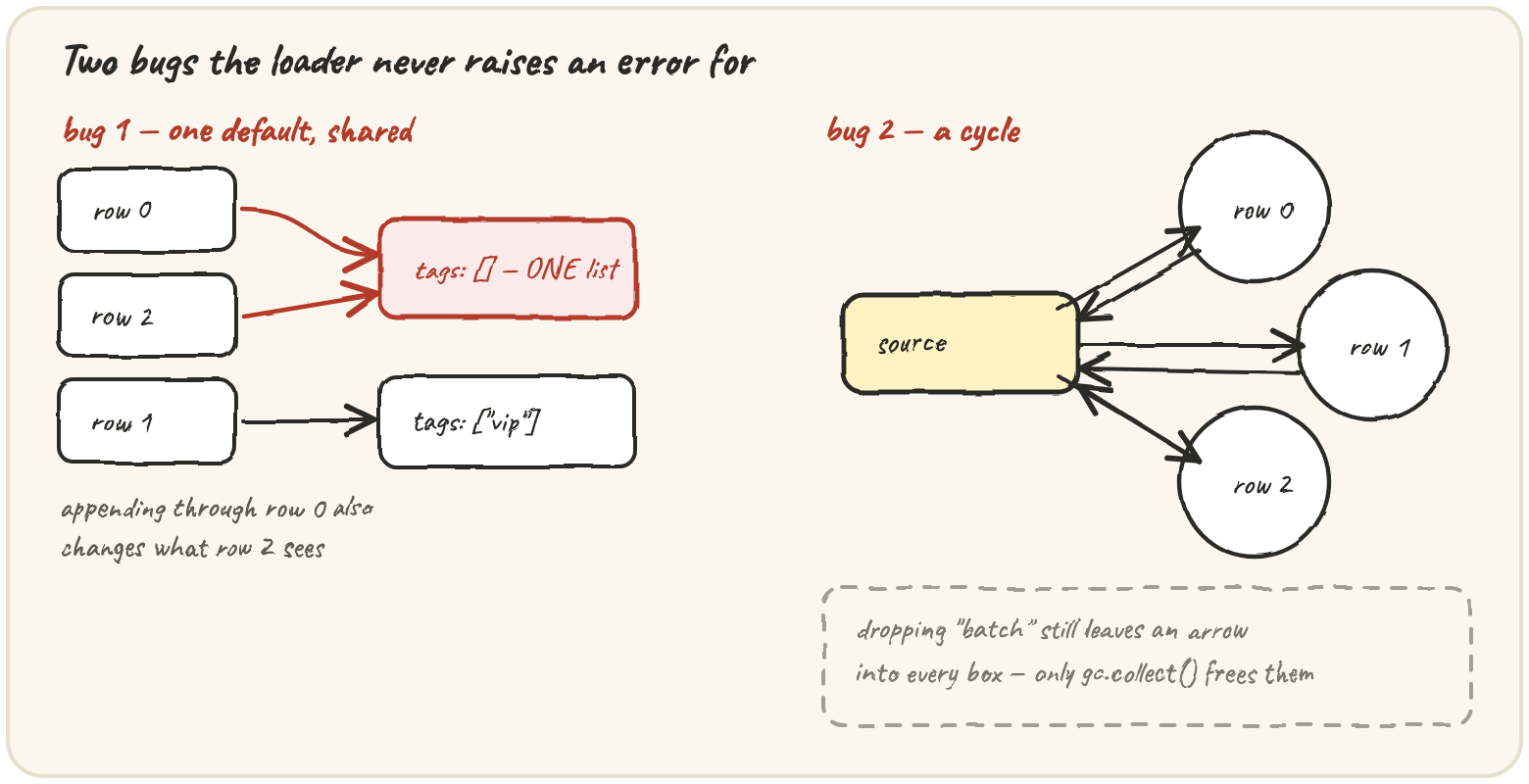
Row 0 got a tag, and so did row 2 — both took the default, and "the default" is
one list. Row 1 brought its own list, so it's unaffected. This is the mutable
default argument from lesson 02 and [[0] * 3] * 3 from lesson 01, in one more
disguise: one object, several names, a mutation.
defaults = {"tags": []}
rows = [{"id": i} for i in range(3)]
for r in rows:
    r.setdefault("tags", defaults["tags"])
rows[0]["tags"].append("vip")
print(rows[2]["tags"], defaults["tags"])Which rows repeat
Freezing each row's fields (lesson 02) turns "are these rows duplicates?" into a
set lookup. It compares values the way == does, which includes one quirk worth
re-meeting here:
def freeze(value):
    if isinstance(value, list):
        return tuple(freeze(v) for v in value)
    if isinstance(value, dict):
        return frozenset((k, freeze(v)) for k, v in value.items())
    return value

keys = {freeze({"ok": 1}), freeze({"ok": True}), freeze({"ok": 1.0})}
print(len(keys))What survives the drop
Lesson 03's probes measure what's still alive after the batch is dropped. A
healthy loader gives 0 right after the drop. Quarry's gives rows + 1,
because every object in the batch is part of a row-source cycle:
Take away the batch bubble and every box still has an arrow coming into it,
which is why counting frees none of them. Step through the drop and watch the
two counts:
The measurement itself has a trap: any name still pointing at a row keeps it alive, including a leftover loop variable:
None of these rows are in a cycle, so the count after dropping batch should be 0. Run it, work out which row survived and why, then fix the drop.
The reliable fix is structural: do the loading and inspecting inside a helper that returns only the report and the probes. When the helper returns, its whole frame — the batch, every loop variable, every temporary — goes with it.
What the report is for
A report doesn't fix anything, but it names the fix precisely:
- Shared fields → copy the default per row.
fields.setdefault(key, copy.deepcopy(value))— lesson 01's "copy as deep as what you're about to mutate." - Rows alive after the drop → give the cycle an owner. Rows hold their
source strongly; the source tracks its rows weakly, with a
weakref.WeakSet. Lesson 03's rule: strong references run in the direction of ownership. - Duplicates → dedupe with frozen keys, lesson 02, before rows go anywhere else.
Quick practice
Calling probe_all and letting it return is enough — nothing outside keeps
objs alive, so every row is already gone by the time the function hands the
probes back.
🎯 Your turn
The starter gives you Source, Row, load_batch and freeze, exactly as
above. Write inspect_batch(spec), returning:
"rows"— how many rows were loaded"shared"— groups of"<row>.<field>"labels whose values are the samelist/dictobject (sorted labels, sorted groups)"duplicates"— groups of row indices whosefieldsare equal (two or more, first-seen order)"alive_after_drop"— how many rows + source survive dropping the batch, with the collector off"alive_after_collect"— the same count aftergc.collect()
For the orders.csv spec above:
{"rows": 3, "shared": [["0.tags", "2.tags"]], "duplicates": [], "alive_after_drop": 4, "alive_after_collect": 0}.
Hint: a helper look(spec) loads the batch, builds the report and the
probes, and returns just those two — its own frame going away is what keeps the
measurement honest. inspect_batch disables the collector, calls it, counts,
collects, counts again, and re-enables the collector in a finally.
Press ▶ Run, then ✓ Check. ✅