
Pebellslearn by building
0%
RoadmapsMatrixCoursesSandboxSign in
Modules, Environments & Packaging  ›  Lesson

pyproject.toml, Wheels & the Console Entry Point

Building and Publishing 26 minOne file describes the project; the build turns it into a wheel, and an entry point turns a function into a command
You're building a piece ofQuarry — the shipment
This piece — check_pyproject(): Reads pyproject.toml before a release and lists everything that would stop it building a working quarry command.
Scenario Quarry is about to become `pip install quarry` and a `quarry` command on other people's machines, and a release can never be taken back once it is published.
Your task
Build check_pyproject(text), Quarry's pre-flight check before a release. Parse the pyproject.toml text with tomllib and return a list of problems, in this order: "invalid TOML" (alone) if it won't parse; "missing build-system.build-backend"; "missing [project]" (then stop); "missing project.name" or "invalid project.name"; "project.version must be a string", or "missing project.version" unless "version" is listed in project.dynamic; and "bad entry point: <command>" for each [project.scripts] entry, in sorted order, that isn't dotted.module:dotted.attr. An empty list means ready to build. Example: a file with version = 0.5 (no quotes) and quarry = "quarry/cli.py:main" → ["project.version must be a string", "bad entry point: quarry"].

pyproject.toml, Wheels & the Console Entry Point

In short: pip install quarry then quarry run ./data working on a stranger's machine needs three things. pyproject.toml — read by every tool with the standard tomllib since Python 3.11 — describes the project: which backend builds it, its name and version, its dependencies as loose ranges, and [project.scripts], one line mapping a command name to a dotted module:attribute reference. A wheel (.whl) is a zip file laid out exactly as it will sit in site-packages; installing one is close to unzipping it. And the entry point is a short walk — import the module on the left of the colon, getattr the name on the right — that pip turns into a tiny executable on the user's PATH.
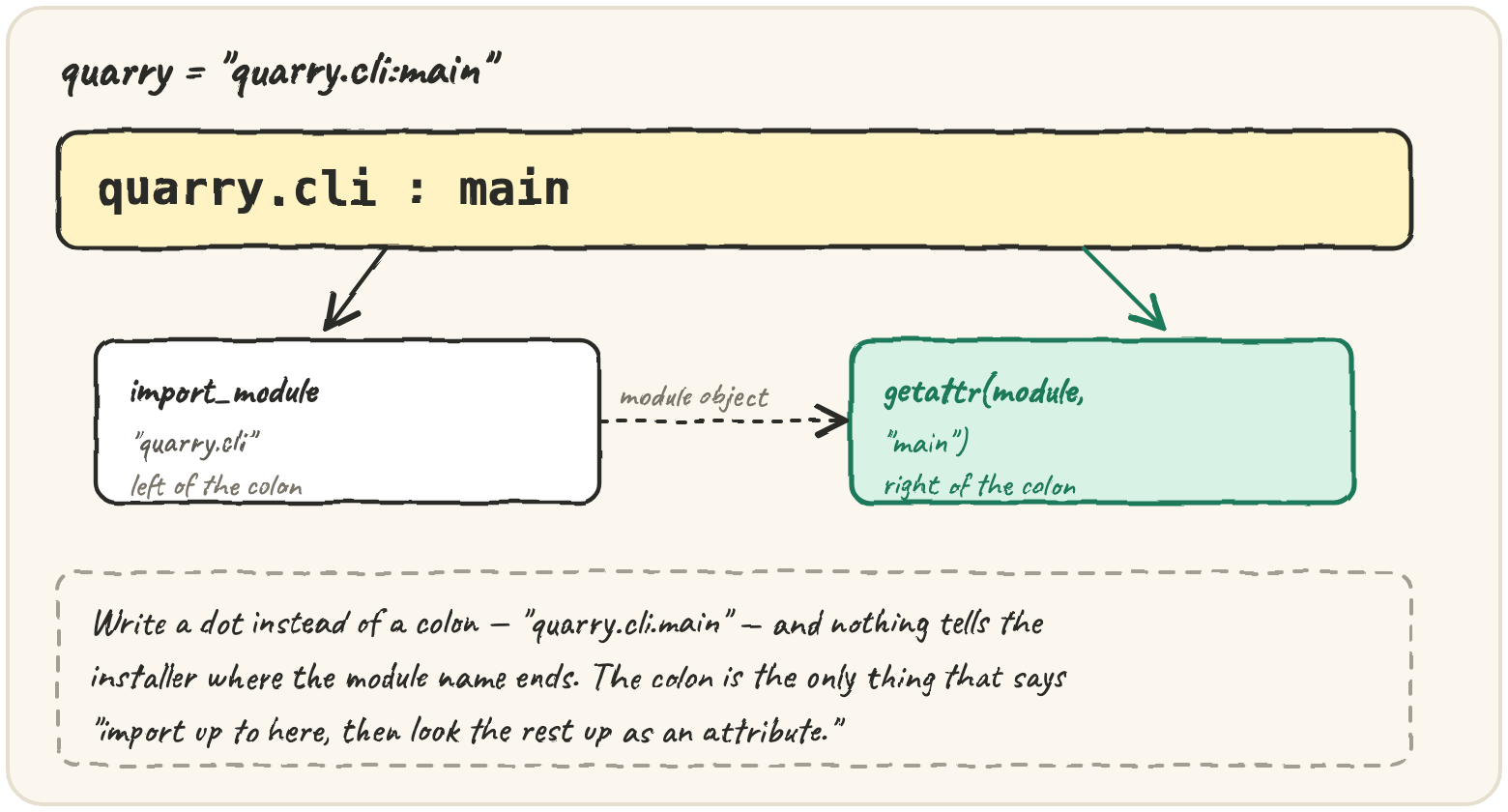
quarry = "quarry.cli:main" split at the colon: the left half is import_module("quarry.cli"), the right half is getattr(module, "main") — write a dot instead and nothing says where the module name ends

Check the metadata before a release

Every modern project has one pyproject.toml at its root:

[build-system]
requires = ["hatchling"]
build-backend = "hatchling.build"

[project]
name = "quarry"
version = "0.5.0"
requires-python = ">=3.11"
dependencies = ["chardet>=5,<6", "rich~=13.7"]

[project.scripts]
quarry = "quarry.cli:main"

Three tables, three jobs: [build-system] says which tool builds the project — pip never builds anything itself, it installs the named backend into a throwaway environment and asks it for a wheel. [project] is metadata every tool agrees on, dependencies included — loose ranges, as a library should have; lesson 2's lock file pins them for Quarry's own deployment, but the metadata stays honest ranges. [project.scripts] declares commands. The file is TOML, and it's typed:

python

That typing bites people who write versions the way they say them out loud:

What does this print?
import tomllib

print(tomllib.loads("version = 1.10")["version"])

Build quarry-0.5.0-py3-none-any.whl

A wheel is a zip archive: your package folders exactly as they'll sit in site-packages, plus one <name>-<version>.dist-info folder of metadata. You build one with the standard front-end — python -m build — which hands your source tree to the backend and writes two files into dist/: the sdist (.tar.gz, source plus metadata) and the wheel, ready to install:

Drawing diagram…

Nothing about a wheel is hidden — it's a zip file, and zipfile can make one:

python

A real wheel adds WHEEL (format version and platform tag) and RECORD (a hash and size per file, so the installer can verify and later remove exactly what it unpacked). py3-none-any means pure Python that runs anywhere — Quarry needs one wheel total; a project with compiled code needs one per Python version per platform.

In a src layout, the package lives at src/quarry/, which isn't on sys.path by accident — the only way to import it is to install it, which during development means an editable install (pip install -e .): the installed copy points back at src/, so edits show up without reinstalling, and tests import Quarry the way users will.

Wire quarry.cli:main to the quarry command

[project.scripts] maps a command name to an object reference: a module imported by its dotted name, then an attribute looked up on it. On install, pip writes a tiny executable whose entire job is from quarry.cli import main; sys.exit(main()). Two consequences follow from lesson 1: quarry.cli is imported, so its relative imports work and its own main guard does not run — the wrapper calls main() itself — and main takes no arguments and communicates through its return value, which goes straight to sys.exit:

What does this print?
def main():
    rows = ["a", "b"]
    total = len(rows)

try:
    raise SystemExit(main())
except SystemExit as exc:
    print(exc.code)

Resolving the reference is a short walk — import, then follow each dotted attribute with getattr:

step through it
1import types
2 
3cli = types.ModuleType("quarry.cli")
4exec("class App:\n @staticmethod\n def run():\n return 0\n", cli.__dict__)
5 
6ref = "quarry.cli:App.run"
7module_name, _, attr = ref.partition(":")
8target = cli
9for part in attr.split("."):
10 target = getattr(target, part)
11status = target()
12print(module_name, attr, status)

The common mistake is writing the reference like a path, with a dot where the colon belongs:

broken — fix itValueError

This entry point would install a quarry command that crashes the moment it starts. Fix the TOML, not the loop.

The same machinery serves plugins: any [project.entry-points."quarry.stages"] table becomes a group in the wheel's entry_points.txt, and at run time importlib.metadata.entry_points(group="quarry.stages") lists what every installed package declared — so a stage from someone else's package can join Quarry's registry without Quarry importing it by name.

Traps worth knowing

A version number publishes once. You can yank a broken release so resolvers skip it, but you cannot replace 0.5.0 with different files — so the release routine is bump, build, install the wheel into a fresh environment, test it, then upload, and most teams let CI do all of it on a tag. Pure Python is cheap to ship. Six platforms times four supported Pythons is 24 wheels per release for compiled code, each built and tested on its own machine; a py3-none-any wheel is one file for all of them — a real reason to stay pure Python until measurements say otherwise.

Quick practice

What does this print?
try:
    raise SystemExit("disk full")
except SystemExit as exc:
    print(exc.code, isinstance(exc.code, str))
What does this print?
import tomllib

print(tomllib.loads('deps = ["a", "b"]')["deps"], type(tomllib.loads("n = 3")["n"]).__name__)
broken — fix itValueError

Run it, read the ValueError, then fix ref so it has a module and an attribute separated by a colon.


🎯 Your turn

Build check_pyproject(text) — the last piece of Quarry's shipment, run before every release. Parse the text with tomllib and return the problems in this order (an empty list means ready to build):

  1. "invalid TOML" on its own, if it won't parse;
  2. "missing build-system.build-backend";
  3. "missing [project]" — and stop there;
  4. "missing project.name" or "invalid project.name" (letters, digits, ., _, -, starting and ending with a letter or digit);
  5. "project.version must be a string", or "missing project.version" unless "version" is listed in project.dynamic;
  6. "bad entry point: <command>" for each script, in sorted order, whose value isn't dotted.module:dotted.attr.
check_pyproject('''
[build-system]
build-backend = "hatchling.build"
[project]
name = "quarry"
version = 0.5
[project.scripts]
quarry = "quarry/cli.py:main"
''')
# → ["project.version must be a string", "bad entry point: quarry"]

Press ▶ Run and hit ✓ Check. ✅

Practice — level up

0/6 solved

Solve each in its own editor — Run to try, Check to grade. Stuck? Reveal a Hint, or the full Solution + walkthrough.

Warm-upModule and attribute

An entry point names a function as module:attribute, like "quarry.cli:main". Write split_ref(ref) returning [module, attribute], or [] when there isn't exactly one : with something on both sides.

distributionstrings
DrillName the wheel

A built wheel's file name is {name}-{version}-{tag}.whl, where the name is lower-cased and every run of -, _ or . becomes a single _ (a dash would be read as the separator). Write wheel_name(name, version, tag). Example: wheel_name("Quarry-Tools", "1.2.0", "py3-none-any") → "quarry_tools-1.2.0-py3-none-any.whl".

distributionstrings
BuildWrite entry_points.txt

Inside every wheel is an entry_points.txt that installers read to create commands and that importlib.metadata.entry_points() reads to find plugins. Write entry_points_txt(text): parse the pyproject.toml text with tomllib and build that file. [project.scripts] becomes group console_scripts, [project.gui-scripts] becomes gui_scripts, and each [project.entry-points.<group>] table becomes that group. Write groups in sorted order, each as a [group] line then one name = ref line per entry in sorted order, with a blank line between groups. No entry points at all gives "".

distributionentry-pointdictionaries
BossBe the console script

When pip installs Quarry it writes a tiny quarry program that imports quarry.cli, fetches main, and exits with sys.exit(main()). Write run_script(sources, ref, argv) that does the same: sources maps module names to source text. Build the module named in ref as a real module object (types.ModuleType with its dotted name, not __main__) and run its source in it; walk the attribute path after the colon with getattr; call it with sys.argv temporarily set to ["quarry"] + argv. Turn the outcome into an exit status the way sys.exit does: None → 0, an int → itself, anything else → 1; a SystemExit raised inside counts the same way, using its code. Return {"exit": status}, or {"error": "ModuleNotFoundError"} / {"error": "AttributeError"} if the module or the attribute isn't there. Restore sys.argv afterwards.

distributionentry-pointmodules-and-imports
CapstoneBuild the wheel

Build a real wheel, in memory. files maps paths in a src layout project to their text: src/quarry/__init__.py, tests/test_cli.py, README.md and so on. Write build_wheel(pyproject, files):

  • read name and version from the pyproject text; the distribution name is the name lower-cased with runs of -_. turned into _;
  • the wheel is {dist}-{version}-py3-none-any.whl;
  • include every .py file under src/<pkg>/ where src/<pkg>/__init__.py exists, stored without the src/ prefix; nothing else from the project goes in;
  • add {dist}-{version}.dist-info/ holding METADATA (at least Metadata-Version, Name and Version lines), WHEEL, RECORD, and entry_points.txt only if there are [project.scripts];
  • write it all into a zipfile.ZipFile over an io.BytesIO.

Return {"wheel": <file name>, "files": <sorted names in the zip>, "hashes": {<each package .py path in the wheel>: "sha256=<digest>"}}, where the digest is the file's UTF-8 bytes hashed with SHA-256 and encoded with base64.urlsafe_b64encode, = padding stripped — the form RECORD uses.

distributionpackagesentry-point
ExplainGreen in the repo, broken when installed

Quarry's tests pass on your machine, you publish 0.5.0, and the first user's quarry run dies with ModuleNotFoundError: No module named 'quarry.stages'. The project used a flat layout — quarry/ next to tests/ and pyproject.toml — and the new stages/ folder had no __init__.py. Explain how the tests could pass while the installed package was broken, and how a src/ layout plus testing against an installed copy would have caught it.

check_pyproject.py
Call the function you wrote — just like your app's frontend would. Edit the inputs and hit Call.
check_pyproject(text) → listList everything that would stop this pyproject.toml from building a working release.
try:
returned
Press Run to execute your code.
Press Check to run the tests for this lesson.