
sub, split, finditer & Flags
In short: re.sub(pattern, replacement, text) returns a new string with
every match replaced — the replacement can be a template using \1,
\g<name> or \g<0> when it only needs to rearrange captured text, or a
function when the new text must be computed. re.split cuts on a pattern
instead of one fixed separator, and keeps the separators only if the pattern
captures a group. re.finditer yields one match at a time, with its span —
the primitive sub and split are built from. Flags (re.IGNORECASE,
re.MULTILINE, re.VERBOSE, combined with |) change how the whole
pattern reads, and re.escape makes untrusted text safe to drop into one.
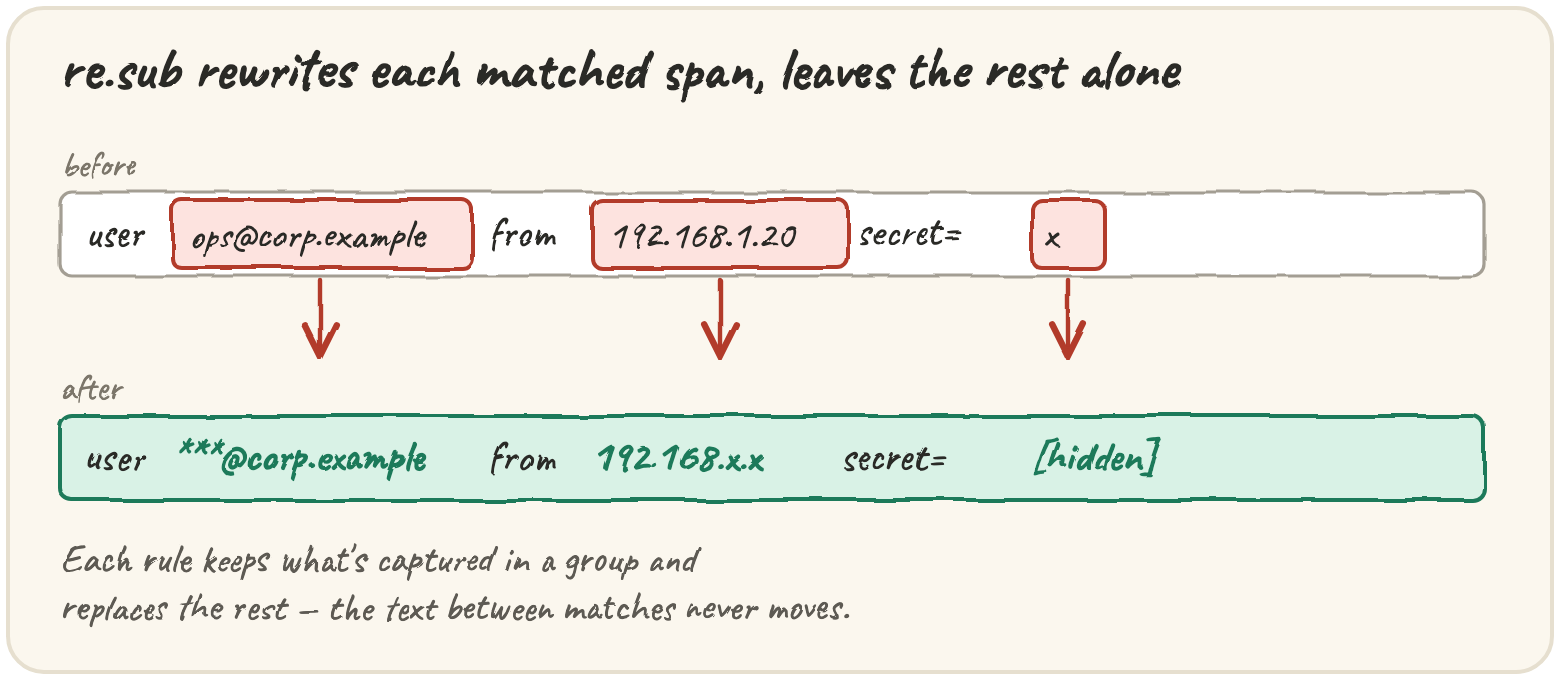
Quarry's report is about to leave the building. Operators paste it into
tickets and chat threads, and the lines it quotes are full of things that
should never travel that far — customer emails, internal IPs, and a password
some debug statement logged in plain text. This lesson teaches the extractor
to rewrite text, not just read it: redact(), the last thing every line
passes through before a human sees it.
Mask a leaked phone number before it ships in a ticket
re.sub finds every match and swaps it for the replacement. A first attempt
at masking a 10-digit phone number:
One phone number is masked, the other leaks in plain sight. Run it, see which one survives, then widen the pattern so both are caught.
Masking a credit-card-shaped number is different: you want to keep the
last four digits, and that has to be computed, not just rearranged. Pass a
function instead of a string, and re.sub calls it once per match with the
match object:
A replacement string can only reorder captured text and add fixed text around it:
There's one sharp edge here, worth meeting on purpose. \1 followed by digits
doesn't mean "group 1, then some digits":
This should turn took=2s into took=2000ms, but it prints something odd. Run it, then fix the replacement string.
\g<1> always works, so reach for it whenever a group reference is followed
by a digit.
Both forms are really the same machine underneath. Here's sub written out
by hand with re.finditer, which yields a match object for each match, left
to right. Step through it and watch out grow: the text between matches is
copied as-is, and each match's span is swapped for the replacement.
finditer is the right tool whenever you want matches and their
positions, one at a time, without building the full replaced string.
Split a messy export on whatever separator someone used
A legacy exporter writes component lists with any of ,, ; or |, with or
without spaces. str.split only cuts on one fixed separator — re.split cuts
on anything a pattern matches:
The second line shows the one real surprise: if the pattern contains a
capturing group, the separators are kept in the output, interleaved with
the pieces. Use (?:...) when you need grouping but not the separators in the
result.
maxsplit caps the number of cuts — exactly what a log line needs: four
leading fields, then a message that must stay whole even though it contains
spaces.
import re
print(re.split(r" ", "2026-09-14 08:15:02 WARN [auth] login failed user=maya", maxsplit=3)[-1])A line with x separators splits into min(x, maxsplit) + 1 pieces. One
warning: maxsplit=0 does not mean "no cuts" — it means "no limit", the
same as leaving it out.
Scrub a ticket with flags, then run the whole chain
Flags change how the whole pattern behaves, passed as flags= and combined
with |:
| Flag | Effect |
|---|---|
re.IGNORECASE / re.I |
letters match either case |
re.MULTILINE / re.M |
^ and $ match at every line, not just the string's ends |
re.VERBOSE / re.X |
whitespace and # comments in the pattern are ignored |
Without re.IGNORECASE, the capitalised Password= would sail straight
through. When the text to search for isn't yours — a username, a search
term an operator typed — re.escape makes it literal, so . and + in it
don't get read as regex syntax:
Redaction is a chain of substitutions, and a rule that looks right alone can be wrong in company, because each rule runs on the output of the one before:
\w+ stops at the first dot, so only 10 is hidden and .0.4.17 leaks —
and now the IP rule can't recognise the leftover either, because three
numbers aren't four. Run the widest, most dangerous rule first, with a
wide value pattern (\S+), and test the whole chain together, because
that is where surprises live.
Quick practice
import re
print([m.span() for m in re.finditer(r"\d+", "a1 bb22 c333")])import re
block = "INFO start\nWARN disk 91%\nwarn disk 97%\nINFO done"
print(re.findall(r"^warn .*$", block, re.I | re.M))import re
print(re.split(r"\d+", "a1b22c", maxsplit=0), re.split(r"\d+", "a1b22c", maxsplit=1))🎯 Your turn
Write redact(line), the last stop before a human sees a line. Apply three
rules, in this order:
- Secrets —
password=,token=orsecret=(any letter case) followed by a value: keep the key exactly as written, replace the value with[hidden]. - Emails — replace everything before the
@with***, keep the domain. - IPv4 addresses — keep the first two numbers, replace the last two with
x.
redact("login failed user=maya ip=10.0.4.17")→"login failed user=maya ip=10.0.x.x"redact("reset sent to maya.k@quarry.dev")→"reset sent to ***@quarry.dev"redact("retry Password=hunter2 token=abc123")→"retry Password=[hidden] token=[hidden]"
Hint — one re.sub per rule. Capture what you keep and put it back with
\1 or \g<name>; use re.IGNORECASE for the secret keys.
Then press ▶ Run and hit ✓ Check. ✅