
Capstone — The Middleware Ring
In short: Quarry runs every stage unattended, so every stage needs the
same four things wrapped around it: a log line, a retry for a flaky source, a
timing, and a bounded cache. You already have all four as separate decorator
factories. This capstone composes them into one decorator, instrumented,
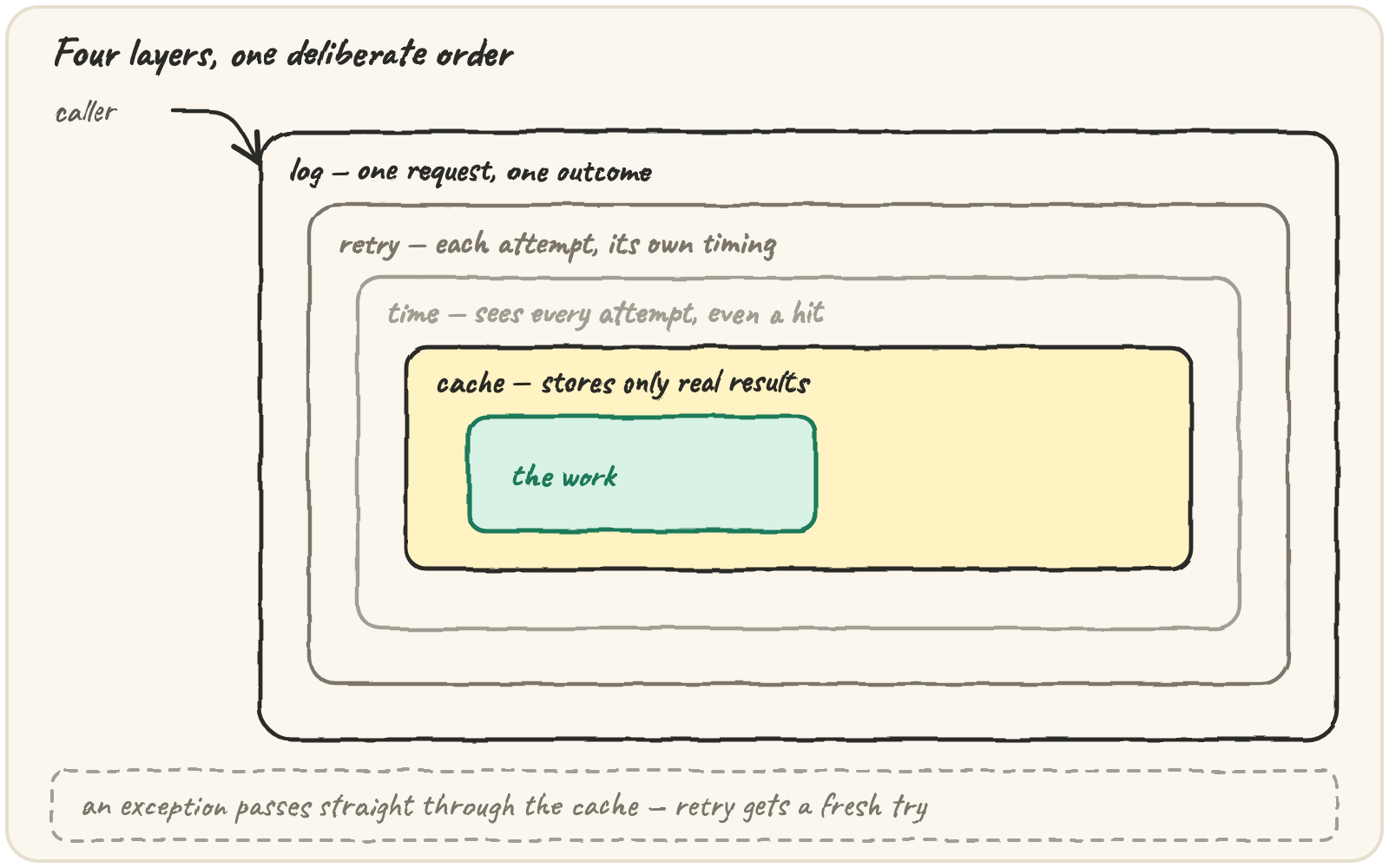
applied in a fixed order — log → retry → time → cache → the work — using
reduce to fold the list instead of stacking four @ lines by hand. The
order isn't arbitrary: swap any two layers and the report starts lying,
because each layer only knows what the layer inside it lets through.
A clock you can control
Real timing is useless in a test — the numbers change on every run. So the
ring takes its clock as a setting, the same trick a backoff decorator uses
for sleep. In production Quarry passes something that reads
time.perf_counter(). Here, a fake clock moves only when the work says so:
The stage we'll wrap is a host lookup that costs 5 ticks per attempt, and can be told to fail some attempts — standing in for a flaky directory server:
Build the four layers
Each layer is a decorator factory — the lesson 03 shape — because each needs a
setting: where to log, how many retries, which clock, how big a cache. Every
one uses @wraps, so the stage's name survives all four:
Two details matter. logged re-raises with a bare raise after recording —
swallowing it would turn every failure into a silent None. And timed uses
try/finally, so a failed attempt still records its duration — a timer that
only measures successes makes a struggling source look fast.
Compose them with reduce
Stacking four @ lines works, but Quarry wants the ring as one decorator
so its order lives in exactly one place. reduce, from lesson 04, applies a
list of functions in order:
from functools import reduce

def instrumented(*, log, clock, timings, retries=2, maxsize=32):
    def decorate(func):
        # innermost first: cache, then time, then retry, then log (outermost)
        layers = [cached(maxsize), timed(clock, timings), retry(retries, log), logged(log)]
        return reduce(lambda f, layer: layer(f), layers, func)
    return decorate
The settings are keyword-only, the lesson 05 wall, because
instrumented(log, clock, timings, 3, 64) would be unreadable, and swapping
3 and 64 would be a silent disaster. The list is written innermost first,
because reduce applies it left to right.
Follow one request through the ring
Here's a request for a key whose first attempt fails, followed by the same
key again. Watch the log fill from the outside in, retry catch the first
failure, timed record both attempts, and the second request stop at the
cache:
(The trace uses cut-down, setting-free layers so the table stays readable. The real ones differ only in where their settings come from.)
The ring as a picture:
Why this order, one layer at a time
Log is outermost because it should describe what the caller experienced
— one request, one outcome. Put it inside retry and a request that
succeeded on its second attempt would log a failure and a success, and
anyone reading the log would count two requests instead of one.
Retry sits outside time so each attempt is timed separately. Two 5-tick attempts is a different diagnosis from one 10-tick attempt, and only per-attempt timings show the difference.
Time sits outside the cache so hits are timed too, showing up as near-zero. That's how you see the cache working. Move the cache outside the timer and hits vanish from the timings entirely:
from functools import lru_cache, wraps

timings, t = [], [0]

def lookup(key):
    t[0] += 5
    return key.upper()

def timed(func):
    @wraps(func)
    def wrapper(key):
        start = t[0]
        result = func(key)
        timings.append(t[0] - start)
        return result
    return wrapper

stage = lru_cache(maxsize=8)(timed(lookup))     # cache OUTSIDE the timer
for key in ["a", "b", "a", "a"]:
    stage(key)
print(timings)Cache is innermost so it stores only real results — lru_cache never
stores an exception. A failed attempt raises straight through it, and the
retry tries again:
from functools import lru_cache

attempts = []

@lru_cache(maxsize=8)
def lookup(key):
    attempts.append(key)
    if len(attempts) == 1:
        raise ConnectionError("blip")
    return key.upper()

for _ in range(2):
    try:
        lookup("a")
    except ConnectionError:
        pass
lookup("a")
print(len(attempts))The trap that ruins a ring
Every layer has to pass the result back out. One layer that forgets turns the
whole ring into a None machine, and because logged records "done", the
log says everything went fine:
Run it. The log looks healthy and the result is None. Make the wrapper hand the stage's result back to its caller.
That's why a ring's tests always check the results, not only the log — a layer can look healthy and still be losing data.
What the ring buys Quarry
Every stage now declares its operational behaviour in one line; the body of
each stage is only the work. Logging format, retry policy, timing and cache
size change in one place. Every layer uses @wraps, so each stage still
reports its own name and real signature to the dispatcher from lesson 05. The
layers are also testable one at a time, exactly what the exercises below do.
🎯 Your turn
The starter provides SourceDown, Clock and make_lookup(clock, flaky).
Write the four layer factories, logged(log), retry(times, log),
timed(clock, timings) and cached(maxsize), and compose them in
instrumented(*, log, clock, timings, retries=2, maxsize=32) in the order
log → retry → time → cache → work.
Then write ring_report(keys, flaky). It builds a fresh clock, log and
timings list, wraps the lookup, requests every key in order (recording None
for a key that still fails after its retries) and returns:
{"results": [...], "timings": [...], "work": <real successes>, "log": [...]}
ring_report(["a", "b", "a"], [])→{"results": ["A", "B", "A"], "timings": [5, 5, 0], "work": 2, "log": ["call lookup('a')", "done lookup", "call lookup('b')", "done lookup", "call lookup('a')", "done lookup"]}
The log formats are exact: call lookup('a'), retry lookup,
fail lookup: SourceDown and done lookup.
Hint — get one layer working at a time, then compose. If a log line says
wrapper anywhere, a layer is missing @wraps.
Press ▶ Run, then ✓ Check. ✅