
A point-of-sale program records an order and calculates what the customer owes.
Combine menu lookups, command validation and pricing rules while keeping rejected commands from changing the order.
A café session mixes calculation with commands that change an order. Keep the arithmetic reusable while giving each command an explicit state change. The challenge is not only producing a receipt: rejected input must leave the order consistent, and the same session must be replayable.
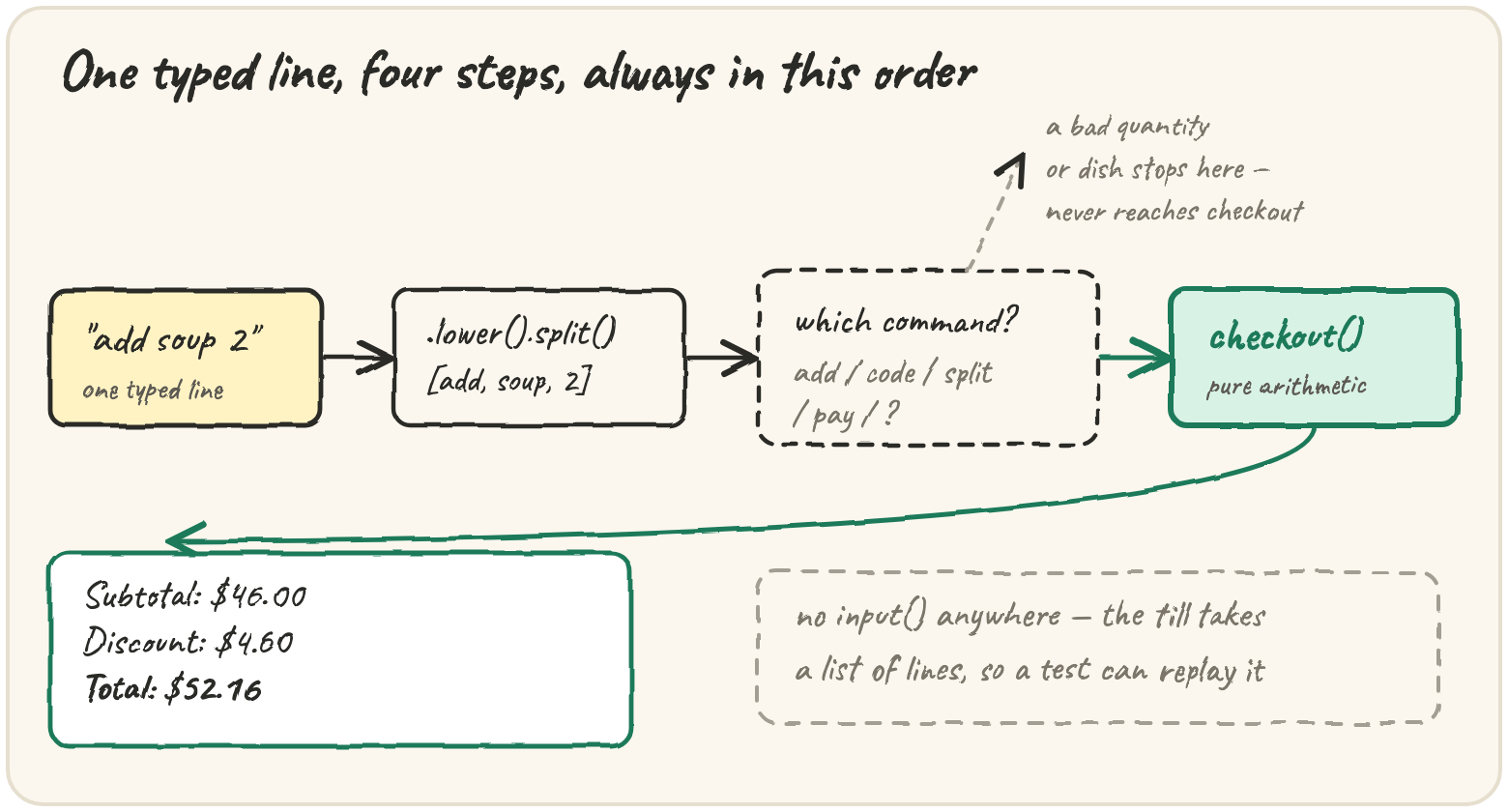
A café runs its till from a terminal. The server types one command per line —
add soup 2, code SAVE10, split 2, pay — and the till answers each one, then
prints a receipt. You'll build that till with only what Fundamentals gave you:
dictionaries,
loops, conditionals,
functions, exceptions and f-strings.
A session with the finished program:
| typed | till says |
|---|---|
add soup 2 |
+ 2 x soup |
add pizza |
? no pizza on the menu |
add steak · add cake |
+ 1 x steak · + 1 x cake |
code save10 |
code SAVE10 applied |
split 2 |
split 2 ways |
pay |
Subtotal: $46.00 · Discount: $4.60 · Total: $52.16 · Each of 2: $26.08 |
The till never crashes: an unknown dish or a quantity typed as two gets a polite ?
line and the session carries on.
Every box is live — edit and ▶ Run.
The plan
Split the program into parts that each do one job:
checkout is pure arithmetic, built in four milestones (the practice cards below).
The command loop comes last, as the project at the bottom.
The calculation and command functions take typed lines as a list and return
output lines. A real terminal adapter can call input() and pass values in;
keeping keyboard interaction outside this core makes sessions easy to test
without simulating a person at a terminal.
Preparing this topic’s interactive investigation…
A rejected command must leave the order unchanged
Read a session as a sequence of state transitions. State is the current
order, promo code and party size; output is a separate log of what happened.
For add soup 2, parsing produces command add, dish soup, and quantity
text 2. Only after the dish exists and the quantity converts to a positive
integer may the order change.
| Command | State before | State after |
|---|---|---|
add soup 2 |
empty order | two soups |
add cake zero |
two soups | two soups; error output only |
split 2 |
party size 1 | party size 2 |
pay |
two soups, party size 2 | receipt returned; remaining commands ignored |
This is why appending a dish before validating its quantity is wrong: an error message could accompany a changed bill. The invariant is that every stored dish came from a successful add command, and every stored party size is positive. Test a rejected command between two accepted ones, then pay; the rejection should have no numeric effect.
Input is a deliberately small language: dish identifiers are single words, commands ignore case, and extra token handling follows the project below. Supporting names such as “tomato soup” would require a quoting or identifier rule; simply splitting on whitespace cannot discover the intended grouping.
Milestone 1 — the subtotal
The menu is {dish: price}; the order is a list of dish names, repeats allowed:
menu[dish] would raise KeyError for anything off the menu; .get returns the
default 0 instead.
Milestone 2 — promo codes
SAVE10 takes 10% off, HALF takes 50%. Rather than an if per code, a dict from
code to rate turns "which discount?" into a lookup — a third code is a one-line change:
Every amount passes through round(..., 2), because money is where floats show their
seams:
print(round(2.675, 2))Milestone 3 — tax and tip
For this fictional café, tax is 8% and tip 18%, both on the discounted subtotal. These are project rules, not jurisdictional tax or tipping guidance. Step through the session's arithmetic:
41.40 after the discount, 3.31 tax, 7.45 tip, 52.16 total. One named value per
line is how you audit a receipt.
Milestone 4 — splitting the bill
Dividing by the number of people has one way to go wrong:
ZeroDivisionErrorRun it and read the last line of the error. Then make a split of zero people return 0.0 instead of crashing.
A guard clause handles the bad case first and returns, so the rest only sees good
input. The command loop uses the same move: check, complain, continue.
Assembling checkout
With four tested pieces, checkout is wiring:
:.2f makes 0.0 print as 0.00 — a receipt never says $0.0. This function is the
Your task editor beside the lesson.
A helper is reusable only when its contract matches
The tax-and-tip practice card rounds its combined result once. The assembled
checkout rounds tax and tip separately before adding them. The displayed
examples agree, but the policies are not identical: on a base of 0.02,
8% tax is 0.0016 and 18% tip is 0.0036. Each rounds to zero, leaving
0.02; rounding the combined 0.0252 once gives 0.03. A test with larger,
convenient amounts can miss this integration difference.
The final checkout follows the explicitly shown component-rounding policy. When composing your earlier helper, check its rounding contract instead of assuming that the same function name guarantees the same arithmetic.
After the supplied tests, add a configurable tip command on your own. Specify its units, accepted range, and behavior after invalid input. Before writing a branch, name the one new state variable and which receipt fields depend on it. Keep the calculation callable independently of the session.
The command loop
Each typed line becomes a list of words; the first picks the branch, the rest are its arguments:
Lower-casing makes ADD Soup equal add soup; .split() eats any run of spaces. The
hard command is add: its quantity is optional and typed by a human, and int() is
strict:
qty = int("2.5")
print(qty)Is there a dish at all?
addalone leavesargsempty. Answer? add what?andcontinue— never touchargs[0]before you know it exists.
code and split follow the same pattern; pay prints the receipt and stops.
Build the till
The starter holds MENU, PROMOS and checkout; you write run_till. Run the tests
after each command you add.
Write run_till(menu, inputs): given the typed lines, return the lines the till
answers. Commands ignore case; blank lines are skipped. Start with an empty order, no
code and 1 person.
add <dish> [qty]→+ 2 x soup(qty defaults to 1). Unknown dish:? no pizza on the menu. Qty not a whole number ≥ 1:? quantity must be a whole number.code <code>→code SAVE10 appliedif the upper-cased code is inPROMOS, else? unknown code BOGUS.split <n>→split 3 ways; not a whole number ≥ 1:? split needs a whole number.add,codeorsplitwith nothing after it →? add what?(its own name).pay→ with an empty order,? nothing to pay for. OtherwiseSubtotal: $46.00,Discount: $4.60,Total: $52.16,Each of 2: $26.08— then stop.- Anything else →
? unknown command: dance.
- no input, no output
- qty defaults to 1, blanks skipped
- case-insensitive
- unknown dish
- bad quantities
- promo codes
- split validation
- missing arguments
- unknown, empty pay
- the full session
- nothing after pay
When it passes, compare with our solution: would you rather extend one long
if/elif chain, or a helper per command, when the café adds tip 20?
🎯 Your turn
Build the four practice cards, then checkout(menu, orders, code, people) in the
editor beside the lesson. For the session above it returns
{"subtotal": 46, "discount": 4.6, "total": 52.16, "per_person": 26.08}.
Press ▶ Run, try the scenario chips, and hit ✓ Check. ✅
Practice — level up
0/4 solvedSolve each in its own editor — Run to try, Check to grade. Stuck? Reveal a Hint, or the full Solution + walkthrough.
The café's menu is {dish: price}; an order is a list of dish names, repeats allowed. Write menu_total(menu, orders) returning the subtotal, where a dish that isn't on the menu costs 0 (never a crash). Round to 2 decimals.
Write apply_promo(subtotal, code) returning the subtotal after the discount: "SAVE10" takes 10% off, "HALF" takes 50% off, and any other code (including "") changes nothing. Round to 2 decimals. Tip: a dict from code to rate beats an if per code.
Write add_tax_tip(subtotal, tax_rate, tip_percent) returning subtotal + tax + tip, rounded to 2 decimals. Careful: tax_rate is a fraction (0.08 means 8%) but tip_percent is a percent (18 means 18%).
Write split_bill(total, people) returning each person's share, rounded to 2 decimals. If people is 0 or negative, return 0.0 — a till must never crash on a mistyped number.