
Selecting and Reading the DOM
In short: the DOM (Document Object Model) is the browser's live
tree of the page — every tag is a node you can find and read from
JavaScript. document.querySelector(selector) returns the first
element matching a CSS-style selector, or null if nothing matches.
document.querySelectorAll(selector) returns every match, as a static
list. document.getElementById(id) returns the one element with that
exact id. This lesson's code runs against a real page, not this
sandbox — read it, don't run it.
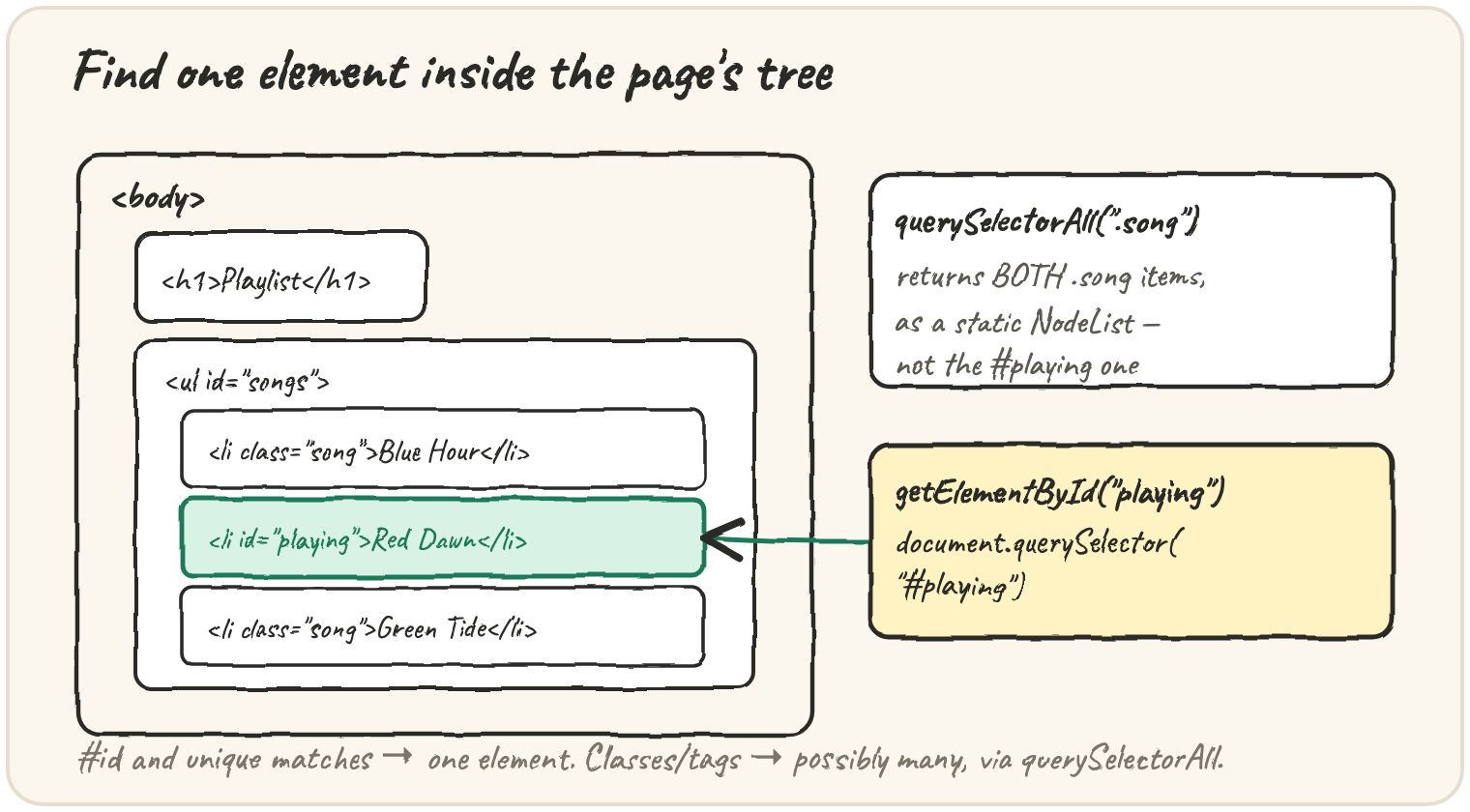
Find the element that's currently playing
An id is meant to be unique on the page, so both getElementById and a
#-selector on querySelector return exactly one element:
const playing = document.getElementById("playing");
console.log(playing.textContent);

const same = document.querySelector("#playing");
console.log(same === playing);
Both lines find the same <li id="playing">Red Dawn</li> element.
playing.textContent reads its visible text, "Red Dawn".
document.querySelector("#playing") does exactly the same job through a
CSS selector, and — since both calls find the one element that actually
exists — same === playing is true.
Grab the first match, or every match
querySelector always returns a single element — the first one it
finds in the page's order — even if several elements match:
const firstSong = document.querySelector(".song");
console.log(firstSong.textContent); // "Blue Hour" — only the first match

const allSongs = document.querySelectorAll(".song");
console.log(allSongs.length); // 2 — every .song element
allSongs.forEach((song) => console.log(song.textContent));
querySelectorAll returns every matching element as a static
collection — a snapshot taken at the moment you called it, not a live view
that updates if the page changes afterwards.
The trap: assuming something was found
A selector that matches nothing doesn't throw — it returns null (for
querySelector) or an empty list (for querySelectorAll), and reading a
property off null is where the real crash happens:
const missing = document.querySelector("#does-not-exist");
console.log(missing); // null — no error yet

console.log(missing.textContent); // TypeError: Cannot read properties of null
The fix is always to check first: if (missing) { ... }, or use optional
chaining, missing?.textContent, which reads as undefined instead of
throwing when missing is null.
Quick practice
A page has three .song elements. What does document.querySelector(".song") return?
What does document.querySelectorAll(".song") return for the same page?
What does document.querySelector("#does-not-exist") return when nothing matches?
What happens when you read .textContent on the result of a querySelector call that matched nothing?
Which method finds an element by its unique id attribute?
🎯 Your turn
A page has three <li class="song"> elements and one
<li id="playing">. Explain what document.querySelector(".song"),
document.querySelectorAll(".song"), and document.getElementById("playing")
each return, and what happens if you call document.querySelector("#missing").
Write your explanation and submit it — there's no code to run here, just your reasoning.