
Skip to the workspace
Pebellslearn by building
Introduction and Setup  ›  Lesson

What Ruby Is

Introduction 12 minRuby is a dynamic, interpreted language designed for programmer happiness, in which every value is an object that responds to methods.

Set up Ruby and run your first file

Install a Ruby interpreter and run a saved script. You do not need Rails or a database to begin learning Ruby.

Already set up? Continue to the lesson

New to coding? Meet the tools and find the terminal
Ruby interpreter
Executes .rb source files.
RubyGems
Ruby’s package system, used when a project needs additional libraries.
Text editor
Saves scripts independently of the interpreter.

A terminal is a window for commands. Its shell interprets those commands. PATH is the list of folders the shell searches for programs. An editor extension adds editing help; it usually does not install the language itself.

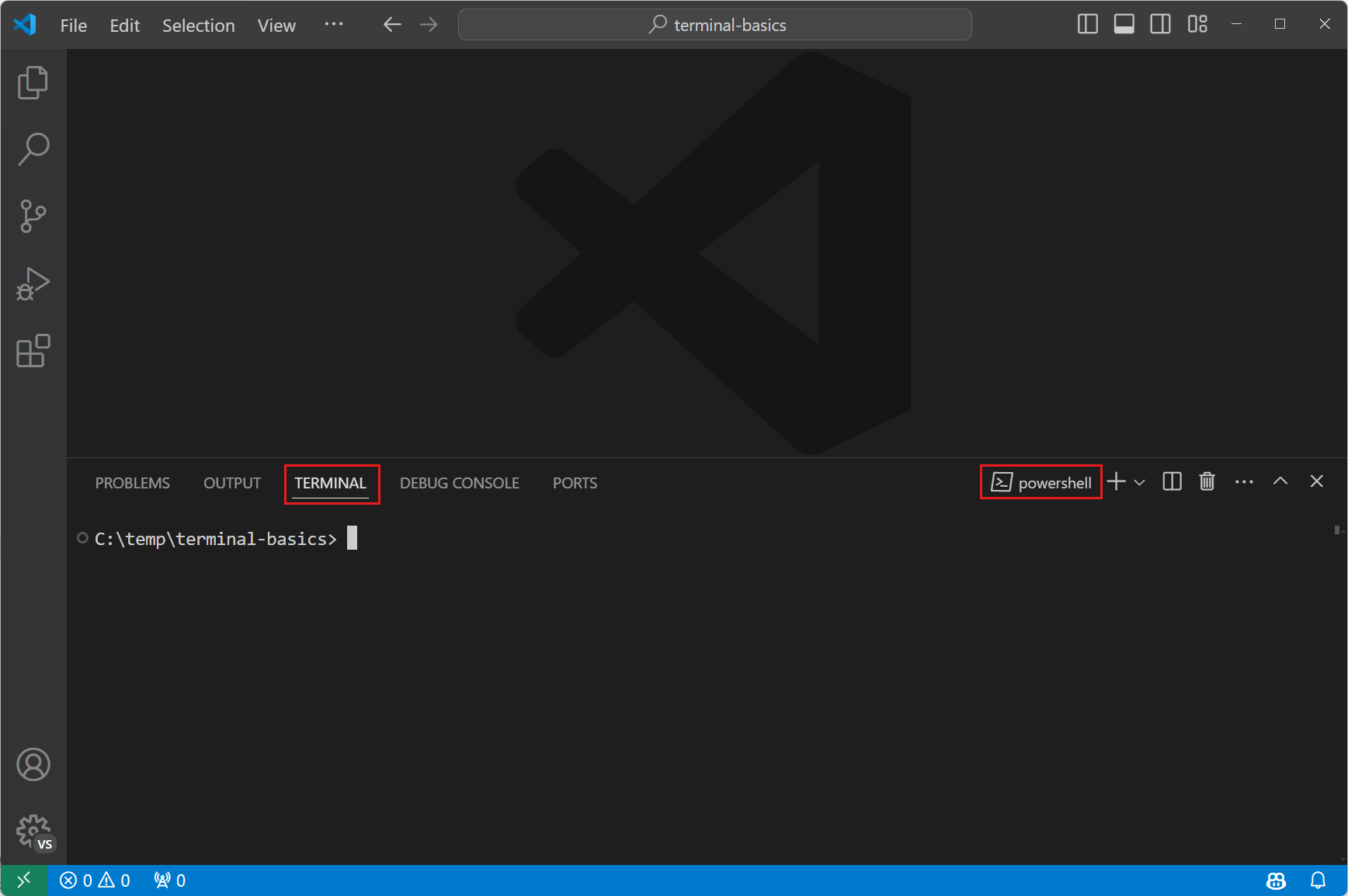
In VS Code, open your project folder, then choose View → Terminal. Type at the cursor in the Terminal panel, not in Output, the source file, or the browser address bar. Our command blocks omit prompt symbols such as $ and >; do not add them.

Official VS Code screenshot: the Terminal tab is selected below the editor, with the PowerShell shell name at the right and a command prompt at the left.
Find the Terminal tab and shell name. Open full-size screenshot (new tab).

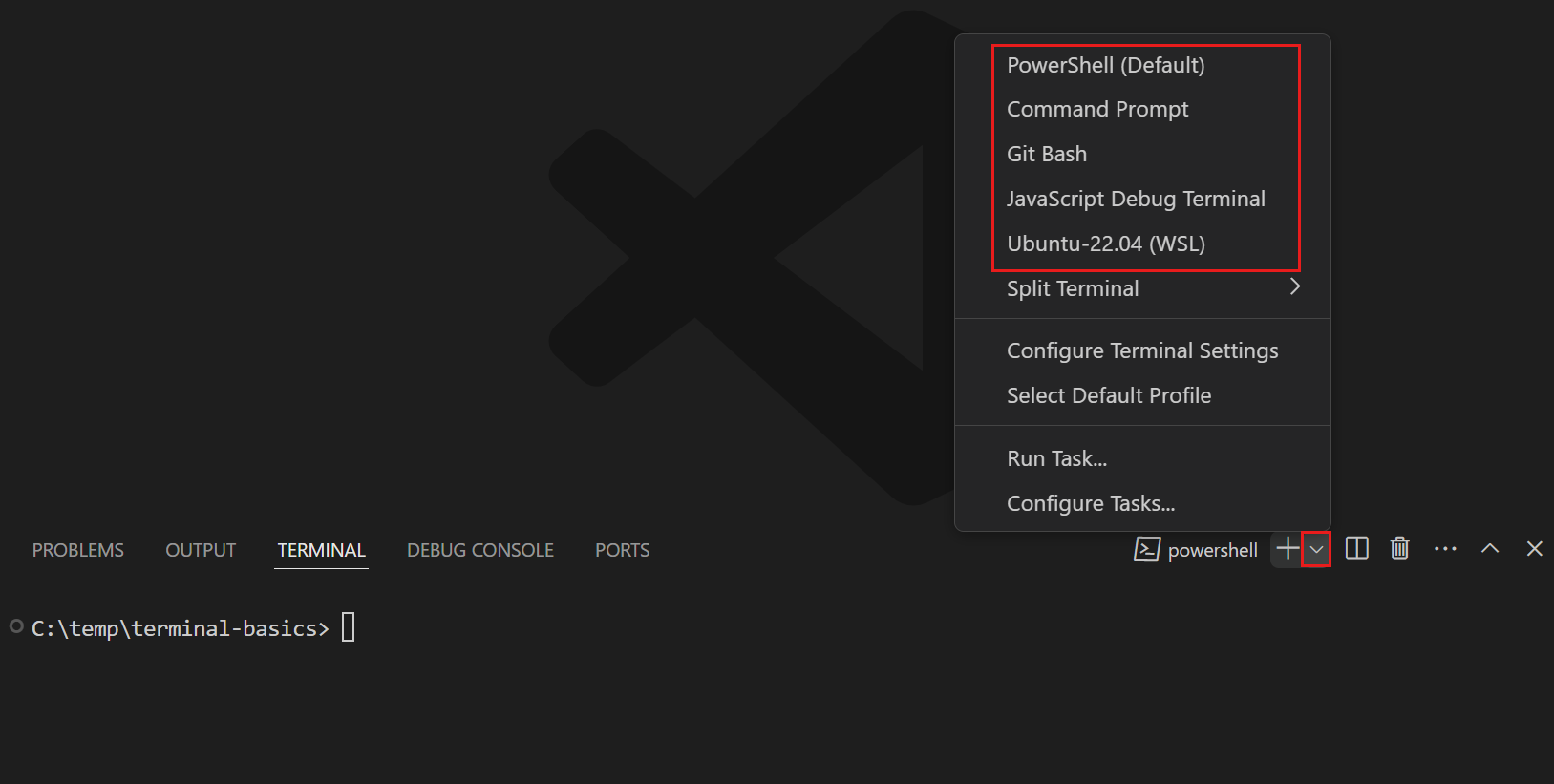
The dropdown next to the plus button selects a shell. Choose the shell named in your operating-system instructions below. Available choices depend on what you installed.

Official VS Code screenshot: the arrow beside the terminal plus button opens a list containing PowerShell, Command Prompt, Git Bash and Ubuntu WSL.
Official documentation screenshots by Microsoft, VS Code terminal guide, CC BY 3.0 US. Unmodified; your version may look different.

Choose a system to see its installation steps. A computer is needed for these local setup instructions.

Official documentation and illustrated guides

Instructions reviewed 2026-10-27. Use the linked installer page for current versions and supported operating systems.

Continue to the lesson

ruby / What Ruby Is

Explore each scene at your own pace.

01 · The rule

The rule

What Ruby Is

Ruby is a dynamic, interpreted language designed for programmer happiness, in which every value is an object that responds to methods.

Follow messages sent to objects and see how Ruby expresses a small program.

Imagine you run a small coffee cart called Bean Cart, and you want a script that totals the day's sales. In some languages that takes a page of ceremony. In Ruby it reads almost like a sentence. That is the whole point of the language, and it explains most of the choices you will meet in this course.

The rule

Ruby is built for people first: everything is an object.

Ruby was created in Japan by Yukihiro Matsumoto ("Matz") and first released in 1995. His stated goal was to make programmers happy, so the language favours code that is short, readable and pleasant to write over code that is easy for the machine.

"Everything is an object" is the idea that holds it together. A number, a piece of text, even "nothing" (nil) is an object you can ask questions of:

5.class          # => Integer
"latte".upcase   # => "LATTE"
nil.class        # => NilClass
3.times { puts "Order up!" }

That last line is not special syntax. 3 is an Integer object, and times is a method it understands. Once you see that pattern, a lot of Ruby stops looking like magic.

A few more facts worth holding on to:

  • Interpreted. You run a file with ruby sales.rb; there is no separate compile step you manage yourself. The main implementation is called CRuby (or MRI), and modern Ruby 3.x ships with a just-in-time compiler, YJIT, that speeds up long-running programs.
  • Dynamically typed. A variable does not declare a type; the object it points to carries its type.
  • Interactive. Type irb in a terminal and you get a prompt where each line runs as soon as you press Enter.
  • Famous for Rails. The Ruby on Rails web framework made Ruby popular, but Ruby is a general-purpose language used for scripts, tools and automation too.
Scene 1 of 5
Hover to wake the cannons. Drag to move, or use arrow keys when focused. Press Enter to fire a shot.