
Skip to the workspace
Pebellslearn by building
Introduction to Kotlin  ›  Lesson

Where Kotlin Came From and Why Use It

History of Kotlin 12 minKotlin is a JetBrains language, stable since 2016 and preferred for Android since 2019, chosen for concise code, built-in null safety and full use of existing Java libraries.

Set up Kotlin and run your first file

Start with a Kotlin/JVM console project. IntelliJ IDEA can download its JDK and create the Gradle build files, so you can focus on one small program before learning Android tooling.

Already set up? Continue to the lesson

New to coding? Meet the tools and find the terminal
IntelliJ IDEA
An editor with Kotlin project and run support.
JDK
The Java runtime and development tools used by Kotlin/JVM.
Gradle wrapper
The project launcher that obtains and uses the configured Gradle version.

A terminal is a window for commands. Its shell interprets those commands. PATH is the list of folders the shell searches for programs. An editor extension adds editing help; it usually does not install the language itself.

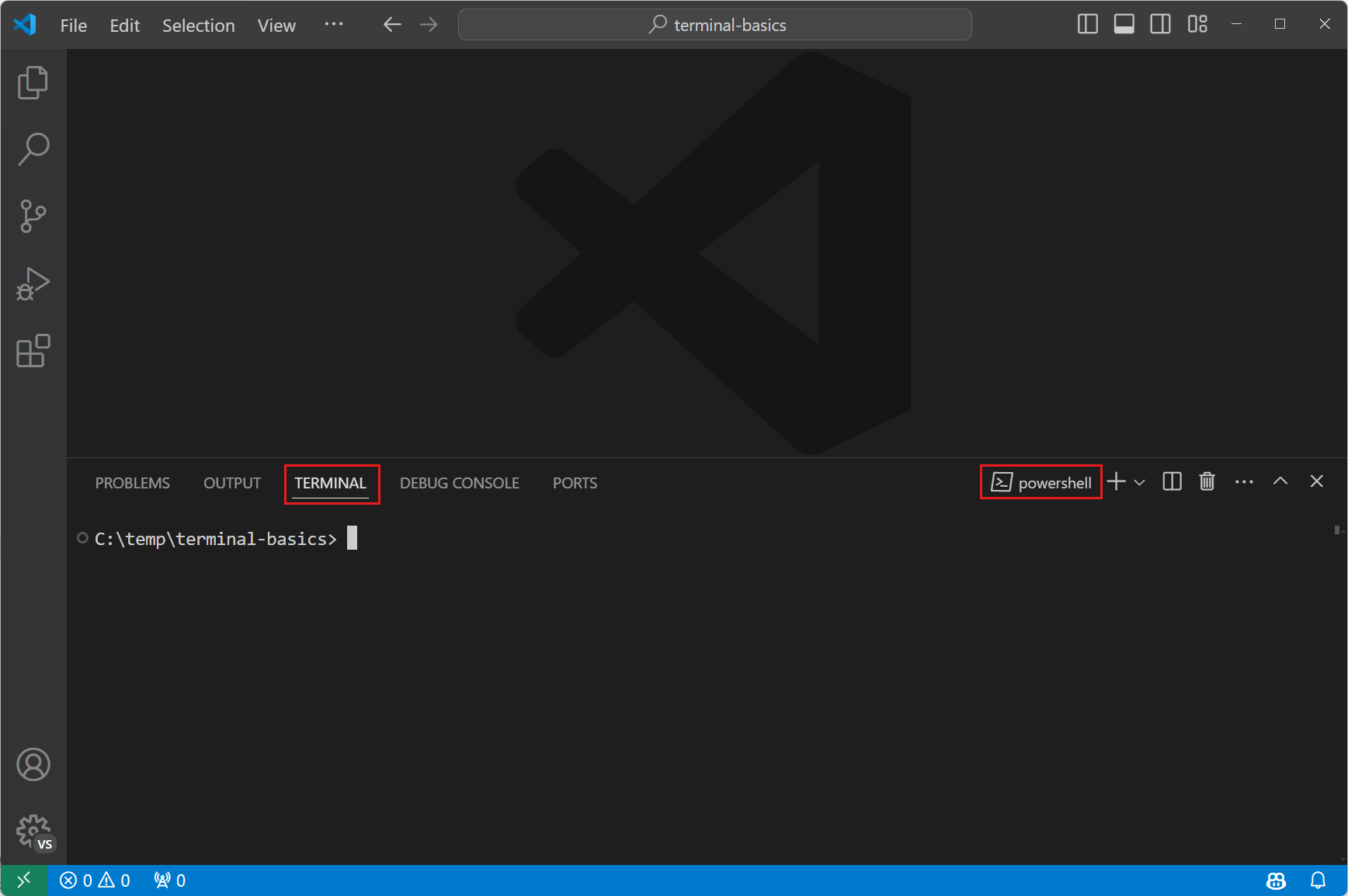
In VS Code, open your project folder, then choose View → Terminal. Type at the cursor in the Terminal panel, not in Output, the source file, or the browser address bar. Our command blocks omit prompt symbols such as $ and >; do not add them.

Official VS Code screenshot: the Terminal tab is selected below the editor, with the PowerShell shell name at the right and a command prompt at the left.
Find the Terminal tab and shell name. Open full-size screenshot (new tab).

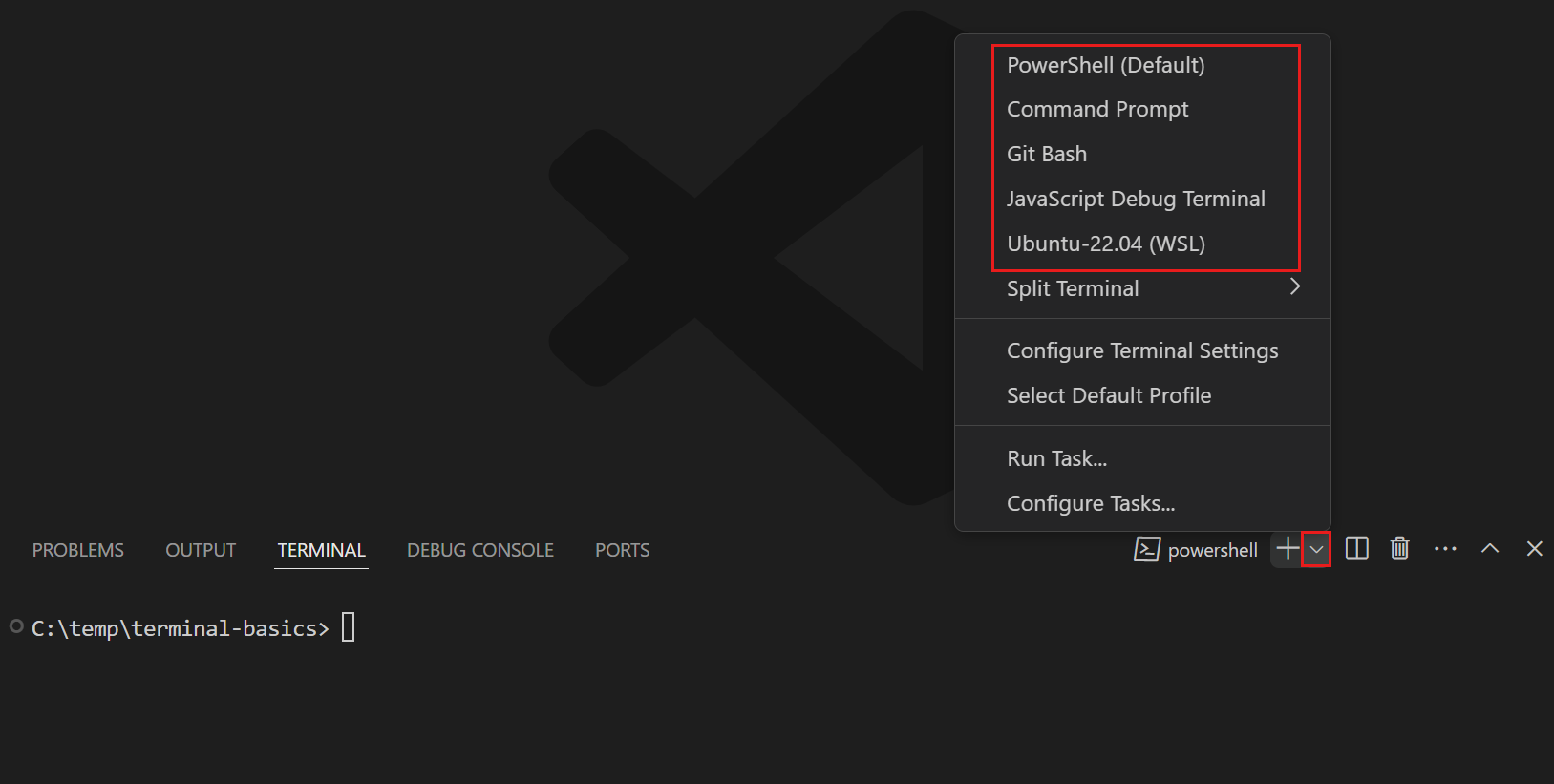
The dropdown next to the plus button selects a shell. Choose the shell named in your operating-system instructions below. Available choices depend on what you installed.

Official VS Code screenshot: the arrow beside the terminal plus button opens a list containing PowerShell, Command Prompt, Git Bash and Ubuntu WSL.
Official documentation screenshots by Microsoft, VS Code terminal guide, CC BY 3.0 US. Unmodified; your version may look different.

Choose a system to see its installation steps. A computer is needed for these local setup instructions.

Official documentation and illustrated guides

Instructions reviewed 2026-10-27. Use the linked installer page for current versions and supported operating systems.

Continue to the lesson

kotlin / Where Kotlin Came From and Why Use It

Explore each scene at your own pace.

01 · The rule

The rule

Where Kotlin Came From and Why Use It

Kotlin is a JetBrains language, stable since 2016 and preferred for Android since 2019, chosen for concise code, built-in null safety and full use of existing Java libraries.

Connect Kotlin's language choices to JVM development and its other targets.

Imagine the Pebble Café order app crashes every Friday because some customer's name turned out to be missing. The code was written in Java, and nothing warned anyone that the name could be empty. Kotlin was created by people who were tired of exactly this kind of bug.

The rule

Kotlin: Java's world, less typing, nulls caught before running.

Where it came from. Kotlin was built by JetBrains, the company behind the IntelliJ IDEA editor. They announced it in 2011 and named it after Kotlin Island, near St Petersburg, where much of the team worked. Version 1.0, the first release promised to stay stable, arrived in February 2016. In 2017 Google announced official Android support, and in 2019 it declared Android development "Kotlin-first". Kotlin 2.0, released in 2024, brought a rewritten, faster compiler called K2.

Why teams use it. Three reasons come up again and again:

  • Less ceremony. A class that holds a few values can be one line instead of a page of getters and setters.
  • Null safety. The type String can never hold null; the type String? can. The compiler makes you handle the second case.
  • It runs where Java runs. Kotlin compiles to the same bytecode as Java, so it can use every Java library and run on any Java virtual machine (JVM).
val cafe: String = "Pebble Café"   // can never be null
val nickname: String? = null       // allowed: the ? says "maybe missing"

Kotlin also compiles to JavaScript, to WebAssembly and to native machine code, which lets one codebase share logic between Android, iOS, web and server. That is a later topic; for this course we stay on the JVM.

Scene 1 of 5
Hover to wake the cannons. Drag to move, or use arrow keys when focused. Press Enter to fire a shot.